


Uno
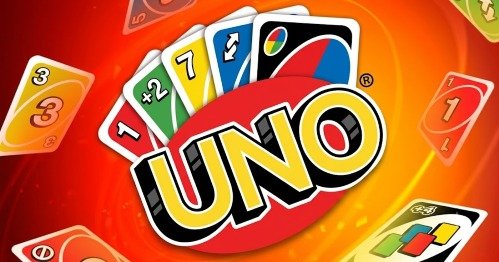
UNO is a colorful multiplayer card game where players match cards by color, number, or symbol and try to empty their hands first. Use Skip, Reverse, Draw Two, Wild, and Wild Draw Four cards, call UNO before your final card, and play against computer opponents, friends, or online players.
UNO Online Multiplayer Card Matching Game
UNO is a turn-based card game where players race to empty their hands by matching the color, number, or symbol shown on the discard pile. Number cards keep the round moving, while Skip, Reverse, Draw Two, Wild, and Wild Draw Four cards can quickly change who has the advantage.
The rules are simple enough for a first match, but careful card management makes UNO more strategic than it initially appears. Players must decide when to change colors, when to save an action card, and whether an opponent’s final card can be blocked before they win.
What Is UNO?
UNO is a competitive shedding-style card game owned by Mattel. Players take turns placing matching cards and try to become the first person to use every card in their hand.
Official physical sets are commonly designed for two to ten players aged seven and older. Digital versions may use smaller lobby sizes, computer-controlled opponents, online matchmaking, team play, or different house rules. (Mattel Service)
UNO is available in several forms:
- Physical Mattel card sets
- Browser adaptations
- The Ubisoft computer and console game
- The official UNO mobile app
- Special editions such as UNO Flip
- Themed decks with modified rules
- Local and online multiplayer versions
The Ubisoft digital game was released on December 8, 2016. It supports solo play, online competition, shared-screen play, teams, house rules, and cosmetic customization. (Steam Store)
Players who enjoy traditional card games can also try Rummy Offline Board. UNO is generally quicker to learn because players match one visible card instead of building complete sets and runs.
How UNO Gameplay Works
A standard round begins with each player receiving seven cards. The remaining cards become the draw pile, and one card is placed face-up to begin the discard pile. Mattel’s published instructions use seven starting cards and separate draw and discard piles. (Mattel Service)
On your turn, choose one card that matches the top discard by:
- Color
- Number
- Action symbol
For example, when the top card is a red seven, you can normally play any red card, any seven, or a Wild card.
When you cannot play a card, draw from the deck. Under the standard rule, a playable drawn card may be placed immediately. Otherwise, the turn passes to the next player. (Mattel Service)
The basic round follows this pattern:
- Check the top card on the discard pile.
- Look for a matching color, number, or symbol.
- Play one valid card.
- Follow any action created by that card.
- Draw when no suitable card is available.
- Call UNO when only one card remains.
- Play the final card to win the round.
Browser versions usually handle shuffling, dealing, valid-card checking, turn order, and penalties automatically.
UNO Controls
Controls depend on the version being played.
Browser Controls
| Action | Common Control |
|---|---|
| Select a card | Left mouse button |
| Play a card | Click the highlighted card |
| Draw a card | Click the draw pile |
| Choose a Wild color | Click the requested color |
| Call UNO | Click the UNO button |
| Challenge a Wild Draw Four | Select Challenge |
| Pass after drawing | Click the displayed pass button |
| Open settings | Click the menu icon |
| Restart or leave | Use the pause menu |
Playable cards are often raised, highlighted, or outlined. Cards that do not match usually cannot be selected.
Mobile Controls
| Action | Touch Control |
|---|---|
| Play a card | Tap the card |
| Draw | Tap the deck |
| Choose a color | Tap red, yellow, green, or blue |
| Call UNO | Tap the UNO button |
| View cards | Swipe or tap through the hand |
| Use chat options | Tap the displayed message controls |
| Open settings | Tap the menu icon |
Computer and Console Controls
Ubisoft’s UNO uses mouse, keyboard, or controller menus depending on the platform. Players select cards from their hand, confirm the move, choose colors, and respond to challenges through displayed prompts.
The exact button layout should be checked inside the Gam-core version because browser adaptations may use different controls.
Matching by Color
Color matching is the most common type of move.
UNO uses four main colors:
- Red
- Yellow
- Green
- Blue
When the discard pile shows a blue card, any blue number or blue action card can normally be played.
Color management becomes important near the end of a round. When another player has only one or two cards, changing away from their preferred color may stop them from finishing.
Pay attention to the colors opponents frequently play. Someone who avoids yellow for several turns may not have any yellow cards.
Matching by Number
A number can match even when the color is different.
For example, a green five can be played on a red five. The active color then changes to green for the next player.
Number matching provides useful flexibility when your hand contains few cards in the current color.
It can also be used to change the active color without spending a Wild card. Saving Wild cards for a more difficult moment often provides better control later.
Matching by Symbol
Action cards can match another card carrying the same symbol.
A red Skip can normally be played on a blue Skip. A yellow Reverse can be played on a green Reverse.
The color of the newly placed card becomes the active color unless a Wild card is used.
Symbol matching can create an unexpected move when your hand has no number or color match.
Number Cards
Number cards form the main part of a normal UNO deck.
They do not activate an additional effect. Their value comes from maintaining color control and reducing the number of cards in your hand.
Number cards are often easier to play than action cards, so keeping too many different numbers until the end can be risky. However, a wide selection of colors increases the chance of having a legal move.
A useful hand normally contains several colors rather than one large group of a single color.
Skip Card
A Skip card makes the next player miss a turn.
The official mobile rules describe Skip as passing over the next player. (letsplayuno.com)
Skip is especially helpful when:
- The next player has one card
- You want another turn before a dangerous opponent
- Team rules place an opponent beside you
- You need to keep the active color unchanged
- The match is down to two players
Do not automatically use every Skip card as soon as it becomes playable. Saving one may prevent an opponent from using their final card.
Reverse Card
A Reverse card changes the direction of play.
When turns are moving clockwise, Reverse changes them to counterclockwise. Playing another Reverse changes the direction again. (letsplayuno.com)
Reverse cards become more important in matches with three or more players because they change which person acts next.
A Reverse can:
- Move play away from a nearly finished opponent
- Return the turn toward a player with many cards
- Help a teammate act sooner
- Change the value of your seating position
- Interrupt an opponent’s expected plan
In two-player versions, the exact treatment of Reverse can depend on the selected rules. The digital game normally explains the effect before the match begins.
Draw Two Card
Draw Two requires the next player to take two cards and miss their turn under standard rules. (letsplayuno.com)
The card can increase an opponent’s hand while giving the following player a chance to act sooner.
Draw Two is strongest when used against someone with very few cards. It is less important against a player already holding a large hand unless you also need its color.
Some digital versions allow Draw Two cards to be stacked. This is a house rule rather than something that should be assumed in every match.
Wild Card
A Wild card can be used to choose the next active color.
The player selects red, yellow, green, or blue after placing it. (letsplayuno.com)
A Wild card is useful when:
- No normal card can be played
- Your hand is dominated by one color
- An opponent appears weak in a particular color
- You want to prepare your final card
- The current color helps another player
Choose the color represented most strongly in your remaining hand.
For example, when you hold three green cards and one blue card, green will usually be the safer choice.
Wild Draw Four Card
Wild Draw Four changes the active color and requires the next player to draw four cards and lose their turn.
However, the card has an important restriction. It should only be played when you do not hold a card matching the current color. Having another number or symbol match does not necessarily prevent its use, but having the active color does. (letsplayuno.com)
The affected player may receive an option to challenge.
Successful Challenge
When the player who used Wild Draw Four had a matching color card, the challenge succeeds and that player receives the penalty.
Failed Challenge
When the Wild Draw Four was played legally, the challenger receives a larger penalty. The official mobile rules use six cards for an unsuccessful challenge. (letsplayuno.com)
Do not challenge only because the move feels inconvenient. Consider what colors the opponent previously played and whether they were likely to have a legal color match.
Calling UNO
When you play your next-to-last card, you must announce UNO to show that only one card remains.
In digital editions, this usually means pressing the UNO button before another player catches you.
When a player forgets and is caught before the next turn begins, the usual penalty is drawing two cards. Mattel’s instructions and the official mobile rules both document this penalty. (Mattel Service)
Pressing the button too late may not protect you.
Watch opponents who move down to one card. Some versions provide a challenge button for catching them before their next turn.
Winning a Round
The first player to empty their hand wins the round.
Some versions treat that result as a complete match. Other versions award points based on the cards remaining in the opponents’ hands and continue until a target score is reached.
Mattel’s customizable Wild Card edition describes a points format where the first player or team to reach 500 wins. Digital and browser versions may instead use one-round victories or shorter match settings.
Check the opening menu to see whether the game uses:
- One-round wins
- Best-of-several rounds
- A points target
- Timed matches
- Tournament progression
- Team scoring
Official Rules and House Rules
UNO groups often use rules learned from friends or family.
These house rules may be entertaining, but they are not automatically active in every digital version. The computer will follow the options selected before the match.
Common house rules include:
- Stacking
- Jump-In
- Seven-Zero
- Draw until playable
- Playing multiple identical cards
- Swapping hands
- Special customizable Wild actions
Ubisoft’s digital UNO officially supports optional house rules such as Jump-In, Stacking, and Seven-Zero. (Steam Store)
Agreeing on the rules before a physical match prevents arguments. Digital versions solve this problem by enforcing the host’s selected settings automatically.
Stacking
Stacking allows another penalty card to be placed instead of immediately drawing.
In the official mobile game’s stacking option, Draw Two cards stack with Draw Two, while the total penalty passes to the next eligible player. Its specific rules are explained inside the mobile rule guide. (letsplayuno.com)
Stacking can create very large card penalties.
It also changes strategy because keeping a Draw Two may protect you from another Draw Two later.
Do not assume that Draw Two and Wild Draw Four can always be combined. Each edition decides which combinations are allowed.
Jump-In
Jump-In allows a player to act outside normal turn order when holding an exact match for the current card.
An exact match generally means the same color and value or symbol.
For example, when a red six is played and you also hold a red six, Jump-In may let you place it immediately.
This rule creates faster and less predictable matches. Players must watch the discard pile even when it is not their normal turn.
Ubisoft includes Jump-In among the house rules available in its digital version. (Steam Store)
Seven-Zero Rule
Seven-Zero changes what happens when a seven or zero is played.
Under this optional format:
- Playing a seven lets the player exchange hands with another participant.
- Playing a zero rotates every hand in the direction of play.
Mattel has published Seven-Zero as an optional UNO variation, and Ubisoft includes it among its digital house-rule choices. (Mattel Service)
Seven-Zero can completely change a round.
A player with one card may suddenly receive a large hand, while someone far behind can take control of a nearly finished hand.
Playing UNO With Two Players
Two-player UNO creates a more direct match.
Every action affects the same opponent, making Skip and Reverse cards especially valuable. Card counting also becomes easier because only one other hand must be watched.
Useful two-player habits include:
- Save Skip cards for the end
- Keep track of colors the opponent avoids
- Change to their weak color
- Avoid giving away your final color
- Use Draw Two when they have few cards
- Keep a Wild card for recovery
Players interested in other direct tabletop challenges can visit Elo Board Games For Two.
Playing With Three or More Players
Larger games are less predictable.
A move intended to stop one person may help another. Reverse changes more than one relationship, and a Wild color may travel through several players before returning to you.
Pay attention to:
- Each player’s approximate hand size
- The person who acts after you
- The direction of play
- Which players recently drew cards
- Repeated color choices
- Players approaching one card
The person with the smallest hand is not always the only threat. Someone holding several action cards may lose multiple cards quickly.
Choosing the Best Color
A Wild card gives control over the next color, but the most obvious choice is not always best.
Consider:
- Which color appears most in your hand?
- Which color has the next player struggled to match?
- Which color supports your final card?
- Does your teammate need a particular color?
- Has another player repeatedly selected the same color?
Choosing your strongest color is normally reliable.
Choosing an opponent’s weak color may be better when that player is close to winning.
Saving Action Cards
Action cards provide control, but they cannot help after the round has already been lost.
Save at least one defensive card when an opponent has a small hand.
A strong late-round sequence might include:
- Change to your preferred color.
- Skip the next player.
- Play a number card.
- Finish with a final legal card.
However, holding action cards for too long can also be risky. When another person wins first, unused cards may increase your point loss in scoring formats.
Balance immediate progress with protection.
Watching Opponent Colors
You cannot see another player’s hand, but their moves provide clues.
An opponent may be weak in a color when they:
- Draw after that color appears
- Immediately use a Wild card to change it
- Avoid returning to that color
- Play action cards of other colors
- Repeatedly select one preferred color
These clues are not perfect. A drawn card may have changed the player’s options.
Still, color observation can help you make a better Wild choice.
Managing a Large Hand
Drawing several cards does not automatically mean the round is lost.
A larger hand may provide:
- More color choices
- Several action cards
- Wild cards
- Exact matches
- Better protection from color changes
Organize the hand mentally by color and identify which color can be reduced fastest.
Do not focus only on hand size. A small hand with no matching card can struggle, while a larger balanced hand may discard quickly.
Playing Your Final Two Cards
The final two cards should be planned together.
Suppose your last cards are a blue Reverse and a yellow four. Playing the Reverse may leave you unable to use the yellow four on your next turn.
A better route could be waiting until yellow becomes active, playing the four, calling UNO, and keeping the blue action card for a likely symbol or color match.
Before going down to one card, ask:
- What is my final color?
- Can an opponent change it?
- Is the last card an action card?
- Do I have to press UNO manually?
- Can another player challenge me?
- Is stacking enabled?
Planning one turn ahead prevents many avoidable losses.
Single Player UNO
Digital UNO versions may provide computer-controlled opponents.
Solo play is useful for:
- Learning card symbols
- Understanding turn order
- Practising Wild choices
- Learning challenge rules
- Testing house rules
- Playing without waiting for matchmaking
The Ubisoft computer version lists single-player support alongside its multiplayer features. (Steam Store)
Computer opponents may behave differently from human players. They follow programmed decision patterns and do not provide the same social uncertainty as a friend group.
Local Multiplayer
Local play allows people in the same place to share a computer, console, or physical deck.
The Ubisoft edition supports couch play and shared-screen competition. It also provides team and free-for-all formats. (Steam Store)
Local digital UNO must protect each player’s hidden hand. The exact method depends on the platform and mode.
Physical UNO remains the easiest option when several people want to play around one table without separate accounts.
Online Multiplayer
Online UNO connects players through private rooms or public matchmaking.
Common online options include:
- Quick matches
- Private friend rooms
- Free-for-all games
- Two-versus-two teams
- Ranked or event play
- Custom rules
- Public matchmaking
- Computer-controlled replacements
The official mobile app supports real-time matches, friend play, two-versus-two teams, clubs, tournaments, events, and leaderboards. (Google Play)
Online behavior can vary. Use the available mute, block, report, or leave functions when another person acts inappropriately.
Two Versus Two Mode
Team UNO places two players on each side.
Partners work toward a shared result, although the exact way hands and scoring operate depends on the edition.
Good team play includes:
- Remembering the colors your partner selects
- Avoiding unnecessary penalties against them
- Choosing a color they appear able to use
- Blocking the opposing player closest to winning
- Watching both opponents’ hand sizes
The official mobile game and Ubisoft version both support two-versus-two play. (Google Play)
Players seeking another card-based competitive game can read about Clash Royale, although its deck-building and real-time arena structure are very different from UNO.
Ubisoft UNO Digital Game
Ubisoft’s UNO turns the tabletop game into a customizable computer and console experience.
Its current features include:
- Solo play
- Online player-versus-player matches
- Shared-screen play
- Online and local teams
- Two-versus-two mode
- Free-for-all matches
- House rules
- Cosmetic boards and decks
- Avatars
- Music customization
- Downloadable rule sets
- Twitch interaction tools
The Steam edition requires a Ubisoft Connect account and supports online and shared-screen play. Its current store page lists downloadable editions and themed rule packs. (Steam Store)
MyDesign Customization
The Ubisoft game includes a system called MyDesign.
Players can unlock and combine visual items such as:
- Game boards
- Card decks
- Music
- Avatars
- Table presentation
- Background elements
These changes affect appearance rather than the core matching rules.
Ubisoft’s current PC listing describes MyDesign as a way to create a personalized UNO game space. (Steam Store)
UNO Downloadable Editions
Ubisoft sells additional UNO rule packs and themed editions.
The current Ultimate Edition combines the base game with nine major downloadable rule sets. These include UNO Flip, the 50th Anniversary edition, Party Mania, Show ’Em No Mercy, and several Ubisoft-themed adaptations. (Steam Store)
Each expansion can introduce different cards, board mechanics, penalties, or winning conditions.
Players should read the selected pack’s instructions rather than assuming classic rules apply.
Official UNO Mobile App
The official UNO mobile app is developed by Mattel163.
It includes:
- Classic Quick Play
- Real-time multiplayer
- Private friend matches
- Custom house rules
- Two-versus-two teams
- Clubs
- Gifts
- Tournaments
- Seasonal events
- Leaderboards
- Cosmetic collections
The Android app remained active and received an update on July 17, 2026. (letsplayuno.com)
The mobile edition is separate from Ubisoft’s computer and console version. Accounts, progress, purchases, events, and rule systems should not be expected to transfer between them.
Mobile Purchases and Family Settings
The mobile app is free to install but contains optional purchases and online features. Its store listing also indicates that account and financial data may be handled according to the app’s published privacy information. (Google Play)
Younger players should:
- Ask a parent or guardian before making purchases
- Use device purchase approval
- Avoid sharing account details
- Keep personal information out of clubs or chat
- Review event requirements before entering
- Avoid unofficial modified versions
Virtual items do not improve real card-playing ability and should not be treated as necessary for enjoying classic matches.
Browser UNO Versions
Browser versions often use simpler graphics and fewer account features.
A typical web adaptation may offer:
- Two, three, or four-player matches
- Computer opponents
- Basic number and action cards
- Mouse or touch controls
- Automatic rule enforcement
- Quick restarts
- No installation
- Desktop and mobile browser support
Some browser games use names such as Four Colors because UNO is a protected Mattel brand. These adaptations may resemble UNO without being the official Mattel or Ubisoft release.
Follow the displayed rules because a browser version may:
- Require drawing until a playable card appears
- Allow or disable stacking
- Use different player totals
- Call UNO automatically
- Remove Wild Draw Four challenges
- End after one round
- Use fewer optional cards
Is UNO Free?
The answer depends on the edition.
Browser adaptations may be playable without an upfront purchase. The official mobile app is free to install with optional purchases. Ubisoft’s PC and console edition is normally sold through digital stores, with extra editions and downloadable content available separately. (Google Play)
The physical Mattel card game is purchased as a deck.
Avoid websites claiming to provide unauthorized paid editions for free.
Is UNO Multiplayer?
Yes. UNO is mainly designed as a multiplayer card game.
Depending on the version, multiplayer may include:
- Two-player matches
- Local tabletop play
- Private online rooms
- Public matchmaking
- Two-versus-two teams
- Shared-screen games
- Tournaments
- Events
Computer-controlled opponents provide a solo alternative when other players are unavailable.
Players looking for several short multiplayer activities can visit Fun Mini Online.
Online Safety
Public UNO games may include player names, clubs, messages, invitations, or social features.
Use sensible online habits:
- Do not share your real name or address.
- Keep passwords and verification codes private.
- Do not open links from unknown players.
- Use private rooms for known friends.
- Mute or report inappropriate behavior.
- Leave uncomfortable public rooms.
- Use family purchase settings.
- Follow the platform’s age requirements.
UNO may be family-friendly as a card game, but public online communication still requires care.
Graphics and Presentation
Digital UNO uses bright colors and large symbols that make cards easy to identify.
The four main colors remain visually distinct, while number and action symbols provide additional information. This means players do not need to rely entirely on color.
Digital effects may highlight:
- A valid card
- A changed direction
- A skipped turn
- A draw penalty
- A Wild color choice
- An UNO call
- A round winner
The Ubisoft game adds animated boards, avatars, music, themed decks, and visual effects. Browser versions normally use a simpler tabletop layout.
Sound and Feedback
Sound effects confirm important actions such as:
- Playing a card
- Drawing
- Changing direction
- Receiving a penalty
- Calling UNO
- Winning a round
- Entering a match
- Selecting a Wild color
Audio is helpful but not essential. Symbols, highlights, card movement, and turn indicators provide the main gameplay information.
Lowering the volume does not normally make the rules harder to follow.
Who Should Play UNO?
UNO suits players who enjoy:
- Card games
- Short competitive matches
- Simple rules
- Local family games
- Online multiplayer
- Color and number matching
- Light strategy
- Team play
- Quick browser games
- House-rule customization
The game is easy to begin because every move is based on matching one visible card.
Players seeking deeper long-term planning may prefer Master Chess. UNO depends more heavily on changing hands, hidden information, and card draws.
Honest Strengths and Limitations
| Strengths | Possible Limitations |
|---|---|
| Basic rules are easy to learn | Card draws create a strong luck element |
| Matches can be completed quickly | Some rounds continue longer than expected |
| Supports several player counts | Digital lobby limits vary |
| Action cards create frequent changes | Penalty cards can feel frustrating |
| Wild cards provide control | Choosing the wrong color can waste the advantage |
| Local and online versions exist | Online play requires a connection |
| Computer opponents support solo play | AI is less social than human competition |
| House rules add variety | Different rules can confuse new players |
| Two-versus-two supports teamwork | Partners cannot always communicate privately |
| Browser versions need no large installation | They may not be official UNO releases |
| Mobile edition receives events | It includes optional purchases |
| Ubisoft edition offers customization | Extra rule packs may cost more |
| Symbols support color recognition | Similar digital animations may slow fast matches |
| Quick restarts support replay | The core matching loop remains similar |
Tips for Playing UNO Better
Keep Several Colors
A hand containing several colors is less likely to become stuck after another player changes the active color.
Save One Wild Card
A Wild card can rescue you when your final few cards do not match.
Watch the Next Player
The person acting directly after you is affected most by Skip and Draw Two cards.
Change Away From an Opponent’s Color
When someone repeatedly chooses green, avoid leaving green active when they have one card.
Call UNO Immediately
Press the button as soon as your next-to-last card is played.
Read the House Rules
Stacking, Jump-In, and Seven-Zero can completely change the best move.
Do Not Challenge Every Draw Four
Challenge only when previous turns suggest the card may have been played illegally.
Plan the Final Card
Try to leave a Wild card or a color that is likely to remain active.
Use Reverse Carefully
Check the current direction before deciding who will act next.
Organize Large Hands Mentally
Identify your strongest and weakest colors instead of looking only at the number of cards.
Watch Hand Sizes
A player with two cards deserves more attention than someone still holding ten.
Avoid Unnecessary Purchases
Classic UNO remains fully understandable without paid cosmetic items.
UNO Game Information
| Detail | Information |
|---|---|
| Game title | UNO |
| Brand owner | Mattel |
| Genre | Card, casual, party, strategy |
| Main objective | Empty your hand before the other players |
| Basic matching | Color, number, or action symbol |
| Main colors | Red, yellow, green, and blue |
| Standard starting hand | Seven cards |
| Main action cards | Skip, Reverse, Draw Two, Wild, and Wild Draw Four |
| UNO penalty | Commonly draw two when caught |
| Physical player count | Commonly two to ten |
| Recommended physical age | Seven years and older |
| Browser controls | Mouse or touchscreen |
| Single player | Available in supported digital versions |
| Local multiplayer | Supported |
| Online multiplayer | Supported in official digital editions |
| Team mode | Two-versus-two in supported editions |
| Ubisoft digital developer | Ubisoft Entertainment |
| Ubisoft PC release | December 8, 2016 |
| Official mobile developer | Mattel163 |
| Mobile platforms | Android and iOS |
| House rules | Available in supported versions |
| Optional purchases | Present in mobile and some digital editions |
Mattel documents the physical game’s matching objective and age guidance. Ubisoft documents the PC release, multiplayer formats, house rules, and customization, while Mattel163 documents the current official mobile modes. (Mattel Service)
Frequently Asked Questions
What Type of Game Is UNO?
UNO is a turn-based card game where players match colors, numbers, or symbols and race to empty their hands.
Who Owns UNO?
UNO is a Mattel card-game brand. Ubisoft produces a licensed computer and console adaptation, while Mattel163 operates the official mobile game. (Ubisoft)
How Many Cards Does Each Player Start With?
A standard match begins with seven cards for every player. (Mattel Service)
How Do You Play a Card?
Select a card matching the current color, number, or action symbol. A Wild card can also be played when permitted.
What Happens When You Cannot Play?
Draw a card. Under standard rules, the drawn card may be played immediately when it is valid. (Mattel Service)
What Does a Skip Card Do?
Skip makes the next player miss their turn. (letsplayuno.com)
What Does a Reverse Card Do?
Reverse changes the direction of play. (letsplayuno.com)
What Does Draw Two Do?
The next player draws two cards and misses their turn under the normal rules. (letsplayuno.com)
What Does a Wild Card Do?
Wild lets the player choose the next active color.
What Does Wild Draw Four Do?
Wild Draw Four changes the color and makes the next player draw four cards and miss a turn when played legally.
When Can You Play Wild Draw Four?
It should be played only when you do not have a card matching the current color. The next player may be able to challenge the move. (letsplayuno.com)
What Happens After a Failed Draw Four Challenge?
In the official mobile rules, an unsuccessful challenger draws six cards. (letsplayuno.com)
When Do You Call UNO?
Call UNO immediately after playing your next-to-last card.
What Is the Penalty for Forgetting UNO?
A player caught before the next turn begins normally draws two cards. (Mattel Service)
Can You Stack Draw Cards?
Stacking is available in some digital versions as an optional house rule. It should not be assumed unless the match settings enable it. (Steam Store)
What Is Jump-In?
Jump-In lets a player immediately use an exact matching card outside the normal turn order when that house rule is active.
What Is the Seven-Zero Rule?
A seven allows a hand exchange, while a zero rotates all hands in the current direction of play. (Mattel Service)
Can Two People Play UNO?
Yes. Physical UNO supports two players, and many browser and digital editions include two-player matches.
Is UNO Online Multiplayer?
Yes. Official digital editions offer online matches, private rooms, teams, and other multiplayer options. (Steam Store)
Can I Play UNO Alone?
Supported digital versions allow solo play against computer-controlled opponents.
Does UNO Have Two Versus Two?
Yes. Both Ubisoft’s digital game and the official mobile app support two-versus-two team matches. (Steam Store)
Is UNO Free?
Browser adaptations may be free. The official mobile app is free to install with optional purchases, while Ubisoft’s computer and console version is normally a paid game.
Can UNO Be Played on Mobile?
Yes. The official UNO mobile game is available for Android and iOS. (letsplayuno.com)
Is the Browser Version Official?
Not always. Some browser titles are UNO-inspired adaptations with similar matching rules. Check the developer and displayed title.
Why Can I Not Play a Card That Looks Valid?
The card may not match the current color, number, or symbol, or an active rule may restrict the move.
Why Did the Game Make Me Draw Cards?
Possible reasons include having no valid move, receiving a Draw Two or Draw Four penalty, forgetting UNO, losing a challenge, or triggering a house rule.
Does UNO Require Strategy?
Yes. Luck determines the cards received, but color selection, action-card timing, opponent observation, and final-card planning influence the result.

Reviews
There are no reviews yet.