

Golf Orbit
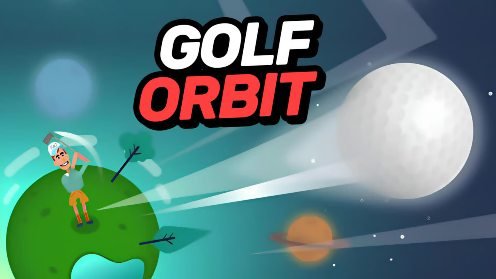
Golf Orbit is a one-button arcade golf game where every swing can send the ball farther across colorful landscapes. Time the power meter, collect coins, improve strength, speed, and bounce, unlock unusual golfers, and work toward new distance records.
Golf Orbit Long Distance One Shot Golf Game
Golf Orbit is a casual golf game where the goal is not simply to place the ball in a nearby hole. You must time one powerful swing, send the ball across the landscape, bounce over obstacles, collect coins, and travel farther with every attempt.
The controls use one button, but a perfectly timed shot takes practice. Coins earned during each flight can improve strength, speed, and bounce, allowing future shots to cross larger distances and eventually travel beyond ordinary golf courses.
What Is Golf Orbit?
Golf Orbit is a single-player arcade golf game currently published by TapNation. The original mobile version arrived in 2018, while the browser edition was released in June 2024. It can be played through desktop, mobile, and tablet browsers, with separate versions available for Android and iOS. (Crazy Games)
Instead of completing a realistic eighteen-hole tournament, you repeatedly launch the ball as far as possible. Every attempt earns rewards that can improve the next swing.
The idea is easy to understand, but the changing terrain creates unexpected results. A ball may bounce from a roof, strike a tree, fall into a bunker, roll down a hill, or land inside the hole.
Players who enjoy quick casual games with simple controls can also try Chain Cube 2048, which replaces golf swings with number-merging challenges.
How Golf Orbit Gameplay Works
Each attempt begins with the golfer preparing a shot. A moving power indicator helps you choose the timing and strength of the swing.
Press or release the control when the indicator reaches the strongest area. A well-timed input creates a more powerful and accurate shot, while poor timing may send the ball on a shorter path.
After the swing, the ball travels automatically. You watch it fly, bounce across the ground, interact with objects, and eventually stop.
The distance is recorded, and coins are awarded based on performance. These coins can be spent on upgrades before the next attempt.
The basic gameplay loop is:
- Time the swing.
- Launch the golf ball.
- Watch it bounce across the environment.
- Collect distance rewards and coins.
- Upgrade strength, speed, or bounce.
- Unlock cosmetic choices.
- Attempt a longer shot.
Each upgrade makes earlier areas easier to cross and brings new parts of the world within reach.
Golf Orbit Controls
Golf Orbit uses a one-button control system.
| Action | Desktop Control | Mobile Control |
|---|---|---|
| Prepare or time the shot | Left mouse button | Tap the screen |
| Release the swing | Release or click at the correct moment | Lift your finger or tap at the correct moment |
| Purchase an upgrade | Left mouse click | Tap the upgrade |
| Open the clubhouse | Select the clubhouse button | Tap the clubhouse button |
| Choose a character or ball | Left mouse click | Tap the chosen item |
The exact input prompt may vary slightly between versions. The browser listing uses the left mouse button, while the mobile edition asks players to time the moving swing indicator. (Crazy Games)
Timing the Perfect Shot
The most important moment happens before the ball leaves the ground.
A moving marker passes through different power areas. Pressing at the wrong time produces a weaker attempt, while hitting the best section creates a perfect shot.
Perfect timing gives the ball more distance and can help it pass through certain obstacles. The current browser description notes that powerful perfect shots may break objects such as trees and buildings instead of stopping immediately. (Crazy Games)
Do not press randomly and hope for a good result. Watch the movement speed for one or two cycles before making the swing.
The indicator usually becomes easier to read after several attempts. Once you understand its rhythm, successful shots become more consistent.
Why Distance Matters
Golf Orbit records how far the ball travels during every attempt.
The distance provides a clear way to measure progress. Even when the ball does not enter a hole, travelling farther than your previous attempt still shows that the upgrades are working.
A longer shot also tends to provide better rewards. More coins mean stronger upgrades, which then help the next ball travel farther.
This creates a steady progression system. A distance that once required a perfect shot may later become easy after several improvements.
Players are encouraged to beat their own best result rather than compete against a live opponent. Golf Orbit is a single-player game without online multiplayer. (GameFAQs)
Strength, Speed, and Bounce Upgrades
Golf Orbit has three main performance upgrades.
| Upgrade | Main Effect |
|---|---|
| Strength | Increases the initial power of the swing |
| Speed | Helps the ball maintain faster movement |
| Bounce | Improves how far the ball continues after touching the ground |
Each upgrade affects a different part of the shot.
Strength helps during the first launch. A stronger opening hit sends the ball farther before it begins losing height.
Speed helps maintain movement during the flight and following contact with the environment.
Bounce affects what happens after landing. A ball with better bounce may continue crossing the landscape instead of stopping after its first impact.
The current browser listing confirms that strength, speed, and bounce can all be improved with earned reward points. (Crazy Games)
Which Upgrade Should You Buy First?
There is no single upgrade order that suits every situation.
Strength is usually useful during the early game because it helps the ball reach new areas immediately. A weak starting shot may struggle even when bounce has been improved.
Speed becomes more valuable when the ball already travels through the air for a reasonable distance.
Bounce can produce surprising gains on open terrain. Several strong rebounds may carry the ball much farther than the first landing point.
A balanced approach is comfortable for most players. Upgrade the cheapest useful statistic rather than saving for one category while ignoring the others.
Watch where the ball loses most of its distance. If the opening shot looks weak, improve strength. If it lands strongly but stops quickly, improve bounce.
Coins and Reward Collection
Coins are earned through successful shots and can also appear along the ball’s path.
Longer distances generally provide greater rewards. Special results, including birdies and eagles, can produce additional points that help improve later attempts. (Crazy Games)
The ball does not need to touch every coin during a flight. Its route depends on timing, power, terrain, and the upgraded statistics.
It is normally better to focus on a strong shot than deliberately aim for one small reward. Longer attempts naturally create more opportunities to collect coins.
Some versions also include a reward spin. This can provide extra points or bonuses between attempts.
Birdies, Eagles, and Holes
Golf Orbit may focus on distance, but golf holes still appear throughout the landscape.
Landing in a hole can provide a larger reward than simply stopping nearby. The game uses familiar golf terms to describe how efficiently the ball reaches it.
An eagle is awarded when the ball enters the hole in one shot. A birdie can be earned by reaching it in two shots, depending on the current stage and version. (Crazy Games)
These results are valuable because they provide extra points for upgrades.
However, not every attempt needs to end in a hole. A ball that travels far beyond one target can still create a useful distance record and earn coins.
Obstacles and Environmental Objects
The landscape contains more than empty grass.
Your ball may meet trees, buildings, rocks, hills, sand bunkers, water, and other objects. Each one can change the final distance.
A solid object may stop a weak attempt. A powerful perfect shot can sometimes break through and continue travelling.
Sloped ground may create a helpful bounce or send the ball backward. Flat areas are more predictable but may not add as much unexpected distance.
Water and sand are usually less helpful. The browser description warns that landing in water or a bunker can reduce the success of a shot. (Crazy Games)
You cannot directly steer the ball after it has been launched. Your main control comes from the original timing and the upgrades selected before the shot.
Using Bounces to Travel Farther
The first landing does not always decide the final result.
A ball with enough speed and bounce can continue moving across several parts of the landscape. Each contact may add useful distance.
Objects can also create unusual rebounds. A rooftop or hill may send the ball upward again, while a badly angled wall may stop it completely.
This makes every flight interesting to watch. Even an imperfect opening shot can sometimes travel surprisingly far because of a lucky series of bounces.
Do not judge the attempt too early. Wait until the ball has fully stopped before deciding whether the shot was successful.
Players who enjoy unpredictable physics and simple inputs may also like Fun Mini Online, which provides several short casual activities.
Reaching Space and New Worlds
Golf Orbit gradually moves beyond an ordinary golf course.
As upgrades become stronger, the ball can travel through unusual environments and reach space-themed areas. The current browser page describes the long-term goal as sending golf balls to extreme heights and potentially reaching Mars. (Crazy Games)
These changing locations give players something visual to work toward. A new world shows that the golfer has moved beyond earlier distance limits.
The environments remain playful rather than scientifically realistic. Golf Orbit is an arcade game built around exaggerated power and physics.
The changing worlds also prevent every attempt from using the same background. New areas introduce different colors, objects, and themes.
The Clubhouse
The clubhouse contains Golf Orbit’s cosmetic customization options.
Players can change three main parts of the presentation:
- The golfer
- The ball
- The world
These changes do not replace the strength, speed, and bounce upgrades. They provide visual rewards alongside performance progression.
The clubhouse is useful when repeated attempts begin looking similar. A new golfer, ball color, or environment can make later sessions feel fresher.
Unlockable Golfers
Golf Orbit includes a wide selection of unusual playable characters.
The browser listing mentions around 24 golfer options. Alongside a standard male golfer, choices may include a clown, lion, samurai, Santa, ballerina, and other unusual characters. (Crazy Games)
Some characters use objects that do not look like traditional golf clubs. A samurai may swing a sword, while another character may use a themed item connected to their appearance.
These options are cosmetic and humorous. They do not turn Golf Orbit into a detailed character-based sports game.
Unlocking a new golfer gives players another reason to collect points after improving the main performance statistics.
Ball Colors and Designs
The clubhouse also allows players to change the ball.
Available options include colors such as yellow, pink, blue, and orange. The exact selection may depend on the version and current progression. (Crazy Games)
A different ball does not automatically improve distance. Performance still depends on shot timing and upgrade levels.
The color options are useful for players who want a more personal visual setup. Bright colors can also make the ball easier to follow against certain backgrounds.
Graphics and Presentation
Golf Orbit uses colorful 2D graphics with exaggerated characters, bright landscapes, and clear visual effects.
The golfer stands on the left side while the power indicator displays the timing of the swing. After the shot, the camera follows the ball across the environment.
Objects are easy to recognize, which helps players understand why a shot stopped or changed direction.
The game uses a playful style rather than realistic golf-course presentation. Space locations, unusual golfers, and extreme ball distances make it feel more like an arcade launcher than a traditional sports simulation.
Playing Golf Orbit on Mobile
Golf Orbit is available on Android and iOS, and the browser edition also supports phones and tablets. (Crazy Games)
Mobile players tap the screen to time each swing. Since the game needs only one main input, it is comfortable to play without a physical controller.
The mobile version can include advertisements and optional in-app purchases. Availability and pricing depend on the device, store, and current app version. (App Store)
The browser version is useful for players who prefer not to install a separate app. Progress-saving behavior may differ between websites and mobile editions.
Is Golf Orbit Multiplayer?
Golf Orbit is mainly a single-player game.
You are improving your own distance, collecting rewards, unlocking cosmetic items, and upgrading shot statistics. Historical release data lists one local player and no online multiplayer. (GameFAQs)
Some descriptions use words such as battle or competition, but this normally refers to improving scores and completing one-shot challenges rather than playing a live match against another golfer.
Players looking for a wider selection of quick games can browse the Gam-core games collection.
Who Should Play Golf Orbit?
Golf Orbit is suitable for players who enjoy casual sports games, simple controls, physics-based movement, upgrades, and score improvement.
It works well during short sessions. One attempt takes little time, and the next upgrade always provides a clear target.
The game may also appeal to people who do not normally play golf simulators. There are no complicated club selections, wind charts, realistic tournaments, or detailed course rules to learn.
Players looking for serious golf simulation may find it too simple. The exaggerated distances, unusual characters, and space environments are intentionally unrealistic.
People who dislike repeated one-button actions may also lose interest after longer sessions. Most of the progression comes from swinging, earning coins, and buying stronger upgrades.
For another simple browser challenge with a calm pace, try Find Easy Hidden Differences.
Honest Strengths and Limitations
| Strengths | Possible Limitations |
|---|---|
| One-button controls are easy to learn | The central gameplay loop is repetitive |
| Shot timing still requires attention | Players have little control after the ball launches |
| Strength, speed, and bounce provide clear progression | Upgrade choices are relatively simple |
| Environmental objects create unpredictable results | Some attempts may depend on lucky rebounds |
| Includes many cosmetic characters | Characters do not deeply change gameplay |
| Supports desktop and mobile browsers | Progress saving may differ between platforms |
| Short attempts suit quick gaming sessions | It is not a realistic golf simulation |
| New environments reward continued play | No live online multiplayer |
Tips for Longer Golf Orbit Shots
Watch the Meter Before Swinging
Do not press immediately. Observe the indicator’s movement so you can understand its speed and best timing point.
Aim for the Perfect Area
A nearly perfect shot can still travel far, but hitting the strongest section provides the best chance of breaking obstacles and setting a new record.
Improve Strength Early
Strength helps the ball reach more distant areas from the start. It is usually a useful early investment.
Do Not Ignore Bounce
Strong bounce can add a large amount of distance after the first landing. It becomes especially useful on open terrain.
Balance the Three Statistics
Putting every coin into one upgrade can leave another part of the shot weak. Keep strength, speed, and bounce reasonably close.
Watch Where the Ball Stops
The end of each attempt shows which upgrade may be needed. A weak launch suggests strength, while a quick stop after landing suggests bounce.
Let the Flight Finish
The ball may continue rolling or rebound from an object after appearing to slow down. Wait until the distance has been fully recorded.
Use Cosmetic Rewards Later
Performance upgrades are more useful when you are trying to reach new locations. Save cosmetic purchases for moments when your shot statistics already feel comfortable.
Avoid Judging Every Attempt by the Hole
Entering a hole provides useful rewards, but a long flight can still set a new record and earn coins.
Learn From Poor Timing
A failed swing helps show how quickly the indicator moves. Adjust the next input slightly rather than changing your timing completely.
Golf Orbit Game Information
| Detail | Information |
|---|---|
| Game title | Golf Orbit |
| Current publisher | TapNation |
| Original mobile release | 2018 |
| Browser release | June 2024 |
| Browser engine | Unity 2022 |
| Genre | Arcade golf, sports, physics |
| Game mode | Single-player |
| Platforms | Web browser, Android, and iOS |
| Supported browser devices | Desktop, mobile, and tablet |
| Main control | Left mouse button or touchscreen tap |
| Main upgrades | Strength, speed, and bounce |
| Customization | Golfers, balls, and worlds |
| Visual style | Colorful 2D arcade graphics |
The current browser listing names TapNation, Unity 2022, a June 2024 web release, and support for desktop and mobile browsers. Historical records place the original iOS and Android releases in 2018. (Crazy Games)
Frequently Asked Questions
What type of game is Golf Orbit?
Ans: Golf Orbit is a single-player arcade golf and distance-launching game. You time a swing, send the ball across the landscape, earn coins, and improve future shots.
Who developed Golf Orbit?
Ans: The current browser and App Store listings name TapNation. Historical 2018 release records credit Green Panda Games for the original mobile release. (Crazy Games)
How do I play Golf Orbit?
Ans: Use the left mouse button or tap the screen to time the swing. Try to activate the shot when the power indicator reaches its strongest area.
What upgrades are available?
Ans: You can upgrade strength, speed, and bounce. These improvements affect the opening hit, movement speed, and distance travelled after landing.
Can I play Golf Orbit in a browser?
Ans: Yes. The browser edition supports desktop computers, phones, and tablets. (Crazy Games)
Is Golf Orbit available on mobile?
Ans: Yes. Separate editions are available for Android and iOS, and the browser version also supports mobile devices. (Crazy Games)
Is Golf Orbit multiplayer?
Ans: No. Golf Orbit is mainly a single-player game focused on personal distance records, upgrades, and unlockable cosmetic items. (GameFAQs)
Can I unlock different golfers?
Ans: Yes. The clubhouse includes around 24 character options, including standard golfers and humorous characters with unusual equipment. (Crazy Games)
What happens when the ball enters a hole?
Ans: Reaching a hole with a birdie or eagle can provide additional points, helping you purchase stronger upgrades.
Can perfect shots destroy obstacles?
Ans: The current browser description states that a perfect shot can break through certain obstacles, including trees and buildings. (Crazy Games)
Does Golf Orbit have an ending?
Ans: Golf Orbit is built around increasing distance, improving statistics, unlocking cosmetic content, and reaching new environments. It does not use a traditional story ending.
Why does my ball stop quickly after landing?
Ans: Your bounce or speed level may be too low, or the ball may have landed in difficult terrain such as sand or water. Upgrade the relevant statistics and improve the timing of the next swing.




Reviews
There are no reviews yet.