


Rocket Goal
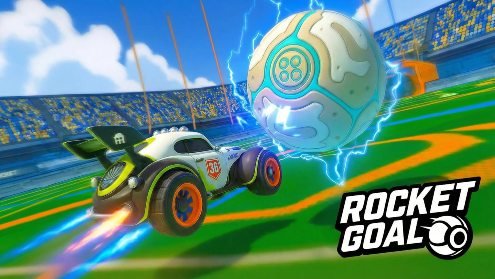
Rocket Goal is an online car soccer game where players boost, drift, jump, and perform aerial moves to strike a giant ball into the opposing net. Practice your controls, unlock more vehicles, compete with other players, and progress through ranked leagues.
Rocket Goal Online Multiplayer Car Soccer Game
Rocket Goal is a fast online sports game where rocket-powered cars replace traditional football players. You drive around a compact arena, hit a large ball toward the opponent’s net, defend your own goal, and use boosts, jumps, drifts, and aerial rolls to control each play.
The idea sounds simple, but controlling a car around a moving ball requires practice. Strong players do more than chase the ball. They manage their speed, read rebounds, protect open space, and choose the right moment to attack.
What Is Rocket Goal?
Rocket Goal, officially listed as RocketGoal.io, is a 3D multiplayer car soccer game developed by PocketHavenGames. The browser edition was released in January 2026 and supports desktop, mobile, and tablet browsers, along with mobile app versions. (Crazy Games)
Each player controls a rocket-powered vehicle instead of a human footballer. The main objective is to push or strike the ball into the opposing team’s net while stopping the other side from scoring.
The game combines driving, football positioning, physics, and online competition. Players can boost across the arena, jump for higher balls, drift through tight turns, drive along walls, and perform aerial movements.
Players who mainly enjoy speed and stunt-based racing may also like Asphalt 8 Car Racing. Rocket Goal uses similar ideas such as boosting and jumping, but every movement is connected to controlling the ball or defending the net.
How Rocket Goal Gameplay Works
A match begins with vehicles positioned around the arena and the ball placed near the center. When play starts, both sides move toward the ball and try to gain the first useful touch.
Hitting the ball directly toward the goal is not always the best choice. A rushed strike may send it toward a wall, hand possession to the opposing team, or leave your own goal unprotected.
Good positioning often matters more than constant speed. A player waiting behind the action can stop a counterattack, collect a loose ball, or take a clearer shot after other vehicles collide.
The ball reacts to the speed, angle, and position of the car. A direct front-bumper hit creates a different result from touching the side of the ball or meeting it while jumping.
Matches become easier to understand when you stop treating every touch as a shooting attempt. Sometimes the correct play is moving the ball away from danger, passing it toward a teammate, or placing it into open space.
What Makes Rocket Goal Different?
Rocket Goal combines two familiar game types without making either one feel separate.
The driving controls provide speed, drifting, wall movement, and aerial control. The football side adds goals, defensive positions, passing opportunities, and team decisions.
The result is more demanding than a normal racing game. Reaching the ball first does not matter if the touch sends it in the wrong direction.
It is also more unpredictable than traditional football. Cars can approach the ball from the ground, walls, or air, creating rebounds that are difficult to read during the first few matches.
The physics produce both skilled and chaotic moments. A carefully timed aerial hit can create a clean goal, while several cars meeting the ball together may send it bouncing across the arena.
Main Rocket Goal Features
- Online multiplayer matches: Compete with other players in real time and work through ranked league matches.
- Physics-based ball movement: The speed and angle of each vehicle affect where the ball travels.
- Rocket-powered cars: Vehicles can accelerate, boost, drift, jump, flip, and move through the air.
- Practice mode: Enter the field alone to understand the controls, ball movement, and shooting angles.
- Ranked progression: Play competitive matches, improve your league position, and climb the leaderboard.
- Unlockable vehicles: Begin with the Vortex and work toward additional cars through continued progress.
- Controller support: The browser listing confirms that players can use a compatible controller.
- Ball camera: Switch the camera toward the ball when tracking it becomes difficult.
- Desktop and mobile access: Rocket Goal supports browsers on computers, phones, and tablets.
- Vehicle customization: The mobile edition allows players to personalize their cars. (Crazy Games)
Rocket Goal Controls
Rocket Goal offers several controls for ground driving and aerial movement.
| Action | Default Control |
|---|---|
| Drive and steer | W, A, S, D or arrow keys |
| Jump | Right mouse button or K |
| Boost | Left mouse button or J |
| Drift | Shift |
| Air roll | Q and E |
| Change camera | Spacebar |
A compatible controller can also be used. Mobile and tablet versions display touchscreen controls instead of requiring a physical keyboard. (Crazy Games)
The number of controls may look difficult at first, but new players do not need to master every aerial action immediately. Basic driving, jumping, boosting, and camera switching are enough for the opening matches.
Learning Basic Car Control
Spend the first practice session driving around the arena without focusing entirely on the ball.
Learn how quickly the car accelerates, how widely it turns, and how much distance it covers while boosting. This gives you a better understanding of when to slow down before making contact.
The steering can feel sensitive, particularly when several players are moving around the same ball. Small corrections are often better than holding a turn for too long. (Crazy Games)
Practice stopping near the ball instead of crashing into it at maximum speed. Controlled contact gives you more choice over where it travels.
Players interested in open-world driving and more traditional drifting can also try CarX Street. Its racing structure is different, but it can appeal to players who enjoy learning vehicle control.
Using Boost Properly
Boost gives your car a quick increase in speed. It is useful for reaching a loose ball, returning to defend, or creating more power behind a strike.
Holding the boost button during every movement is rarely efficient. High speed makes turning more difficult and may cause you to miss the ball completely.
Use short boosts when adjusting your position. Save longer boosts for moments when you clearly need to cross the arena or challenge an opponent.
Boost is especially useful after losing possession. Returning to your net quickly may stop an easy goal.
Do not assume that the fastest player should always touch the ball first. Approaching at a controlled speed can produce a much better result than hitting it without a plan.
Jumping and Aerial Movement
Jumping allows the car to reach balls that are bouncing or travelling above ground level.
Aerial movement takes more practice because the vehicle must be controlled while it is away from the floor. The Q and E keys provide air-roll control, helping players adjust the car’s angle.
New players should begin with low jumps. Try meeting the ball just after it bounces rather than attempting difficult high aerial strikes immediately.
Once this feels comfortable, combine a jump with boost. This can lift the car farther through the air and create stronger contact.
The official browser listing identifies aerial movement as an important skill for players who want to compete effectively. (Crazy Games)
Understanding Ball Camera
The normal camera follows the direction of the car. This is useful for driving, but the ball can move outside your view.
Pressing the spacebar changes the camera and helps keep the ball visible. Ball camera is useful when rotating back toward your goal or waiting for a rebound.
However, keeping it active all the time may make close driving feel uncomfortable. Some players prefer the normal camera when collecting space, turning near a wall, or lining up a direct hit.
Practice changing between both views instead of depending entirely on one. Camera control becomes especially important when the ball moves above or behind the vehicle.
Drifting Through Tight Turns
Drifting helps the car rotate more sharply than a normal turn.
It is useful when you pass the ball, need to face the opposite direction quickly, or must return toward your own net.
A short drift can correct your direction without carrying the car too far away. Holding it for too long may cause the vehicle to lose useful speed or rotate beyond the desired angle.
Practice driving past the ball, drifting, and returning for a second touch. This is more realistic than expecting every first approach to be perfect.
Racing fans who like drifting, upgrades, and track-based competition can visit Cars Fast as Lightning.
Practice Mode
Practice mode places you alone on the field so you can work on driving and scoring without online pressure.
Guiding lines on the ground help players understand routes toward the goal. This makes the mode useful for learning how the ball reacts to different angles and speeds. (Crazy Games)
Begin with slow shots from directly in front of the net. Then move to the sides and test how the ball rebounds from walls.
You can also practice recovering after a missed jump. Learning how to land and face the next play is just as useful as learning the original aerial move.
Practice mode should not be treated as a one-time tutorial. Return after changing controls or unlocking a car that feels different.
Online and Ranked Matches
Rocket Goal includes real-time online competition where players face others across the arena. The game also includes league progression, ranked matches, and a leaderboard. (Crazy Games)
Online matches are less predictable than practice sessions. Opponents may challenge early, wait near their net, or attack from unusual angles.
Teammates can also influence your choices. If another player is already moving toward the ball, following directly behind them may leave the team without a defender.
Ranked play rewards consistency. One impressive goal is useful, but regular positioning, recoveries, and defensive decisions usually matter throughout the match.
Playing With Friends
Rocket Goal allows players to enter matches with friends as well as join games with other online players. (Crazy Games)
Playing with someone you know makes communication easier. One player can attack while the other remains prepared for a counterattack.
Avoid placing both cars in the same small area. When teammates chase the same ball, they may collide or leave the rest of the arena open.
Simple roles work well for beginners. The player closest to the ball can challenge, while the other watches the goal and waits for a loose touch.
Roles should change naturally during the match. After attacking, rotate away and allow the teammate to move forward.
Defending the Goal
Defense is not only about parking the car inside the net.
A stationary goalkeeper may struggle to reach balls travelling toward the corners. It is usually better to remain slightly forward with enough space to react.
Watch the opponent rather than looking only at the ball. The angle of their car can suggest whether they plan to shoot directly, push the ball along a wall, or pass it across the arena.
When clearing the ball, avoid sending it through the center if an opponent is waiting there. A side-wall clearance may create a safer result.
After making a save, follow the movement carefully. The ball may rebound directly toward another attacker.
Attacking Without Chasing Every Ball
Constant ball chasing is one of the most common beginner mistakes.
When several cars are already challenging, adding another vehicle to the group often creates more confusion. Wait a short distance away and prepare for the ball to escape.
Approaching from an angle is often better than driving directly behind it. A side touch can direct the ball toward the net instead of pushing it straight into a wall.
Look for open space before boosting. The fastest route to the ball is not always the best route for the next play.
A useful attack often begins before the final shot. Moving the ball away from defenders can create a simpler scoring opportunity for you or a teammate.
Cars and Unlockable Vehicles
Players begin with a vehicle called Vortex. Additional listed cars include Overdrive, Crimson, Specter, Frostbite, Pulsewave, Blaze, and Nitron. (Crazy Games)
Unlockable cars provide a clear progression goal beyond winning one match. They also allow players to change the appearance of their vehicle.
Do not expect a new car to replace basic skill. Positioning, ball control, recovery, and teamwork remain important regardless of the selected vehicle.
Spend a little time in practice mode after switching cars. Even a small difference in appearance or handling can affect how you judge contact with the ball.
Graphics and Presentation
Rocket Goal uses a colorful 3D stadium with a large ball, clear goals, bright boost effects, and easily recognized vehicles.
The arena is designed to support movement across the floor, walls, and ceiling. The wide visual space helps players track aerial balls and approaching opponents.
Goals and high-speed impacts create stronger visual effects, while the interface shows information needed during competitive play.
The presentation is closer to an arcade sports game than a realistic football broadcast. Cars, boosts, aerial rolls, and wall driving are treated as normal parts of the match.
Playing on Mobile Devices
Rocket Goal is available through mobile and tablet browsers, as well as app versions. The Android listing identifies it as a sports game from PocketHaven and confirms real-time online multiplayer, physics-based ball movement, and vehicle customization. (Crazy Games)
Touchscreen controls place virtual driving, jumping, and boost buttons on the display. This can require an adjustment period for players used to a keyboard or controller.
A stable internet connection is important because matches involve real-time online movement. Delays can make quick turns, ball contact, and defensive reactions harder to judge.
Mobile players may find practice mode useful before entering ranked games, especially after changing the control layout.
Who Should Play Rocket Goal?
Rocket Goal is suitable for players who enjoy online sports games, arcade driving, physics-based competition, and short team matches.
It is a good choice for people who like games with simple objectives but a high learning ceiling. Scoring is easy to understand, while controlling aerial movement and reading rebounds takes more time.
Players who enjoy practicing one mechanic repeatedly may appreciate its progression. Driving, drifting, boosting, jumping, and positioning can all improve gradually.
People looking for realistic football teams, licensed players, long story campaigns, or detailed vehicle tuning may find the experience limited.
More racing, action, casual, and multiplayer titles are available in the Gam-core games collection.
Honest Strengths and Limitations
| Strengths | Possible Limitations |
|---|---|
| Combines car driving with football strategy | Steering can feel sensitive initially |
| Includes online and ranked multiplayer | Online play depends on a stable connection |
| Practice mode helps beginners | Aerial control requires patience |
| Boosting and drifting create fast matches | Constant ball chasing can make games chaotic |
| Supports keyboard, controller, and touch input | Touch controls may feel less precise |
| Unlockable cars provide progression | Vehicle progression is less detailed than a racing simulator |
| Works on desktop, mobile, and tablet | New players may struggle against experienced opponents |
| Team roles add tactical choices | Communication with random teammates can be limited |
Tips for New Rocket Goal Players
Begin in Practice Mode
Learn how the car turns, jumps, and contacts the ball before entering ranked multiplayer.
Use Short Boosts
Small bursts provide speed without making the car impossible to control. Save longer boosts for clear races across the arena.
Stop Chasing Every Touch
When a teammate is already near the ball, move into useful space instead of following directly behind.
Protect the Center
The middle of the field often provides a direct route toward the goal. Avoid leaving it completely open when defending.
Learn Low Aerial Hits First
Begin with balls that have just bounced. High aerial shots can wait until jumping and landing feel comfortable.
Change the Camera Regularly
Use ball camera to follow the play, then return to the normal view when positioning or turning feels difficult.
Recover After Every Jump
Try to land with the wheels facing the next direction of play. A good landing saves time and boost.
Watch Rebounds
Balls hitting walls or goal frames may return toward the center. Prepare for the second touch instead of assuming the play has ended.
Rotate With Teammates
After attacking, move away and allow another player to challenge. This keeps someone available for defense.
Practice Controlled Contact
Do not strike every ball at full speed. A softer touch may keep possession and create a better shooting angle.
Rocket Goal Game Information
| Detail | Information |
|---|---|
| Game title | RocketGoal.io |
| Common name | Rocket Goal |
| Developer | PocketHavenGames |
| Browser release | January 2026 |
| Genre | Car soccer, sports, driving, multiplayer |
| Main mode | Online multiplayer |
| Practice option | Single-player practice field |
| Platforms | Desktop, mobile, and tablet browsers |
| App availability | iOS and Android |
| Main controls | Keyboard and mouse, controller, or touchscreen |
| Progression | Ranked leagues, leaderboard, and unlockable cars |
| Starting vehicle | Vortex |
| Visual style | Colorful 3D arena |
The current browser listing confirms the developer, January 2026 release, supported platforms, practice mode, ranked progression, controls, and vehicle list. (Crazy Games)
Frequently Asked Questions
What type of game is Rocket Goal?
Rocket Goal is an online car soccer game. Players control rocket-powered vehicles and attempt to move a large ball into the opposing team’s net.
Who developed Rocket Goal?
RocketGoal.io was developed by PocketHavenGames. The browser version was released in January 2026. (Crazy Games)
Is Rocket Goal multiplayer?
Yes. Rocket Goal includes real-time online multiplayer and ranked league matches against other players. (Crazy Games)
Can I play Rocket Goal alone?
Yes. Practice mode allows you to enter the field alone and learn driving, shooting, ball physics, and aerial movement.
How do I boost in Rocket Goal?
Press the left mouse button or J to activate boost with the default keyboard controls.
How do I jump?
Press the right mouse button or K. Jumping can be combined with boosting and air rolls for aerial movement.
What does the spacebar do?
The spacebar changes the camera view. It can help you switch between following the car and keeping the ball visible.
Does Rocket Goal support controllers?
Yes. The current browser listing confirms controller support. (Crazy Games)
Can I play Rocket Goal on mobile?
Yes. Rocket Goal supports mobile and tablet browsers, and app versions are available for iOS and Android. (Crazy Games)
Can I unlock more cars?
Yes. Players begin with Vortex and can work toward vehicles such as Overdrive, Crimson, Specter, Frostbite, Pulsewave, Blaze, and Nitron. (Crazy Games)
Is Rocket Goal difficult?
The basic objective is easy to understand, but precise turning, aerial control, ball positioning, and teamwork require practice.
Does Rocket Goal require an internet connection?
Online multiplayer and ranked matches require an internet connection. Practice availability may depend on the version and platform being used.



Reviews
There are no reviews yet.