
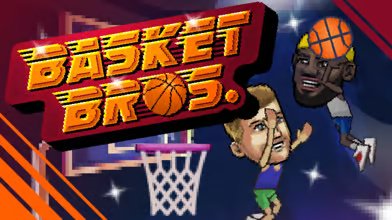


BasketBros
BasketBros is a fast one-on-one basketball game with arcade movement, powerful dunks, unlockable characters, and simple keyboard controls. Play against the computer, share a keyboard with a friend, practice your shooting, or create a private online match.
BasketBros is a quick arcade basketball game where two unusual players compete on a small court. Instead of managing a full team, you control one character and handle every shot, dunk, block, steal, and defensive mistake yourself.
Matches move quickly and can become chaotic within seconds. A clean jump shot may put you ahead, but one missed attempt can give your opponent an open path to the basket. The controls are simple enough for beginners, while shot timing and defensive movement take longer to master.
What Is BasketBros?
BasketBros is a browser basketball game developed by Blue Wizard Digital. It was released in January 2020 and supports solo matches, local two-player games, online matches, practice sessions, and a longer Franchise Mode.
The game uses a one-on-one format rather than traditional five-player basketball teams. Each person controls one character and tries to score more points before the match ends.
BasketBros does not follow realistic basketball rules closely. Players can jump unusually high, perform dramatic dunks, make physical defensive moves, and recover quickly after losing the ball.
This arcade approach makes matches easier to understand. You do not need to study team formations, passing systems, substitutions, or complicated playbooks before entering the court.
Players looking for another competitive game to share with a friend can also try Elo Board Games for Two, which offers a slower and more strategic two-player challenge.
How BasketBros Gameplay Works
A normal match begins with both players trying to gain possession of the basketball. Once you have the ball, you can move across the court, jump toward the basket, attempt a shot, or perform a close-range dunk.
Your opponent can challenge you in the air, block the ball, steal possession, or interrupt your movement. This means simply running toward the basket is not always enough.
The court is small, so both players remain close throughout most of the match. There is little time to stand still or plan a long attack.
You must make quick decisions based on your opponent’s position. A defender standing close to the basket may block a direct dunk, while a defender moving forward may leave enough space for a longer shot.
When a shot misses, the ball remains active. Both players must react quickly and move toward where it lands.
These loose-ball moments often decide a match. A player who watches the ball carefully can recover possession before the opponent understands where it is going.
What Makes BasketBros Different?
BasketBros takes the main actions of basketball and removes most of the complicated rules around them. The result feels closer to a sports battle than a realistic basketball simulation.
The one-on-one structure makes every action important. There are no teammates to cover the basket after you move forward, collect your missed shot, or protect you from a fast counterattack.
The game also uses exaggerated movement. Characters can leap high into the air, perform forceful dunks, and use unusual defensive actions.
This gives each match a playful and unpredictable feeling. Even when one player builds a lead, a few well-timed blocks or steals can quickly change the score.
The short match format also encourages rematches. Losing does not mean repeating a long tournament or waiting through several menus.
BasketBros Game Modes
BasketBros includes several modes for different types of players.
Play Now
Play Now starts a quick match against a computer-controlled opponent. It is a useful place to learn the controls before facing another person.
The computer provides enough pressure to teach basic movement, shooting, and defense without requiring an online connection to another player.
Two Players
The local two-player mode allows two people to compete using the same computer and keyboard.
Each person uses a separate group of keys. This mode works well for friends or family members who want quick matches without creating an online room.
Online Play
Online Play allows players to host or join a private match using a shared game code. One player creates the room and sends the code to the other person.
This private-room system makes it easier to play with a specific friend instead of being placed against a random opponent.
Players who enjoy competing against other people can browse more online multiplayer games on Gam-core.
Franchise Mode
Franchise Mode creates a longer series of basketball matches. Players can compete through as many as 17 games while trying to reach the final trophy match.
This mode gives the game more structure than a single quick match. A loss matters more because it affects your progress through the series.
Shooting Practice
Shooting Practice provides a calmer area where you can learn movement and shot timing.
Beginners should spend a few minutes here before playing online. Understanding how your character jumps can make a major difference during competitive matches.
Main BasketBros Features
- Fast one-on-one basketball: Each player controls one character, keeping every match direct and competitive.
- Simple keyboard controls: Movement, jumping, shooting, blocking, and special actions use a small collection of keys.
- Solo matches: Players can compete against a computer-controlled opponent without waiting for another person.
- Local multiplayer: Two people can share one keyboard and play on the same computer.
- Private online rooms: Friends can host and join online matches through a shared game code.
- Franchise competition: Players can work through a longer series containing up to 17 matches.
- Shooting practice: A separate practice mode helps players understand jumping and shot release timing.
- Unlockable characters: BasketBros includes 33 characters that can be unlocked through continued play.
- Character customization: Clothing colors, socks, shoes, logos, and other visual details can be changed.
- Arcade movement: High jumps and exaggerated physical actions create a faster style than realistic basketball games.
BasketBros Controls
BasketBros uses different control groups depending on the selected mode and player position.
| Action | Control |
| Steer left | Left arrow or A |
| Steer right | Right arrow or D |
| Move forward | Automatic in most versions |
| Restart | Select the restart option after crashing |
Control layouts can vary slightly between hosted versions. The exact buttons normally appear before the match begins, so check the on-screen instructions before playing.
The shooting system is based on movement and timing. Jump first, then press the jump or shoot button again while your character is in the air.
The same action button may behave differently depending on whether you have the ball. It may help with shooting while attacking or blocking and challenging while defending.
Learning Shot Timing
Good shooting in BasketBros is not only about standing near the basket. The point at which you release the ball also matters.
Releasing too early can create a weak attempt. Waiting too long may give the defender enough time to block the ball.
Start by practicing close-range shots. Once you understand the jump movement, slowly move farther away from the basket.
Long shots are useful when the opponent remains close to the hoop. However, missing from a distance can give the other player an easy scoring opportunity.
Do not take the same shot every time. Mixing dunks, short shots, and longer attempts makes your movement more difficult to predict.
Playing Better Defense
Defense is just as important as scoring. A player who only runs toward the opponent may leave the basket completely open.
Try to remain between the attacker and the hoop. This position gives you a better chance of blocking a shot or interrupting a dunk.
Avoid jumping every time the opponent moves. Experienced players may pretend to shoot, wait for you to leave the ground, and then move past you.
Watch the ball instead of only watching the character. A missed shot can bounce into an open area, and recovering it quickly may stop another scoring attempt.
Physical defensive moves can be useful, but timing matters. Using an action too early may allow the opponent to move around you.
Characters and Customization
BasketBros includes a large selection of humorous basketball characters. Many of their names and designs appear to be playful references to well-known basketball styles and personalities.
Players can unlock 33 characters and adjust parts of their appearance. Customization options include clothing colors, socks, shoes, logos, and other equipment.
These options do not turn the game into a complicated character-building system. They simply give regular players more visual choices and goals to work toward.
Different characters may also feel more comfortable depending on how you play. Some players prefer quick movement and outside shots, while others focus on close dunks and aggressive defense.
Test newly unlocked characters in Shooting Practice before using them in an important Franchise or online match.
Graphics and Sound
BasketBros uses colorful 2D graphics with large characters, clear baskets, and a simple side view of the court.
The character designs are intentionally exaggerated. Large heads, dramatic expressions, and unusual movements fit the arcade-style gameplay.
Animations make major actions easy to recognize. Players can quickly see when a shot is blocked, a dunk succeeds, or the ball changes possession.
The sound effects also help communicate important moments. Successful baskets, collisions, jumps, and other actions are easy to notice during a fast match.
The presentation stays focused on the court instead of copying a television basketball broadcast. This keeps the screen readable when both players are moving quickly.
Who Should Play BasketBros?
BasketBros is suitable for players who like sports games but do not want realistic team controls or long matches.
It is especially enjoyable with another person. Local multiplayer turns the game into a quick same-room competition, while online rooms allow friends to play from different devices.
The game can also suit beginners because the basic controls are easy to understand. Most players can begin moving and shooting within their first match.
Regular players still have room to improve. Better timing, defensive positioning, ball recovery, and shot selection can separate an experienced player from a beginner.
Players searching for a collection of shorter browser challenges can also check Fun Mini Online.
BasketBros may not suit players looking for official basketball teams, realistic rules, detailed player statistics, or a full management career.
Honest Strengths and Limitations
| Strengths | Possible Limitations |
|---|---|
| Easy to understand during the first match | Movement may feel unusual at first |
| Supports solo, local, and online play | One-on-one gameplay may feel limited to simulation fans |
| Matches begin quickly | Rounds can become chaotic |
| Includes practice and Franchise modes | Some actions require careful timing |
| Offers unlockable characters and customization | Customization is not highly detailed |
| Works through a web browser | Online performance depends on the connection |
| Good for short competitive sessions | Gameplay may feel repetitive during long sessions |
Tips for Winning More Matches
Practice Before Playing Online
Spend a few minutes in Shooting Practice. Learn how high your character jumps and when the ball is released.
Do Not Rush Every Shot
Having the ball does not mean you must shoot immediately. Move away from the defender and create a clearer attempt.
Mix Your Attacks
Do not use a close dunk every time. Add short shots and longer attempts so your opponent cannot predict your movement.
Stay Near the Basket on Defense
Running directly at the attacker can leave the hoop open. Protect the scoring area and make the opponent take a more difficult shot.
Watch Missed Shots
The next possession often depends on where the ball lands. Move toward the rebound instead of waiting for it to come to you.
Delay Your Jump
Jumping too early makes a block easier to avoid. Wait until the attacker begins the shooting motion.
Use the Court Space
Move backward or sideways to create room. Standing directly beside the opponent makes it easier for them to steal or block the ball.
Learn One Character First
Changing characters constantly can make the controls feel inconsistent. Spend several matches with one character before testing another.
BasketBros Game Information
| Detail | Information |
|---|---|
| Game title | BasketBros |
| Developer | Blue Wizard Digital |
| Release date | January 2020 |
| Genre | Arcade basketball and sports |
| Main format | One-on-one basketball |
| Game modes | Solo, local multiplayer, online multiplayer, Franchise and practice |
| Platform | Web browser |
| Main controls | Keyboard |
| Unlockable characters | 33 |
| Visual style | Colorful 2D arcade graphics |
BasketBros can be played through supported desktop browsers, and some hosted versions also offer mobile or tablet support. Browser and control compatibility may differ between versions.
More casual, action, racing, fighting, and strategy titles are available in the Gam-core games collection.
Frequently Asked Questions
What Type of Game Is BasketBros?
BasketBros is a one-on-one arcade basketball game. It focuses on fast movement, shooting, dunking, blocking, and stealing rather than realistic team management.
Can I Play BasketBros Alone?
Yes. Play Now allows you to compete against a computer-controlled opponent. Franchise Mode and Shooting Practice also provide solo gameplay.
Does BasketBros Have Two-Player Mode?
Yes. Two people can play on the same computer using different keyboard controls.
Can I Play BasketBros Online With a Friend?
Yes. One player can host a private online room and share its code with a friend, who can then join the same match.
How Do You Shoot in BasketBros?
Press the jump button and then press it again while your character is airborne. The exact key depends on your selected player and game mode.
Does BasketBros Have a Practice Mode?
Yes. Shooting Practice allows you to work on movement, jumping, and shot timing without the pressure of a normal match.
How Many Characters Are in BasketBros?
BasketBros includes 33 unlockable characters. Players can also change parts of their character’s clothing and appearance.
Is BasketBros a Realistic Basketball Game?
No. BasketBros uses exaggerated jumps, physical defensive moves, quick matches, and arcade-style controls.
Does BasketBros Require a Download?
The browser version can be played online without installing a traditional desktop game.
Is BasketBros Difficult?
The basic controls are easy to learn, but accurate shooting, defensive timing, and online competition can take practice.




Reviews
There are no reviews yet.