
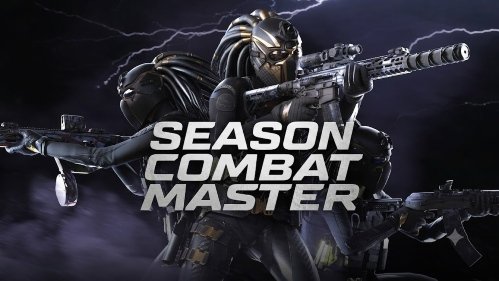


Combat Master
Combat Master is a fast first-person action game with responsive movement, multiplayer competition, varied maps, and offline support. Learn the routes, follow each match objective, and use sprinting, sliding, jumping, and climbing without losing awareness.
Combat Master
Combat Master is built for players who like first-person action that begins quickly and rarely slows down. Matches move across compact maps where opponents can appear from stairways, corners, rooftops, and connecting rooms. Standing in one place for too long usually gives the other team time to surround your position.
The movement is one of the first things you notice. Characters can sprint, slide, jump, and climb through parts of the map, creating matches that feel more mobile than a slow tactical shooter. Good results come from reading the arena, staying aware of nearby routes, and reacting when the direction of the match suddenly changes.
Players who enjoy quick online arena matches can also try Combat Online, which offers team-based browser battles across several multiplayer maps.
What Combat Master Is About
Combat Master is a fast first-person multiplayer action game developed by Alfa Bravo Inc. Players enter short matches, move through three-dimensional arenas, and work toward the objective of the selected mode.
The game focuses on responsive movement and rapid encounters rather than long periods of waiting. Maps contain open lanes, narrow indoor areas, raised positions, and alternative routes that let players approach the same area from different directions.
Depending on the version and available services, Combat Master can include:
- Online competitive matches
- Offline play
- Team-based game modes
- Free-for-all competition
- Custom matches
- Battle royale-style play
- Different maps and environments
- Character and equipment customisation
- Cross-platform multiplayer
The official Combat Master Steam page lists online PvP, LAN play, cross-platform multiplayer, offline support, customisable controls, and maps designed for both close and longer-distance encounters.
The exact features available on Gam-core can differ from the current PC or mobile releases. Browser editions sometimes use a limited build, remote game stream, or adapted version with fewer connected services.
How Combat Master Gameplay Feels
Combat Master moves at a much faster pace than many traditional first-person games. Players can reach the main action soon after a match begins, and defeated characters may return quickly in modes that support respawning.
This short gap between encounters makes awareness important. You may clear one area and immediately face another player entering from a side route. Looking only toward the centre of the map can leave your character exposed to movement from behind or above.
The movement system gives players several ways to cross an arena. Sprinting helps cover open ground, while jumping, sliding, and climbing can connect different sections of the map.
These actions are useful, but constant movement can also make the screen harder to read. A player who moves quickly without checking nearby routes may run directly into an occupied area. The better approach is to combine speed with short moments of observation.
For another competitive game where movement and positioning shape every round, play 1v1.LOL.
Combat Master Controls
The exact controls depend on the device and version running on the page. Check the settings menu before entering a serious match.
A typical desktop layout may include:
- W, A, S, D: Move
- Mouse: Look around
- Spacebar: Jump
- Shift: Sprint
- C or Ctrl: Crouch or slide
- R: Reload
- Number keys: Change the selected item
- Esc: Open the menu
The game supports customisable controls on its main PC and mobile releases, allowing players to adjust the layout to suit their device.
Mobile versions use virtual buttons for movement, camera control, jumping, sliding, and other actions. Players can often rearrange the interface so frequently used buttons are easier to reach.
Do not change several settings at once. Adjust one control, play a short match, and see whether it improves movement before changing something else.
Learn the Map Before Chasing the Score
A new map can feel confusing because several paths may connect the same two areas.
During the first match, pay attention to:
- Routes leading toward the centre
- Side passages connecting major areas
- Stairs and climbable sections
- Open spaces with limited cover
- Locations where players regularly meet
- Safe routes away from crowded areas
Learning these connections makes the game easier to follow. You begin to understand where an opponent may appear after leaving your view.
Do not focus only on reaching the busiest part of the arena. A slightly longer side route may give you a clearer view and fewer directions to watch at once.
Map knowledge develops naturally through repeated play. Each match reveals another shortcut, entrance, or dangerous open area.
How to Play More Consistently
Keep the Camera Moving
Do not stare at one doorway while crossing an area with several entrances. Briefly check the spaces around your character as you move.
This does not mean spinning the camera constantly. Use controlled checks that keep the image readable.
Avoid Crossing Open Areas Carelessly
Open ground can expose your character to several parts of the map at once.
Before moving across it, look for the nearest safe route and check whether the area is already busy.
Stop Sprinting Before Tight Corners
Sprinting helps you travel quickly, but it can reduce the time available to understand what is waiting around a corner.
Slow down briefly when entering a small room or narrow passage. A controlled entrance is often safer than arriving at full speed without a clear view.
Move After an Encounter
Remaining in the same position can make your next location predictable.
After an encounter ends, check the nearby routes and consider moving before another opponent arrives.
Follow the Match Objective
Not every mode is decided by individual eliminations. A player who ignores the objective may finish with a strong personal score while their team loses the match.
Check the mode before play begins and watch the objective indicators during the round.
Movement Without Losing Awareness
Combat Master allows parkour-style actions such as jumps, slides, and climbs. These mechanics help the game maintain its quick pace and allow players to move between different map levels.
Sliding can help maintain momentum through an open section, but using it automatically at every corner may make your route predictable.
Jumping provides another way to cross obstacles or change direction. Repeated jumping without checking the landing area can make movement harder to control.
Climbing creates access to raised paths and alternative entrances. Before climbing, check whether the destination leaves enough room to move after reaching the top.
The goal is not to perform every available movement action. Use the action that makes the current route clearer or safer.
Common Mistakes New Players Make
One common mistake is sprinting toward every sound or marker. Fast movement helps you reach the action, but it can also send you into an area without enough time to understand the situation.
Another mistake is returning through the same route repeatedly. Other players may begin expecting your character to appear from that entrance.
New players also spend too much time looking at menus during a live match. Make major control and interface changes before joining, then use the match itself to focus on movement and awareness.
Ignoring the objective is another problem. Team modes reward players who support the shared goal rather than treating every match like free-for-all play.
Some players become frustrated after several quick losses and begin moving even faster. This usually creates more mistakes. Slow the next approach slightly, check the surrounding paths, and rebuild your rhythm.
Online and Offline Play
Combat Master supports online multiplayer, while its official platform descriptions also list an offline mode.
Online play places you against other players whose movement can be difficult to predict. Some move aggressively through the centre, while others use quieter side routes.
Offline play can help new players become comfortable with the controls and maps without depending on an internet connection. The exact offline content may vary by platform and game version.
Cross-platform multiplayer is listed for the PC release, allowing supported players on different systems to participate in the same wider game community.
Connected features on Gam-core depend on the edition loaded and the availability of its online services.
Performance and Device Support
Combat Master was designed to run across a broad range of hardware. Its Steam description highlights adjustable settings and optimisation for both lower-end and higher-end systems.
The game is officially available through platforms including:
- Steam for PC, Mac, and supported Linux systems
- Google Play for Android
- Apple App Store for iPhone and iPad
The Google Play listing describes support for customisable controls, offline play, multiplayer, varied maps, and performance options. It was updated on July 25, 2026.
Browser performance can still depend on the device, available memory, internet connection, and other tabs running at the same time. Closing unnecessary background pages may help when the game feels uneven.
Game Modes and Match Variety
Combat Master includes several forms of competitive play across its main releases. These can range from compact team matches to larger survival-based modes.
Smaller maps create frequent encounters and quick changes in control. Larger environments give players more time to move between major areas and choose different routes.
Team modes reward players who remain aware of nearby allies and shared objectives. Free-for-all modes remove that support and require closer attention to every direction.
Custom matches can be useful for learning maps or playing with a familiar group when that option is available.
Not every platform or browser build contains the same modes. Check the in-game menu to see which activities are currently supported.
Players who prefer a larger mobile battle format may also be interested in Call of Duty Warzone Mobile.
Age Rating and Online Safety
Combat Master contains intense fictional combat. Its age rating differs between platforms and regions.
Google Play currently lists it as rated 16+ for strong violence, while Apple’s US App Store lists an 18+ age rating. Steam also displays a PEGI rating for strong violence and online interactivity.
Parents and players can use the PEGI labels guide to understand European content symbols and age recommendations.
Online multiplayer can involve unfamiliar players. Avoid sharing personal details such as your full name, school, address, passwords, or private contact information. Use mute, block, privacy, and reporting tools when another player behaves badly.
What Makes Combat Master Worth Playing
Combat Master stands out through its fast movement and short path from the menu to the main action. Players spend less time waiting and more time navigating active matches.
The combination of sprinting, sliding, climbing, and vertical map routes gives movement a larger role than simply travelling from one point to another.
Its adjustable interface also helps players create a control layout that fits their device. This is particularly useful on mobile, where poorly positioned buttons can make fast movement difficult.
The speed can also be a limitation. New players may find the first matches confusing because opponents move quickly and maps contain several connected paths. Learning the surroundings takes patience.
Players looking for a slow, methodical experience may prefer another style of game. Combat Master works best for those who enjoy quick restarts, constant movement, and short competitive rounds.
More fast-paced titles can be found in the action games collection.
Who Will Enjoy Combat Master?
Combat Master suits players who enjoy first-person action, online competition, compact maps, responsive movement, and short matches.
New players can use offline play or less demanding matches to understand the controls and map layouts. They should focus on awareness and movement before worrying about advanced performance.
Experienced players may enjoy learning alternative routes, adapting their control layout, and responding to opponents who use different movement patterns.
The game is less suitable for players who dislike intense fictional combat or very fast camera movement. Age ratings should also be checked before younger players begin.
Play Combat Master Free Online
Play Combat Master free online on Gam-core.com and enter fast first-person matches built around movement, map awareness, and quick decisions.
Learn how each area connects, avoid rushing blindly through narrow entrances, and keep the match objective in mind. Moving quickly can help, but understanding where you are going is what makes that speed useful.





Reviews
There are no reviews yet.