
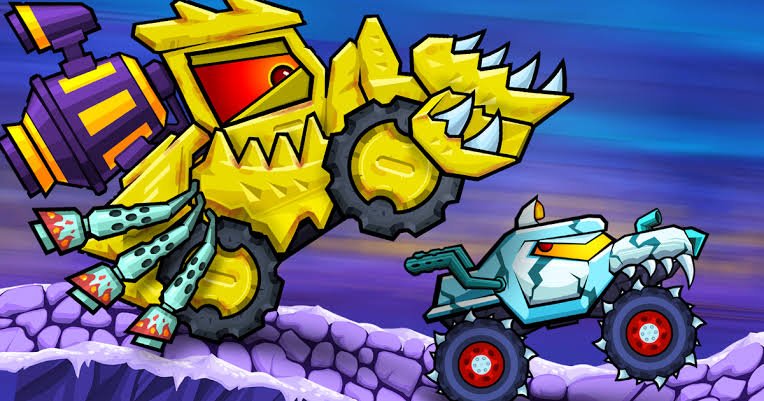


Car Eats Car
Car Eats Car is a side-scrolling survival racing game filled with living cartoon vehicles, dangerous tracks, turbo boosts, flips, and upgrades. Escape aggressive enemy cars, collect gems, improve speed and armor, unlock stronger vehicles, and fight your way toward each finish line.
Car Eats Car Survival Racing and Vehicle Battle Game
Car Eats Car is a side-scrolling survival racing game where ordinary vehicles are replaced by living machines with teeth, eyes, armor, and unusual abilities. You drive across dangerous tracks, escape aggressive enemy cars, collect useful items, perform flips, and reach the finish line before your vehicle loses all its health.
The game mixes racing with platform-style movement and vehicle combat. Driving quickly helps, but surviving also depends on balancing the car, choosing when to use turbo, and improving important statistics between levels.
What Is Car Eats Car?
Car Eats Car is a long-running arcade racing series developed by SMOKOKO LTD. The current main mobile edition is listed as Car Eats Car Apocalypse Race, while the wider series includes Car Eats Car 2, Car Eats Car 3, multiplayer editions, and themed browser adventures.
The basic idea remains similar across most versions. You control a cartoon car travelling through uneven tracks while hostile vehicles chase, ram, and attempt to stop you.
Unlike a traditional racing game, reaching maximum speed is not enough. Tracks contain hills, loops, gaps, traps, and enemies that require careful movement.
Players who prefer standard track racing without monster vehicles can also try Asphalt 8 Car Racing, which focuses more on high-speed races, drifting, and licensed-style sports cars.
How Car Eats Car Gameplay Works
Each level begins with your vehicle entering a side-scrolling track. Enemy cars usually appear behind or ahead, creating pressure from the beginning.
You accelerate to move forward, adjust the car’s balance while jumping, and use turbo when extra speed is needed. Certain versions also give the car a special attack that can clear nearby enemies or obstacles.
The objective is usually to reach the end of the track while protecting the vehicle’s health. Along the way, you can collect gems, turbo energy, health items, and other rewards.
After completing a level, collected resources can be spent in the garage. Upgrades improve the car and prepare it for harder tracks, stronger rivals, and boss encounters.
The general gameplay cycle includes:
- Enter a dangerous track.
- Escape or defeat pursuing cars.
- Collect gems and temporary bonuses.
- Perform flips to gain additional turbo.
- Reach the finish line.
- Improve the car in the garage.
- Unlock stronger vehicles.
- Continue into more difficult locations.
What Makes Car Eats Car Different?
Car Eats Car treats vehicles like living cartoon creatures.
Cars have expressive eyes, large mouths, teeth, unusual body shapes, and exaggerated movements. Some look quick and lightweight, while others resemble armored machines or monster trucks.
The driving is also different from realistic racing. Tracks are viewed from the side and contain steep hills, ramps, loops, underground paths, and large jumps.
A car can rotate while airborne, land on its roof, recover from an awkward bounce, or gain turbo after completing a successful flip.
Enemy vehicles do not simply race beside you. They actively chase and pressure your car, turning each level into a survival challenge.
This mixture of racing, platform movement, upgrades, and cartoon vehicle battles gives the game a style that feels different from CarX Street, where the main focus is open-world street racing and realistic-looking car control.
Main Car Eats Car Features
- Side-scrolling racing: Levels move from left to right across hills, ramps, tunnels, and obstacle-filled tracks.
- Living cartoon cars: Vehicles have faces, teeth, personalities, and unusual designs rather than realistic appearances.
- Enemy pursuits: Aggressive cars chase the player and create constant pressure during each level.
- Turbo boosts: Turbo provides additional speed for escaping enemies, crossing gaps, and reaching difficult areas.
- Airborne stunts: Front and backward flips can help refill turbo when completed safely.
- Garage upgrades: Players can improve speed, armor, turbo capacity, and vehicle control.
- Collectible gems: Track rewards can be saved and spent on upgrades or additional cars.
- Boss encounters: Larger enemy vehicles appear during important stages and require stronger upgrades.
- Unlockable cars: Different vehicles provide new designs and performance characteristics.
- Multiple environments: Depending on the version, tracks can appear in cities, deserts, caves, islands, underwater areas, volcanic regions, and frozen locations.
- Single-player progression: Most main Car Eats Car adventures use level-based solo campaigns.
- Mobile and browser editions: Different games from the series are available through browsers, Android, and iOS.
Car Eats Car Controls
Controls may differ slightly between entries in the series, but most browser editions use a similar layout.
| Action | Common Keyboard Control |
|---|---|
| Accelerate | W or up arrow |
| Reverse or brake | S or down arrow |
| Lean backward | A or left arrow |
| Lean forward | D or right arrow |
| Use turbo | X, Z, or Left Shift |
| Use special ability | Spacebar |
| Select menu options | Left mouse button |
The themed browser editions commonly use W or the up arrow to accelerate, A and D to balance the car, Spacebar for the special ability, and X or Z for turbo. Players should follow the control guide shown beside the exact version hosted on Gam-core.
Mobile editions use on-screen buttons for acceleration, balance, turbo, and other available actions.
Learning How to Balance the Car
Balance is one of the most important skills in Car Eats Car.
The tracks contain frequent jumps, and the car can rotate while it is airborne. A poor landing may reduce speed, damage the vehicle, or leave it exposed to chasing enemies.
Use the forward and backward controls to adjust the car’s angle before touching the ground.
Try to land with both wheels facing the track. A clean landing allows you to maintain speed and continue without giving enemies time to catch up.
Large movements are useful during high jumps, but small adjustments are safer when the car is already close to the ground.
Using Turbo at the Right Time
Turbo provides a temporary increase in speed.
It can help you escape a group of enemy cars, climb a steep hill, cross a large gap, or reach the finish line before taking more damage.
Using the entire turbo supply on an easy section may leave nothing available for the next difficult area.
Short boosts are often enough for normal hills. Save longer boosts for moments when the car clearly needs extra momentum.
Turbo can also affect jumps. Activating it before a ramp may send the vehicle much higher and farther than expected.
This can be useful when the landing area is clear. It can become a problem when a low ceiling, obstacle, or narrow platform is ahead.
Performing Flips
Car Eats Car rewards airborne movement.
When the car leaves a ramp, use the balance controls to rotate it forward or backward. Completing a full flip can provide additional turbo in several games from the series.
Do not attempt a flip during every jump.
A small jump may not provide enough time to complete the rotation and return the wheels toward the ground. Failed stunts can slow the vehicle or cause unnecessary damage.
Begin with larger ramps where the car remains in the air for longer. Watch the ground and stop rotating when the vehicle reaches a safe landing angle.
Flips are most useful when they add turbo without interrupting the run.
Health and Vehicle Damage
The player’s vehicle has a limited amount of health.
Contact with enemies, hard landings, track hazards, and other dangers can reduce it. The level ends when the vehicle can no longer continue.
Health items may appear on the track. Collecting one can help after a difficult section, but the next item may not arrive quickly.
Avoid treating health as something that can always be restored. Preventing damage is more reliable than depending on a later pickup.
Armor upgrades can make the car more durable. These become particularly helpful when levels contain larger groups of enemy vehicles.
Collecting Gems and Bonuses
Gems are one of the main resources in Car Eats Car.
They appear across tracks and are awarded through normal progress. Collected gems can be used for garage upgrades and other unlockable content.
Some gems are placed along the safest path. Others require a jump, alternate route, or risky movement.
Do not put the entire run at risk for one collectible. Finishing the level usually provides more long-term value than crashing while trying to collect everything.
Temporary bonuses can include health recovery, turbo energy, protective effects, or other version-specific rewards.
Learn the appearance of each item so you can decide quickly whether it is worth changing direction.
The Garage Upgrade System
The garage allows players to improve vehicle performance between levels.
Common upgrade categories include:
| Upgrade | Main Benefit |
|---|---|
| Speed | Raises the car’s general driving pace |
| Armor | Helps the vehicle survive more damage |
| Turbo | Increases boost strength or available energy |
| Control | Makes balancing and landing easier |
The current Apocalypse Race listing identifies speed, armor, turbo, and control as its main vehicle improvements.
Speed is useful, but it should not be the only priority. A fast car with weak armor may struggle against large groups of enemies.
Control upgrades help when tracks contain many jumps and uneven surfaces. Better handling can prevent the vehicle from losing momentum after every landing.
A balanced upgrade plan is usually more comfortable than spending every resource on one statistic.
Choosing the Best Upgrade Order
New players often purchase speed first because it creates an immediate difference.
One or two early speed improvements can be useful, but armor and control should not be ignored. Harder levels introduce more contact, larger jumps, and less room for mistakes.
Turbo becomes more valuable once you understand when to use it. A larger boost supply can help cross difficult sections and escape dangerous pursuits.
A practical early approach is:
- Improve speed enough to maintain distance from basic enemies.
- Add armor before levels begin causing frequent losses.
- Improve control when landings feel difficult.
- Increase turbo for longer jumps and demanding chases.
The right order also depends on the selected car. A heavy vehicle may already have useful durability but need more speed and control.
Unlocking More Cars
Car Eats Car includes several unusual playable vehicles.
Different games in the series feature cars such as Beetlee, Carborghini, Tankominator, Harvester, Locomachine, Francopstein, and other themed machines. Available vehicles depend on the edition being played.
Some cars focus on speed and fast movement. Others are heavier and better suited to taking damage.
Unlocking a stronger car does not remove the need for careful driving. Every vehicle still needs to be balanced during jumps and improved through upgrades.
Test a newly unlocked car on an easier level before taking it into a difficult boss stage. Its weight and rotation speed may feel different from the previous vehicle.
Enemy Cars
Enemy vehicles are one of the defining parts of Car Eats Car.
They may chase from behind, wait ahead, block narrow paths, or appear in groups. Their designs often include sharp teeth, large wheels, armor, and exaggerated shapes.
Smaller enemies can sometimes be escaped through speed. Stronger vehicles may continue following across several parts of the track.
The safest response depends on the situation.
When the road ahead is clear, turbo can create enough distance to escape. When a group blocks the route, a special ability or environmental obstacle may provide a better solution.
Avoid becoming trapped between enemies. Keep moving toward open space whenever possible.
Boss Encounters
Bosses appear during major points in several Car Eats Car games.
They are larger and more durable than ordinary enemy cars. Some use special movement patterns or occupy a large part of the track.
A boss encounter tests whether the car has been upgraded enough for the current location.
Before beginning one, check armor, speed, and turbo. Replaying an earlier level for more resources can be easier than repeatedly entering the boss stage with an underpowered car.
During the encounter, focus on remaining balanced and keeping enough space to react.
The largest vehicle on the screen may attract your attention, but track obstacles still matter. A poor landing can create more trouble than the boss itself.
Track Hazards and Obstacles
Car Eats Car tracks contain more than enemy vehicles.
Players may encounter gaps, moving objects, steep hills, breakable barriers, unstable platforms, loops, and narrow tunnels.
The side view allows you to see part of the route ahead, but high speed reduces the time available to react.
Avoid using turbo when the next section is not visible. It may carry the car directly into an obstacle or create an uncontrollable jump.
Some hazards can also affect pursuing enemies. A well-timed jump may cause an enemy car to hit the obstacle you avoided.
Exploring Different Routes
Some levels include upper and lower paths.
One route may contain more gems, while another provides a safer way through the level. A high route may require better turbo and jumping control.
Choosing a path adds a small amount of strategy to the racing.
During the first attempt, use the route that looks easier to follow. Return for difficult collectibles after the car has better upgrades.
A missed side route does not always require restarting. Reaching the finish line keeps progression moving and may provide enough resources for the next improvement.
Game Locations and Themes
The Car Eats Car series has visited many environments.
Car Eats Car 2 includes city streets, fantasy areas, and off-road tracks. Later browser adventures use arctic, underwater, volcanic, sea, winter, and dungeon settings.
These locations change more than the background. Tracks can use different hills, surfaces, hazards, and environmental objects.
Frozen areas may feel slippery, while volcanic stages place more attention on dangerous terrain. Underwater adventures change the visual setting while preserving the familiar turbo, balance, and pursuit mechanics.
The variety helps the series avoid using the same road design in every game.
Graphics and Presentation
Car Eats Car uses colorful cartoon graphics with a side view of each track.
Cars have animated eyes, mouths, teeth, and expressive designs. Enemy vehicles look threatening without using realistic detail.
The environments use bright colors and large objects that are easy to identify while driving quickly.
Animations make jumps, flips, impacts, turbo boosts, and vehicle movement clear. The game’s presentation is playful rather than serious.
Players looking for another colorful car game can try Cars Fast as Lightning, which uses familiar animated characters and more traditional racing events.
Sound and Music
Engine sounds, turbo effects, collectible sounds, and track music support the arcade pace.
The audio helps indicate when turbo is active or when an item has been collected. Important information such as health and available boost is also shown visually.
Players can still understand the basic gameplay with lower sound, although the effects make successful jumps and fast pursuits feel more active.
Browser and Mobile Versions
The Car Eats Car series exists across several platforms.
The main Apocalypse Race edition is available on Android and iOS, while multiple themed Car Eats Car adventures can be played through desktop, mobile, and tablet browsers.
The exact content depends on the selected edition.
A browser adventure may use a shorter level campaign and keyboard controls. Mobile editions can include more cars, achievements, leaderboards, in-app purchases, advertising, and broader progression systems.
Progress may not transfer between different editions or websites.
Is Car Eats Car Multiplayer?
Most main Car Eats Car campaign games are single-player.
You race against computer-controlled enemy vehicles, complete levels, improve cars, and face bosses.
A separate title called Car Eats Car Multiplayer Race supports real-time competition against other players. It includes races for up to four participants, additional tracks, upgrades, and leaderboard features.
Players should not expect multiplayer inside every game carrying the Car Eats Car name. Check the selected version before starting.
Who Should Play Car Eats Car?
Car Eats Car is suitable for players who enjoy arcade racing, cartoon cars, side-scrolling tracks, upgrades, stunts, and short survival challenges.
It works well for players who want more action than a normal racing game. Enemy pursuits and vehicle abilities create pressure beyond simply reaching the finish line first.
The basic controls are easy to understand, but clean landings and well-timed turbo use require practice.
Players looking for realistic vehicle handling, official car models, detailed tuning, or simulation-style tracks may find it too unrealistic.
The game is designed around exaggerated cartoon movement rather than real driving.
More racing, action, casual, and adventure titles can be found in the Gam-core games collection.
Honest Strengths and Limitations
| Strengths | Possible Limitations |
|---|---|
| Combines racing with survival action | Physics can initially feel difficult to control |
| Cartoon cars have memorable designs | The style is not realistic |
| Garage upgrades provide clear progress | Some upgrades require repeated level play |
| Flips help refill turbo | Failed stunts can end a strong run |
| Tracks include different routes and hazards | Some levels may feel crowded |
| Several cars can be unlocked | Available vehicles vary between editions |
| Browser and mobile versions are available | Features differ across platforms |
| Boss encounters add variety | An under-upgraded vehicle may struggle |
| Levels are short and easy to restart | The core loop can become repetitive during long sessions |
Tips for Playing Car Eats Car Better
Balance Before Landing
Watch the car’s angle during every jump. Stop rotating before the wheels reach the ground.
Save Turbo for Difficult Areas
Do not use the full boost supply on flat roads. Keep some available for hills, gaps, and enemy pursuits.
Perform Stunts on Large Jumps
Attempt flips only when there is enough height and time to complete the rotation safely.
Upgrade Armor Regularly
Speed is useful, but stronger armor provides more room for mistakes during crowded stages.
Improve Control When Landings Feel Difficult
A control upgrade can be more useful than additional speed when the car regularly lands badly.
Collect Safe Gems First
Do not leave a clear route for one difficult collectible. Finish the level and return after improving the vehicle.
Keep Moving Around Enemies
Stopping allows pursuing vehicles to surround your car. Move toward open sections whenever possible.
Replay Easier Levels
Earlier stages can provide additional resources when the current level feels too difficult.
Test Newly Unlocked Cars
Different vehicles may rotate, accelerate, and land differently. Learn their movement before entering a boss stage.
Watch the Route Ahead
Avoid activating turbo when the next part of the track is hidden or filled with obstacles.
Car Eats Car Game Information
| Detail | Information |
|---|---|
| Game title | Car Eats Car |
| Current main app title | Car Eats Car Apocalypse Race |
| Developer | SMOKOKO LTD |
| Genre | Arcade racing, action, side-scrolling |
| Main mode | Single-player |
| Separate multiplayer game | Car Eats Car Multiplayer Race |
| Platforms | Web browser, Android, and iOS |
| Common desktop controls | WASD or arrow keys |
| Main mechanics | Racing, balancing, turbo, upgrades, and stunts |
| Upgrade categories | Speed, armor, turbo, and control |
| Progression | Levels, gems, cars, locations, and bosses |
| Visual style | Colorful 2D cartoon graphics |
SMOKOKO’s current listings confirm the main series titles, upgrade systems, platforms, single-player campaigns, and separate multiplayer edition.
Frequently Asked Questions
What type of game is Car Eats Car?
Car Eats Car is a side-scrolling arcade racing game. Players drive living cartoon vehicles, escape enemy cars, collect gems, use turbo, perform flips, and upgrade their cars.
Who developed Car Eats Car?
The Car Eats Car series was developed by SMOKOKO LTD. The studio continues to publish and update several games in the franchise.
How do I control the car?
Most browser editions use W or the up arrow to accelerate, S or the down arrow to reverse, and A and D or the left and right arrows to balance the car.
How do I use turbo?
Depending on the version, turbo commonly uses X, Z, or Left Shift. Check the controls shown beside the exact edition being played.
How do flips help?
Completing front or backward flips can add turbo in several Car Eats Car games. The car must land safely for the stunt to be useful.
Can I upgrade my vehicle?
Yes. Common improvements include speed, armor, turbo, and control. Upgrades are purchased with resources earned during levels.
Can I unlock additional cars?
Yes. Different games in the series include several unlockable vehicles with different designs and performance characteristics.
Is Car Eats Car multiplayer?
Most main campaign editions are single-player. Car Eats Car Multiplayer Race is a separate game with real-time online races.
Can I play Car Eats Car in a browser?
Yes. Several entries in the series support desktop, phone, and tablet browsers. Available browser titles may differ from the main mobile edition.
Is Car Eats Car available on mobile?
Yes. Several Car Eats Car games are available for Android and iOS devices.
Does Car Eats Car work offline?
Some mobile editions, including Car Eats Car 2, support offline single-player gameplay. Browser versions require an internet connection to load.
Why does my car keep landing upside down?
The car is rotating too far during jumps. Use smaller balance adjustments and stop turning before reaching the ground.







Reviews
There are no reviews yet.