
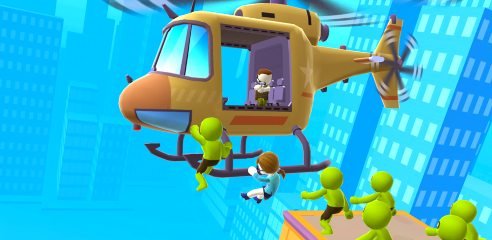


Helicopter Escape
Helicopter Escape is a fast 3D rescue game where you protect a hostage from a helicopter while they run toward safety. Follow the moving camera, react to approaching threats, use simple mouse or touch controls, and complete each short extraction mission.
Helicopter Escape 3D Hostage Rescue Action Game
Helicopter Escape is a fast 3D rescue game where you provide protection from a helicopter while a hostage runs toward safety. The camera follows the escape from above, giving you a clear view of the route, approaching enemies, and environmental obstacles.
The browser version uses simple mouse or touchscreen controls, so players can begin without learning a large control layout. The challenge comes from reacting quickly, protecting the escaping character, and completing each short mission without causing accidental harm.
What Is Helicopter Escape?
Helicopter Escape is commonly listed online as Helicopter Escape 3D. It is a third-person action and rescue game where the player watches the mission from a helicopter and helps a hostage reach the extraction point.
The browser edition is available on computers, phones, and tablets. A larger mobile version is published by SayGames and includes additional levels, equipment upgrades, helicopter improvements, city districts, and boss encounters.
The game does not ask you to manually pilot the helicopter through a detailed flight simulator. Instead, the helicopter follows the action while you control the aiming area and respond to threats around the escaping character.
Players who enjoy short reaction-based missions may also like Escape Road, where quick decisions and safe route choices are more important than following a traditional racing track.
How Helicopter Escape Gameplay Works
Each level begins with a hostage attempting to leave a dangerous location. The helicopter moves alongside or above the escape route while enemies approach from nearby streets, rooftops, rooms, or building floors.
Your job is to prevent those enemies from reaching the hostage. The browser version keeps interaction simple by letting players move the targeting area with a mouse or touchscreen gesture.
Once the immediate danger has been cleared, the hostage continues moving. The level may shift to another part of the building or city before the final helicopter pickup.
Some missions take place across rooftops, while others move through buildings with several floors. The mobile edition also includes enemy encounters where the player must survive incoming attacks while keeping the rescue mission active.
The Main Rescue Objective
The escaping character is the most important part of every mission.
It is not enough to clear the level quickly. You must also make sure the hostage reaches the helicopter safely.
The hostage usually moves automatically, which means you cannot directly stop or reposition them. This creates pressure because the mission continues even when several dangers appear together.
The best way to understand a new level is to watch the whole scene rather than focusing on one corner. An enemy may appear behind the hostage, enter from a doorway, or wait on another floor.
The rescue ends successfully when the character reaches the extraction area and enters the helicopter. Some versions use a short slow-motion sequence to show the final escape.
Helicopter Escape Controls
The browser edition uses a small control system.
| Action | Desktop Control | Mobile Control |
|---|---|---|
| Move the targeting area | Click and drag the mouse | Tap and slide |
| Interact with the selected area | Mouse input | Touch input |
| Continue to the next level | Select the on-screen button | Tap the on-screen button |
| Choose an upgrade | Left mouse click | Tap the upgrade |
YAD lists the desktop control as mouse click and drag, while mobile players use tap-and-slide movement. Other hosted editions may describe the same interaction as clicking to aim and act.
The control instructions shown beside the version on Gam-core should always take priority because browser builds can use slightly different input prompts.
Why the Simple Controls Still Require Attention
Helicopter Escape does not have a complicated keyboard layout, but the missions are not completely automatic.
The escaping character continues moving while threats enter the scene. A slow response can allow them to get too close, while rushed input may affect the wrong part of the environment.
The moving camera also changes your view throughout a level. An object that was near the center can quickly move toward the edge as the helicopter follows the hostage.
Controlled mouse or finger movement is usually more reliable than dragging wildly across the screen. Short corrections make it easier to follow individual targets and understand what is happening around the rescue route.
Level Structure
Most missions are short and divided into small action scenes.
A level may begin with a rooftop pursuit, continue through another city area, and finish with the hostage reaching the helicopter. Other stages can focus on multi-floor buildings where danger appears through windows or open rooms.
This structure keeps the pace quick. Players do not need to travel across a large open map before reaching the next objective.
The mobile edition includes progression through different city districts. Completing enough regular levels eventually leads to larger boss encounters with additional rewards.
The browser build may offer a lighter version of this progression. Features such as districts, detailed upgrades, and special events can depend on the platform.
Slow-Motion Rescue Moments
Slow motion appears during some of the most important parts of a mission.
When danger gets close to the hostage, the game may temporarily reduce the speed of the action. This gives players more time to understand the scene and respond.
Slow motion is not active throughout every level. It is normally used during critical moments or dramatic final sequences.
These sections also make the game feel more cinematic. The camera moves closer to the characters, and individual actions become easier to see.
Do not assume slow motion means the level is already complete. Continue watching until the hostage has safely reached the helicopter.
Environmental Objects
Some stages contain objects that can influence nearby enemies or change the route.
These objects may create a larger effect than interacting with one enemy at a time. They can be useful when several threats are standing close together.
However, the hostage may also be near the same area. Before using anything in the environment, check where the escaping character is moving.
The game is designed around quick reactions, but a brief pause to read the scene can prevent an avoidable failure.
Environmental interactions also add variety. Without them, every level would depend on repeating the same action against one character after another.
Different Enemy Encounters
Helicopter Escape includes several types of stylized opponents.
Some chase the hostage directly, while others remain inside buildings or attack from a fixed location. The mobile edition includes zombies, gang members, guards, and larger boss characters.
The differences affect the pace of a level. A chasing enemy creates immediate pressure, while a stationary opponent may give you slightly more time to understand the scene.
Some opponents can also threaten the helicopter. During those encounters, players must pay attention to both the rescue target and their own protection.
The action is presented with stylized 3D graphics rather than realistic detail. The Google Play listing classifies it as a casual single-player action game with mild violence and scary scenes.
Mission Failure and Restarting
A mission can fail when the hostage is caught, the wrong character is affected, or the player cannot handle an important threat in time.
Failure does not normally lead to a long waiting period. The game allows another attempt so you can learn where the danger appeared and react differently.
Short restarts suit this type of game because many levels are built around timing. Once you know the order of a scene, the next attempt becomes easier.
Avoid treating every failed mission as random. Look at what happened immediately before the loss.
You may have focused too long on one side of the screen, missed an environmental object, or reacted before the hostage moved away from danger.
Upgrades and Progression
The mobile version expands the basic rescue gameplay with several upgrade systems.
Completing levels can improve the player’s equipment, clothing, and helicopter. These upgrades create a sense of progress as the missions move through new districts.
Helicopter improvements mainly provide visual and progression rewards. Equipment upgrades can make later levels more manageable, while clothing changes customize the player character.
The browser version may use a simpler reward system. Players should not expect every feature from the mobile app to appear in the web edition.
When upgrades are available, balanced progress is usually more comfortable than spending everything on one category. Later missions may test survival, rescue speed, and general performance in different ways.
Boss Levels
Boss stages appear after completing groups of normal missions in the larger mobile version.
These encounters usually feature a stronger enemy, a larger character, or a more complicated level setup. They provide a break from ordinary rooftop and building rescues.
Boss levels can take longer because they require several successful actions before the scene is cleared.
The main lesson from normal levels still applies. Keep watching the hostage and surrounding area instead of focusing entirely on the largest character.
Boss victories can provide extra rewards and open further parts of the city progression.
Special and Unusual Levels
Helicopter Escape occasionally moves away from its standard rescue format.
The mobile edition includes special levels with humorous visual effects and unusual equipment themes. These stages are designed to feel lighter and less serious than the normal city missions.
Special stages help prevent the level structure from becoming too predictable. They may change the appearance of the action without completely replacing the basic controls.
The browser version may not contain the full collection of special stages. Content availability depends on the game build hosted by the website.
Graphics and Camera Style
Helicopter Escape uses colorful 3D graphics with simple character models and clear city environments.
The camera provides a third-person view from the helicopter, creating the feeling that the player is watching and protecting the rescue from above.
Camera angles change automatically as the hostage moves between rooftops, streets, and buildings. This makes each section feel more active, but it also means players must regularly adjust their attention.
Slow-motion scenes, close camera movements, and helicopter pickup animations give completed rescues a cinematic presentation.
The graphics are stylized rather than realistic. Characters and environments are designed to remain easy to identify during fast scenes.
Sound and Music
The game uses helicopter sounds, action effects, and tension-building background music.
The soundtrack becomes more noticeable when the hostage is surrounded or the mission reaches an important moment.
Sound can help communicate pressure, but the game remains understandable without relying entirely on audio. Enemy locations, the hostage’s route, and mission progress are shown visually.
Players who prefer quieter sessions can usually adjust sound through the device or in-game settings, depending on the version.
Browser and Mobile Versions
The browser version is designed for quick play on computers, phones, and tablets. It uses HTML5-style web controls and does not require a large traditional PC installation.
The SayGames mobile app is available for Android and iOS. It contains advertisements and optional in-app purchases, along with a larger progression system.
Google Play currently lists the game as single-player and playable offline in the app edition. Browser play still requires internet access to load the game page.
Progress may not transfer between a browser edition and the mobile app. They should be treated as separate versions unless the platform specifically confirms account syncing.
Who Should Play Helicopter Escape?
Helicopter Escape is suited to players who enjoy short action levels, simple mouse controls, rescue objectives, and quick restarts.
It works well for casual sessions because the main objective becomes clear within the first level. There is no large map to memorize or complicated movement system to learn.
Players who like watching a character move automatically while they protect the route may enjoy the game’s mixture of timing and observation.
Those who want a detailed helicopter simulator may be disappointed. You do not manually manage altitude, landing procedures, navigation systems, or realistic aircraft controls.
Players looking for open-world movement may prefer Rope Hero Mafia City Wars, while those who enjoy unpredictable physics can try Ragdoll Hit.
Age Rating and Content
Helicopter Escape contains stylized combat, pursuing enemies, zombies, and rescue situations.
The US App Store currently gives the mobile version a 13+ rating and notes frequent weapon-related content, advertising, and in-app purchases. Google Play labels it Parental Guidance with mild violence, mild themes, and scary scenes.
Parents and younger players should check the rating shown on their own regional store because age classifications can vary by country.
The browser edition may contain advertisements from the hosting platform. Players should avoid selecting unfamiliar pop-ups or leaving the game page through misleading buttons.
Honest Strengths and Limitations
| Strengths | Possible Limitations |
|---|---|
| Mouse and touch controls are easy to understand | The main interaction can become repetitive |
| Short rescue levels begin quickly | Players do not manually fly the helicopter |
| Moving cameras keep missions active | Camera changes may make targets harder to follow |
| Slow motion helps during critical moments | Some failures can happen very quickly |
| City, rooftop, and building scenes add variety | Browser content may be simpler than the mobile app |
| Mobile version includes upgrades and boss levels | Mobile editions include ads and in-app purchases |
| Works on computers, phones, and tablets | There is no multiplayer mode |
| Quick restarts help players learn each scene | Players looking for realistic simulation may find it too simple |
Tips for Completing More Rescues
Watch the Hostage First
Before interacting with anything, locate the hostage and notice which direction they are moving.
Scan the Whole Scene
Do not keep the pointer fixed in one place. Check doors, rooftops, windows, and the area behind the escaping character.
Use Controlled Movements
Small mouse or finger movements are easier to manage than dragging quickly across the entire screen.
Do Not Rush Environmental Interactions
An object may affect a larger area than expected. Check that the hostage has moved far enough away before using it.
Pay Attention During Camera Changes
New threats often appear when the camera moves to another section of the level. Recheck the full screen after every transition.
Use Slow Motion Carefully
Slow motion gives you more time, but the mission is still active. Use the extra moment to understand positions rather than making several rushed inputs.
Learn the Level Order
If a mission fails, remember where the danger appeared. Many scenes become easier once you recognize their sequence.
Upgrade More Than One Area
When the mobile version offers upgrades, improve general performance rather than relying on only one category.
Keep Watching After the Final Threat
The hostage still needs to reach the helicopter. Wait until the rescue animation confirms that the level is complete.
Check the Version’s Controls
Different browser builds may use click-and-drag, click-to-interact, or tap-and-slide controls. Follow the instructions displayed with the game.
Helicopter Escape Game Information
| Detail | Information |
|---|---|
| Common title | Helicopter Escape |
| Full title | Helicopter Escape 3D |
| Mobile publisher | SayGames LTD |
| Copyright credit | GamePie Crew |
| Genre | Action, rescue, casual |
| Game mode | Single-player |
| Main viewpoint | Third-person helicopter view |
| Browser controls | Mouse click and drag |
| Mobile controls | Tap and slide |
| Browser devices | Desktop, phone, and tablet |
| App platforms | Android and iOS |
| Main objective | Protect the hostage until helicopter extraction |
| Mobile progression | Districts, upgrades, special stages, and bosses |
| Visual style | Stylized 3D graphics |
The App Store identifies SayGames LTD as the seller and credits GamePie Crew, while YAD and 4J confirm the browser controls, rescue objective, and support for desktop and mobile browsers.
More action, casual, racing, puzzle, and sports titles are available in the Gam-core games collection.
Frequently Asked Questions
What type of game is Helicopter Escape?
Ans: Helicopter Escape is a single-player 3D action and rescue game. You watch the mission from a helicopter and protect a hostage while they move toward extraction.
Is Helicopter Escape the same as Helicopter Escape 3D?
Ans: Yes. Helicopter Escape is commonly used as a shorter name for Helicopter Escape 3D.
Who developed Helicopter Escape 3D?
Ans: The current mobile store listing names SayGames LTD as the seller and credits GamePie Crew. Browser copies may be distributed through different web-game publishers.
Do I control the helicopter?
Ans: Not in the same way as a flight simulator. The helicopter follows the rescue route automatically while you control the targeting area and protect the hostage.
How do I play Helicopter Escape on a computer?
Ans: The YAD browser version uses mouse click-and-drag controls. Another hosted edition describes the input as clicking to aim and interact.
Can I play Helicopter Escape on mobile?
Ans: Yes. The browser version supports phones and tablets, while separate Android and iOS apps are also available.
Is Helicopter Escape multiplayer?
Ans: No. The main browser and mobile versions are designed as single-player games.
Does Helicopter Escape work offline?
Ans: Google Play lists the Android app as supporting offline play. The browser version requires an internet connection to open and load the game.
Does the game have upgrades?
Ans: The larger mobile edition includes equipment, outfit, and helicopter upgrades. The browser edition may have a simpler progression system.
Are there boss levels?
Ans: Yes. The mobile version includes city progression and boss stages with additional rewards. Browser content may differ.
Why does the game enter slow motion?
Ans: Slow motion appears during important moments when danger is close to the hostage. It gives the player more time to understand the scene and respond.
Is Helicopter Escape suitable for children?
Ans: The US App Store rates the mobile version 13+, while Google Play uses a Parental Guidance label. The game contains stylized combat, scary scenes, advertising, and optional purchases.







Reviews
There are no reviews yet.