

Narwhale
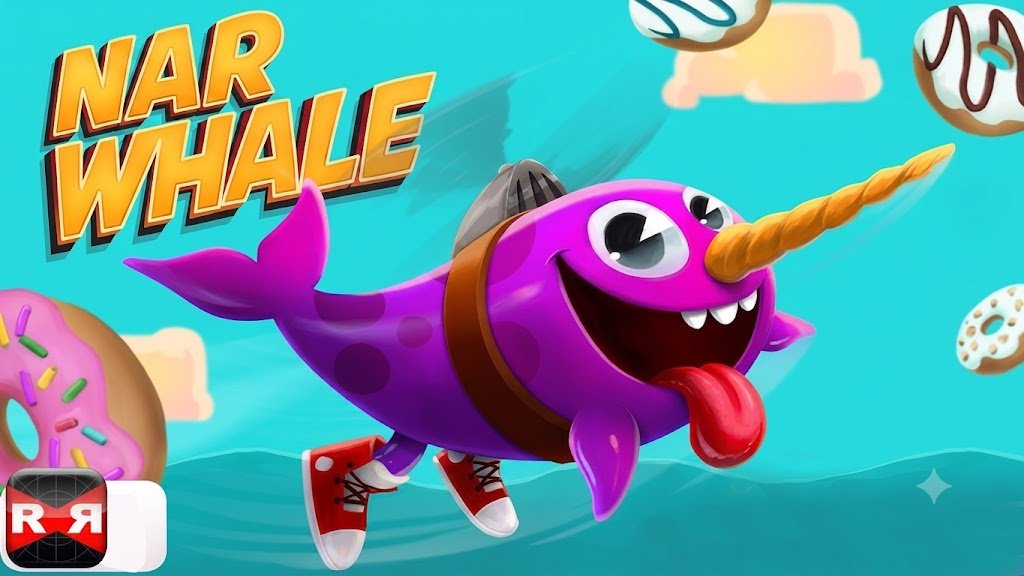
Narwhale is a quick multiplayer arena game where colorful narwhals compete using movement, timing, and tusk-based attacks. Dash toward exposed opponents, protect your sides, earn speed and stamina upgrades, and survive Free For All or team-based ocean battles.
Narwhale Online Multiplayer Ocean Battle Game
Narwhale, commonly known as Narwhale.io, is a fast multiplayer arena game where colorful narwhals compete using movement, timing, and their long tusks. You guide your character around a compact ocean arena, dash toward opponents, avoid incoming attacks, and earn upgrades after successful eliminations.
The rules are easy to understand, but surviving for more than a few moments takes patience. Every player can attack, every direction can become dangerous, and one poorly timed dash may leave your narwhal exposed.
What Is Narwhale?
Narwhale.io is a browser-based multiplayer action game built around short underwater arena battles. The official website describes it as a game about friendly narwhals competing with their tusks and currently lists a customizable joystick control option. (Narwhale)
Each player controls one narwhal and tries to make contact with opponents while protecting their own body. Successful attacks improve useful traits, helping the character move, turn, recover, and dash more effectively during the same run. (Narwhale)
The game belongs to the simple .io style, where players can enter a match quickly without completing a long tutorial or building a permanent character first.
Players who enjoy short online competitions can also try Fun Mini Online, which offers several quick multiplayer activities with different rules.
How Narwhale Gameplay Works
A match begins with your narwhal entering a shared arena filled with other players.
You control the direction of movement and use a short dash when you want to attack, escape, or quickly change position. The tusk points in front of the character, so the direction of your head matters during every encounter.
To remove another player, you must connect with the side or body of their narwhal before they do the same to you. Head-on collisions are often less effective because both players may bounce away instead of gaining a clear advantage. (IO Games)
The general gameplay cycle is simple:
- Enter the multiplayer arena.
- Move away from crowded starting areas.
- Watch the direction of nearby players.
- Dash when an opponent exposes their side.
- Earn upgrades after successful eliminations.
- Use improved statistics to survive longer.
- Continue until another player catches you.
Narwhale does not use a long campaign or traditional story progression. Most of the excitement comes from quick decisions inside each multiplayer round.
What Makes Narwhale Different?
Narwhale uses one central mechanic instead of a large collection of attacks.
Every player has the same basic goal, but movement speed, turning angle, stamina, recovery, and positioning create different outcomes.
The game does not automatically reward the largest or most experienced player. A newly joined player can still surprise someone with several upgrades if they approach from a safe angle.
This keeps the arena unpredictable. Strong players have better traits, but they also attract more attention from others.
The ocean setting also gives the movement a smooth, floating feeling. Characters slide and turn rather than stopping immediately, so planning the next direction matters.
Narwhale Controls
The exact layout can change between desktop and mobile devices.
| Action | Computer | Mobile |
|---|---|---|
| Move | Guide with the mouse | Drag on the left side |
| Dash or boost | Left-click or spacebar | Tap the lower-right control |
| Defend or retract | Right-click | Tap the upper-right control |
| Choose menu options | Left mouse button | Tap the screen |
Community control documentation lists mouse movement for direction, left-click for dashing, and right-click for defense. Laptop users may also use the touchpad and spacebar, while mobile players receive separate touch areas. (Narwhale.io)
The official game page may show a customizable joystick instead, so the instructions displayed in the version hosted on Gam-core should take priority. (Narwhale)
Learning Basic Movement
Your narwhal follows the direction of the pointer or virtual joystick.
Large movements create wider turns, while smaller adjustments allow more precise control. Wide turns work well in open water but can be dangerous when several opponents are nearby.
Try to keep the pointer slightly ahead of the character. Moving it rapidly around the screen can make the narwhal difficult to control.
The body continues following the head, so you need to think about more than the front of the character. A turn that protects your head may expose the side or tail to another player.
Using the Dash
The dash quickly sends your narwhal forward.
It is the main attacking tool, but it also helps with escape and repositioning.
A successful dash usually requires three things:
- The opponent’s side is visible.
- The distance is short enough to close.
- Another player is not waiting behind the target.
Dashing too early gives the opponent time to turn. Dashing too late may carry your narwhal directly into danger.
Do not use the boost whenever it becomes available. Saving it for a clear opportunity makes your movement harder to predict.
Stamina and Dash Recovery
Narwhale limits how frequently you can use full-speed movement.
After a dash, the character needs time or stamina before another strong burst becomes available. Successful upgrades can improve stamina and recovery, allowing more frequent movement later in a run. (Narwhale)
This means repeated clicking is not a reliable strategy. A player who spends every boost immediately may have no escape option when another narwhal approaches.
Watch the recovery indicator and avoid entering crowded areas when your dash is unavailable.
Defensive Movement
Narwhale includes a defensive or retract-style control in some versions.
This action can help protect the body or change how the tusk is positioned during a close encounter. The community control guide assigns defense to right-click on computers and the upper-right touch area on mobile. (Narwhale.io)
Defense works best when used deliberately. Holding it without watching the opponent can slow your reaction or place the character at an awkward angle.
Practice it during quieter moments before relying on it in a crowded fight.
Attacking From the Side
The safest target is usually a player whose body is facing across your path.
Approaching directly from the front can lead to a bounce or an uncertain result. Moving toward the side gives the tusk a clearer angle.
Do not follow the body blindly. Watch the head because the opponent may suddenly turn and face you.
A good attack often begins with patience. Let the other player commit to a direction before starting the dash.
Avoiding Head-On Encounters
Two players moving directly toward each other create a risky situation.
Even when you feel confident, a small change in angle can expose your body. Turning away early is often safer than trying to win every direct contest.
If you must approach from the front, keep enough open space to change direction.
The goal is not to take every possible fight. Surviving keeps your upgrades active and gives you more opportunities later.
Upgrades After Eliminations
Successful eliminations improve the narwhal during the current run.
Community game descriptions identify upgrades such as movement speed, turning, stamina, recovery, tusk strength, and other performance traits. (Narwhale)
These improvements make the character more capable, but they do not remove the need for careful play.
A faster narwhal can escape more easily, but it can also move into danger more quickly. Stronger dashes create better attacking opportunities, yet missed attempts may carry you farther past the target.
Treat each improvement as a tool rather than complete protection.
Movement Speed
Speed upgrades help the narwhal move around the arena more quickly.
This is useful for escaping crowded areas, following weaker players, and reaching open space.
Higher speed also reduces reaction time. Make smaller direction changes after receiving several speed improvements.
Turning Ability
Turning upgrades allow the character to change direction more sharply.
This helps during close encounters where an opponent moves around your side.
Sharper turns can also support defensive movement. You may be able to face an approaching player before they reach your body.
Do not spin continuously. Controlled turns are easier to understand and leave fewer exposed angles.
Stamina
Stamina affects how often or how effectively the character can dash.
More stamina provides greater freedom, especially when several opponents are nearby.
However, it is still useful to keep one burst available for escape. Spending the entire supply during an attack can leave you trapped.
Recovery
Recovery improvements reduce the waiting period after a dash or other action.
This becomes valuable during longer runs because fights often happen close together.
A fast recovery can help you respond to a second opponent after dealing with the first one.
Tusk Improvements
Some upgrades affect the attack range or effectiveness of the tusk.
A stronger or longer attack area can make side hits easier, but it may also encourage risky play.
Continue watching your character’s body. A strong front attack does not protect the sides or rear.
Narwhale Game Modes
Narwhale has used several multiplayer modes across its servers.
Community server documentation lists Free For All, Narwhale Ball, Egg Hunt, and Team Deathmatch among the available server types. Mode availability can vary by region, server activity, and the current game version. (Narwhale.io)
Free For All
Free For All places every player against everyone else.
There are no permanent teammates, so any nearby narwhal can become a threat.
This is the easiest mode for understanding the basic rules. Move carefully, choose clear targets, and avoid groups until you become comfortable with the controls.
Team Deathmatch
Team Deathmatch divides players into opposing groups.
Instead of treating everyone as an enemy, you work with players from your own team and try to remove members of the other side. The mode is documented as one of Narwhale.io’s multiplayer options. (Narwhale.io)
Team play creates different positioning choices. Staying near friendly players may provide protection, but several characters moving together can also make the screen harder to read.
Narwhale Ball
Narwhale Ball changes the objective by adding a shared ball-based activity.
Players must pay attention to both the ball and the opposing team rather than focusing only on individual eliminations. The mode has appeared in official app descriptions and server listings. (Narwhale.io)
This mode may feel more organized than Free For All because players are working toward a visible team objective.
Egg Hunt
Egg Hunt adds a collection-based objective.
Instead of spending the whole round chasing opponents, players search the arena and compete around important items.
This mode may appear only on selected servers or during certain versions of the game. (Narwhale.io)
Players interested in another elimination-focused online game can visit Squid Game Online Multiplayer.
Choosing a Server
Narwhale has historically offered servers across several regions.
Community documentation lists areas such as North America, South America, Europe, Asia, Australia, the Middle East, Russia, and Africa. The number and type of active servers may change over time. (Narwhale.io)
Choose a nearby region when possible. A distant server can create delayed movement, making dashes and turns harder to judge.
Server population also changes the experience.
A quiet room gives you more space to practise, while a full room creates faster and less predictable action.
Playing in Crowded Areas
Crowded areas can provide several quick opportunities, but they are also the most dangerous parts of the arena.
One player may distract you while another approaches from behind.
Keep moving toward open water and avoid remaining in the middle of a large group.
When several players collide, wait outside the main cluster. A careless survivor may move directly into your path.
Playing Near the Arena Edge
The edge can reduce the number of directions from which opponents approach.
However, it also removes possible escape routes.
A player may use the boundary to limit your turning space. Move back toward the center before someone closes the open side.
The edge is useful for a brief recovery, not as a permanent safe area.
Chasing Other Players
Long chases often create more danger than reward.
A player moving away may be guiding you toward a teammate, crowded area, or stronger opponent.
Stop the chase when the route becomes narrow or your dash has not recovered.
It is better to lose one possible elimination than the entire run.
Escaping an Attack
When an opponent begins a dash, turn before they reach your side.
A small direction change made early is safer than a sharp turn made at the final moment.
If your own dash is ready, use it toward open space rather than directly across another player.
Watch for a second opponent. Escaping one attack may move you into someone else’s path.
Using Bait and Direction Changes
You can sometimes encourage an opponent to dash by showing part of your side.
Begin turning away, wait for them to commit, and then change direction.
This tactic is risky because the timing must be accurate. New players should first learn normal movement and safe escapes.
Do not attempt baiting near the boundary or inside a large group.
Character Customization
Narwhale allows players to change the appearance of their character.
Customization can include colors, patterns, names, and other visual details, depending on the version.
These changes help players identify their narwhal during crowded battles. They do not automatically improve movement or attacking ability.
Choose a design that remains easy to see against the arena background.
Graphics and Presentation
Narwhale uses colorful 2D graphics viewed from above.
The characters have simple shapes, bright bodies, and long tusks that clearly show the direction of an attack.
The clean arena makes it easier to notice nearby players and judge movement angles.
The presentation is playful and cartoon-like rather than realistic. Eliminations happen quickly without detailed or graphic visuals.
Sound and Feedback
The game uses short sound effects for movement, collisions, successful actions, and menu selections.
Visual movement remains the most important source of information.
You can still follow the game with low sound because attacks, direction, and recovery are shown on the screen.
Browser and Mobile Play
Narwhale can be controlled through a browser on computers and has also appeared in mobile versions.
Desktop play uses the mouse and click controls, while mobile versions provide touch movement, dash, and defense areas. (Narwhale.io)
A larger screen can make approaching players easier to notice. Mobile players may need time to learn where each touch control is located.
The game requires a stable internet connection because the main modes involve real-time multiplayer activity. (Narwhale.io)
Connection and Performance
Small delays can have a noticeable effect in Narwhale.
A late turn may expose the side of your character, while a delayed dash can miss the intended target.
Close downloads, streaming tabs, or other heavy internet activity when movement feels slow.
Choosing a closer regional server may also improve responsiveness.
Who Should Play Narwhale?
Narwhale is suitable for players who enjoy .io games, quick multiplayer rounds, simple controls, and movement-based competition.
It works well for short sessions because a match begins quickly and a new run can start soon after elimination.
The game may also appeal to people who enjoy improving through repeated attempts. Better timing and awareness often become noticeable after only a few rounds.
Players looking for a long story campaign, detailed equipment system, or permanent role-playing progression may find it limited.
For another real-time competitive game with a deeper upgrade system, Clash Royale offers cards, towers, and short strategic matches.
More action, casual, multiplayer, and strategy titles are available in the Gam-core games collection.
Honest Strengths and Limitations
| Strengths | Possible Limitations |
|---|---|
| Movement controls are easy to understand | Precise turning takes practice |
| Matches begin quickly | One mistake can end a strong run |
| Every player can defeat a stronger opponent | Crowded arenas can feel unpredictable |
| Upgrades reward successful play | Upgrades reset after the run |
| Several multiplayer modes have been available | Mode availability may vary by server |
| Colorful graphics remain easy to read | The visual style is intentionally simple |
| Supports computer and mobile controls | Mobile touch controls may feel less precise |
| Short rounds suit quick sessions | There is no detailed story campaign |
| Team and objective modes add variety | Server population may differ by region |
Tips for Playing Narwhale Better
Move Away From the Starting Crowd
Give yourself room to understand the controls before entering a close fight.
Watch the Head, Not Only the Body
The opponent’s head shows where their next attack is likely to travel.
Attack From the Side
A side approach usually provides a clearer opportunity than a direct head-on dash.
Keep One Dash Available
Do not spend every burst on attack. Save enough movement for an emergency escape.
Use Small Direction Changes
Wide movements can expose more of your body. Small corrections provide better control.
Avoid Long Chases
Leave a target when the route becomes crowded or unsafe.
Check Behind You
Focusing on one opponent can allow another player to approach your side.
Stay Away From the Edge
The boundary reduces your available turning space and may allow another player to trap you.
Adjust After Speed Upgrades
Higher movement speed changes how quickly your narwhal turns and crosses the arena.
Practise Defense Separately
Learn how the defensive control affects the character before using it during an important encounter.
Narwhale Game Information
| Detail | Information |
|---|---|
| Common title | Narwhale |
| Official title | Narwhale.io |
| Genre | Multiplayer action, arena, .io |
| Perspective | 2D top-down |
| Main mode | Online multiplayer |
| Known modes | Free For All, Team Deathmatch, Narwhale Ball, and Egg Hunt |
| Desktop movement | Mouse |
| Desktop dash | Left-click or spacebar |
| Desktop defense | Right-click |
| Mobile movement | Left-side touch control |
| Mobile dash | Lower-right touch control |
| Mobile defense | Upper-right touch control |
| Progression | Temporary stat upgrades after eliminations |
| Main traits | Speed, turning, stamina, recovery, and attack performance |
| Internet required | Yes for multiplayer play |
The official website confirms the game’s basic theme and customizable joystick system, while community documentation records the detailed controls, modes, servers, and temporary upgrade mechanics. (Narwhale)
Frequently Asked Questions
What type of game is Narwhale?
Ans: Narwhale is a fast online multiplayer arena game where players control colorful narwhals and compete through movement, timing, and tusk-based attacks.
Is Narwhale the same as Narwhale.io?
Ans: Yes. Narwhale is commonly used as the shorter name for Narwhale.io.
How do I control my narwhal?
Ans: On a computer, guide the character with the mouse. Mobile players drag on the left side of the screen or use the displayed joystick. (Narwhale)
How do I dash?
Ans: Desktop players commonly use left-click or the spacebar. Mobile players tap the lower-right control area. (Narwhale.io)
What does the right mouse button do?
Ans: The right mouse button activates the defensive or retract-style action in versions using the traditional control layout. (Narwhale.io)
How do I eliminate another player?
Ans: Approach from a safe angle and connect your tusk with the side of the opponent before they reach your body.
What upgrades do I receive?
Ans: Successful eliminations can improve traits such as speed, turning, stamina, recovery, and attack performance during the current run. (Narwhale)
Does Narwhale have different game modes?
Ans: Yes. Documented server modes include Free For All, Team Deathmatch, Narwhale Ball, and Egg Hunt. Availability may change by server and version. (Narwhale.io)
Can I play Narwhale on mobile?
Ans: Yes. Mobile control documentation includes touchscreen movement, dash, and defense areas. (Narwhale.io)
Does Narwhale require an internet connection?
Ans: Yes. The main game uses real-time multiplayer servers, so an active connection is required. (Narwhale.io)
Why does my narwhal feel difficult to turn?
Ans: The character uses smooth, floating movement rather than immediate direction changes. Speed upgrades can also make turns feel wider or faster.
Do upgrades carry into the next match?
Ans: The main upgrades are connected to the current run. After being eliminated, you normally begin again without the previous round’s improvements.




Reviews
There are no reviews yet.