
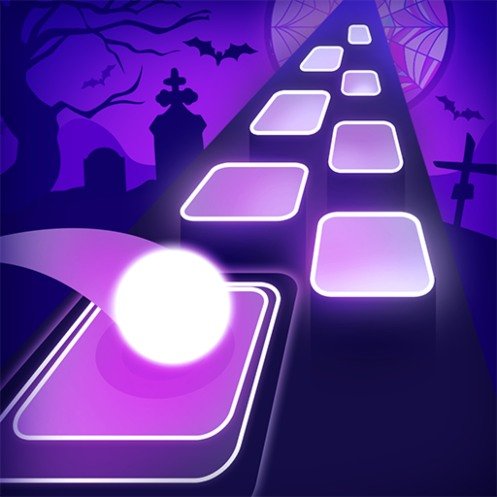


Tiles Hop
Tiles Hop is a music rhythm game where you hold and drag to guide a bouncing ball across floating tiles. Follow each song’s beat, centre your landings, learn difficult path patterns, unlock new tracks and skins, and continue into harder Endless Mode runs.
Tiles Hop Rhythm Ball Music Game
Tiles Hop is a rhythm-action game where you guide a bouncing ball across floating platforms while a song plays. The ball moves forward automatically, leaving you responsible for its horizontal position. A small movement can keep it centred, while one late correction can send it past the next tile and end the run.
The basic control feels approachable, but faster songs demand better timing and smoother movement. Players who enjoy simple score-based challenges can also try Fun Mini Online, which offers a broader collection of short casual activities.
What Is Tiles Hop?
Tiles Hop, also known as Tiles Hop EDM Rush, is a single-player music arcade game published by Amanotes. Its first versions were released as Beat Hopper before being relaunched under the Tiles Hop name in 2018.
The game combines music, ball movement, and reaction-based play. Each track creates a path of platforms that follows the rhythm. You guide the ball from one tile to the next and try to complete the song without missing a landing.
The official Tiles Hop page describes it as a music arcade game where players control a bouncing ball across floating tiles in time with the beat.
How Tiles Hop Gameplay Works
A song begins with the ball moving forward along a path made from separated tiles. The ball bounces automatically, so you do not need to tap for every jump.
Touch and hold the screen, then drag left or right to position the ball over the next platform. On supported computer versions, the same movement may be handled with a mouse.
Every tile forms part of the song’s rhythm. Landing accurately keeps the music and run moving, while missing a tile normally ends the attempt.
The path is not always straight. Tiles can appear on alternating sides, move farther apart, or require a quick correction after landing.
The current Google Play listing identifies Tiles Hop as a single-player rhythm-action and arcade game centred on guiding a music ball across tiles.
The Main Goal
Your immediate goal is to reach the end of the selected song without falling.
A successful run also gives you an opportunity to improve your score. Accurate landings, sustained progress, and longer survival can contribute to a better result.
After completing a song, supported versions may open an endless section where the path continues and becomes more demanding. The current App Store description confirms that finishing a song can unlock its endless mode.
The game is therefore built around two related challenges:
- Completing songs that are still unfamiliar
- Returning to known songs to improve your score
Why Rhythm Matters
You can react only to the visible tiles, but listening to the music makes the movement easier to anticipate.
The ball usually lands in time with the beat. Once you recognise the pattern, you can prepare for the next movement instead of waiting for each tile to appear directly beneath the ball.
This becomes especially helpful during quick sequences. Moving only through visual reaction can make you late, while following the beat gives you an extra clue about when the next landing will happen.
Headphones may make subtle beats easier to hear, but keep the volume at a comfortable level. The game remains playable through normal device speakers.
Learning the Drag Control
Tiles Hop uses one main action, but that does not mean the control lacks depth.
Holding the ball too far to one side can cause it to overshoot a narrow platform. Moving too slowly may leave it short of a tile placed farther away.
The most reliable technique is to use smooth horizontal movements rather than repeated sharp swipes. Keep your finger or pointer controlled and adjust the ball according to the next platform’s position.
Try to centre the ball after every landing. Starting near the middle gives you more room to respond whether the following tile appears on the left or right.
Tiles Hop Controls
| Action | Mobile Control | Supported Computer Control |
|---|---|---|
| Take control of the ball | Touch and hold | Click and hold |
| Move left | Drag left | Move the mouse left |
| Move right | Drag right | Move the mouse right |
| Release control | Lift your finger | Release the mouse button |
| Select a song | Tap its title | Click its title |
| Restart a run | Tap the retry option | Click the retry option |
| Open settings | Tap the settings icon | Click the settings icon |
The official mobile instructions describe the control as touching, holding, and dragging to guide the ball across the tiles.
Timing a Landing
It is tempting to watch the ball itself, but the next tile is usually more important.
Keep your eyes slightly ahead of the current landing point. This gives you more time to judge whether the ball needs a small correction or a wider movement.
Do not move toward the next tile too early. The ball may still be completing its current bounce, causing the movement to become wider than expected.
A controlled landing near the centre of a tile is safer than touching only its edge. Edge landings may succeed, but they leave less room for the next correction.
Following Curved and Alternating Paths
Some parts of a song move steadily from one side to another. Others alternate left and right with almost every bounce.
For a gradual curve, hold a smooth movement in the required direction. Avoid making several separate swipes when one controlled motion will follow the path.
For alternating sections, return toward the centre between landings. Staying too far to one side makes the opposite movement longer and more difficult.
The path may feel unpredictable during a first attempt. After replaying the song, repeated tile patterns become easier to recognise.
Players who enjoy movement and timing without a music focus can also play Cars Fast as Lightning, which replaces rhythm platforms with racing tracks and speed challenges.
Songs and Music Selection
Tiles Hop contains a changing selection of tracks across electronic, pop, piano, dance, phonk, K-pop, and other music styles.
The exact library can differ by region, platform, licensing arrangements, and app version. Songs may also enter or leave the game as events and music agreements change.
Amanotes has previously worked with music labels and artists to add licensed collections to Tiles Hop and its other rhythm games.
The current iOS listing advertises thousands of playable songs and regularly changing events, although the selection visible to an individual player may be smaller or different.
Unlocking Songs
Not every song may be immediately available. Some tracks can be opened through normal progress, rewards, advertisements, events, or optional purchases.
The exact unlock requirement is normally shown beside the song. Check it before spending any in-game resource.
Once a song has been unlocked, the App Store description states that it can be available for offline play. Online access may still be needed for downloading content, receiving updates, using account features, or joining current events.
Endless Mode
Completing a normal song does not always mean the challenge is over.
Endless Mode extends the track after its normal finishing point. The path becomes faster or more difficult, allowing players to continue building their score until they miss a tile.
This mode is useful for players who already know a song well. Instead of repeating only its opening section, you can test how long your timing remains accurate under growing pressure.
Do not change your movement style simply because the game enters Endless Mode. Smooth control remains safer than sudden swiping, even when the pace increases.
Ball Skins and Visual Customisation
Tiles Hop includes different ball skins and special character designs. These options change the appearance of the object moving across the path.
The current App Store listing confirms that players can change ball skins or use special characters.
Some designs may be tied to progression, rewards, events, advertisements, or purchases. Availability can change between versions.
A skin does not automatically improve timing. Choose one that remains easy to see against the current background and tile colours.
Visual Style
Tiles Hop uses a three-dimensional path surrounded by changing backgrounds, lights, colours, and effects.
The tiles are kept visually separate from the environment so players can identify the next landing position. Background themes may change between songs or events.
The presentation becomes more active during intense sections, but the path remains the most important part of the screen. Players should avoid focusing too much on decorative effects while the ball is moving.
The current iOS description lists multiple backgrounds and 3D visual effects as part of the game’s presentation.
Sound and Music Synchronisation
Music is not simply playing behind the action. The tile path is designed around the rhythm of the selected track.
Strong beats often line up with landings, while quicker musical sections may create shorter gaps and faster changes in direction.
This connection makes a successful run feel more natural than moving through randomly positioned platforms. It also explains why playing with the sound muted can make certain sections harder to predict.
The game may include sound effects for landings, mistakes, rewards, and menu actions. Adjust these separately when the settings provide individual volume controls.
Main Tiles Hop Features
- One-touch movement: Hold and drag to guide the ball horizontally.
- Rhythm-based paths: Tile positions and landings follow the selected music.
- Large song selection: The available library covers several music styles and changes through updates.
- Endless challenges: Completed songs may open harder extended runs.
- Ball customisation: Unlock or select different skins and characters.
- Three-dimensional environments: Songs use colourful tiles, backgrounds, and visual effects.
- Score improvement: Replay songs to beat your previous performance.
- Single-player play: Each run focuses on personal progress rather than a live shared track.
- Offline song support: Unlocked songs can be available without a connection, depending on the version.
- Events and rankings: Supported versions may include changing events and score comparisons.
Difficulty and Learning Curve
The first few songs help players understand how far the ball moves in response to a drag.
Slower tracks provide more time to centre the ball. Faster songs add wider jumps, quick direction changes, and longer sequences where one weak landing can end the run.
Difficulty is affected by more than music speed. A slower song can still be challenging when its tile path changes direction frequently.
The control is accessible, but consistency takes practice. A player may complete the first half of a song easily and continue failing at one difficult sequence near the end.
That repetition is part of the game’s structure. Each attempt helps you recognise the path and prepare earlier for its difficult moments.
Common Tiles Hop Mistakes
Watching Only the Ball
Looking directly at the ball gives you less time to prepare. Keep your attention on the next one or two tiles.
Swiping Too Aggressively
A large swipe can carry the ball past a nearby platform. Match the movement to the distance between tiles.
Starting From the Edge
After landing near one side, move gently toward the centre when the path allows it. This keeps both directions available.
Ignoring the Beat
The rhythm often warns you when a landing is coming. Playing only through visual reaction can make fast sections harder.
Lifting Your Finger Accidentally
Breaking contact may reduce control during an important sequence. Keep a comfortable hand position before beginning the song.
Changing Direction Too Late
Wait long enough to avoid overshooting, but do not wait until the ball is already beside the next tile.
Looking at the Score During a Run
Checking the score can pull attention away from the path. Review it after the attempt ends.
Repeating Without Adjusting
When the same section causes repeated failures, identify whether the problem is early movement, late movement, or excessive drag distance.
Tips for Better Scores
Centre the Ball Regularly
A central position shortens the average distance to either side and makes unexpected direction changes easier.
Learn the Opening Pattern
The beginning of a song is usually repeated on every attempt. Use it to settle into the rhythm before harder sections arrive.
Move Smoothly
One continuous correction is often safer than several quick movements.
Watch Two Tiles Ahead
The tile after your next landing can influence where you should position the ball now.
Listen for Strong Beats
Use repeated drum hits or musical accents to predict the timing of landings.
Practise One Difficult Song
Changing tracks after every failure can slow improvement. Repeating one song helps you remember its path.
Keep Your Screen Clean
A smudged screen can make controlled dragging less consistent on touch devices.
Use a Comfortable Grip
Support the device so your dragging hand can move freely without covering the next tiles.
Avoid Distractions
One short interruption can end a long run. Begin difficult songs when you can focus on the screen and music.
Take Breaks
Reaction timing often becomes less accurate after repeated failed attempts. A brief pause can help you return with steadier movement.
Offline Play and Internet Requirements
Google Play currently labels Tiles Hop as supporting offline play, and the App Store states that unlocked songs can be played offline.
A connection may still be required to:
- Download the game and updates
- Download additional song data
- Access current events
- View advertisements
- Make optional purchases
- Compare scores online
- Sync progress between devices
Players should open and unlock required content before travelling or entering an area without a reliable connection.
Advertisements and Optional Purchases
Tiles Hop is free to install, but its official store pages list advertisements and in-app purchases.
Optional purchases may relate to subscriptions, advertisements, songs, rewards, or other game content. Prices and offers can differ by device, region, and current version.
Advertisements may also be offered as a way to unlock a song, retry a run, or receive a reward. Check what the button provides before selecting it.
The main rhythm control can still be understood without purchasing extra items. However, the pace of unlocking content may depend on how the current version is configured.
Who Should Play Tiles Hop?
Tiles Hop suits players who enjoy rhythm games, short mobile challenges, music-based scores, and simple controls that become harder to master.
It is especially suitable for players who like:
- Following musical beats
- Improving personal scores
- Learning repeated movement patterns
- Unlocking songs and visual designs
- Playing short single-player runs
- Testing reaction speed
Players who want a slower puzzle can try Chain Cube 2048 3D Merge, where placement and number matching matter more than rhythm timing.
Tiles Hop may be less suitable for people who dislike repeated attempts, music-based timing, advertising, optional purchases, or losing a run after one mistake.
More arcade, casual, puzzle, and action titles can be found in the Gam-core games collection.
Honest Strengths and Limitations
| Strengths | Possible Limitations |
|---|---|
| One-touch controls are easy to understand | Accurate movement becomes difficult at higher speeds |
| Music and movement work together naturally | One missed landing can end a long attempt |
| Songs provide different path patterns | The available library can vary by region |
| Endless Mode extends completed tracks | Repeating difficult sections may feel frustrating |
| Ball skins add visual choice | Customisation does not change the core gameplay |
| Unlocked songs may support offline play | New downloads and events still need internet |
| Short runs suit quick gaming sessions | Advertisements may interrupt progression |
| Personal scores encourage replay | Optional purchases and subscriptions are included |
| Regular events can add variety | Event availability can change |
Tiles Hop Game Information
| Detail | Information |
|---|---|
| Official name | Tiles Hop EDM Rush Music Game |
| Common name | Tiles Hop |
| Earlier name | Beat Hopper |
| Developer and publisher | Amanotes Pte. Ltd. |
| Relaunch year | 2018 |
| Genre | Music, rhythm-action, and arcade |
| Main mode | Single-player |
| Main objective | Guide the ball across every music tile |
| Controls | Touch, hold, and drag |
| Platforms | Android, iPhone, iPad, and supported Windows play |
| Offline play | Supported for available or unlocked content |
| Endless Mode | Available after completing supported songs |
| Payment model | Free with advertisements and optional purchases |
Amanotes confirms that the earlier Beat Hopper concept became Tiles Hop in 2018, while current store listings identify its platforms, controls, modes, and payment model.
The official Android version of Tiles Hop is maintained through Google Play, while the iPhone and iPad edition is available through Apple’s App Store.
Frequently Asked Questions
What type of game is Tiles Hop?
Tiles Hop is a single-player rhythm-action game where players guide a bouncing ball across floating tiles that follow a song’s beat.
Who developed Tiles Hop?
Tiles Hop is published by Amanotes Pte. Ltd. The game developed from an earlier Inwave Studio title called Beat Hopper before its 2018 relaunch.
How do I control the ball?
Touch and hold the screen, then drag left or right. The ball bounces automatically while you control where it lands.
Does Tiles Hop have multiplayer?
The main gameplay is single-player. Supported versions may provide rankings or score comparisons, but players do not normally control balls together on the same path.
Can Tiles Hop be played offline?
Yes. Google Play identifies the game as supporting offline play, and Apple states that unlocked songs can be played offline. Some downloads, events, purchases, and syncing features still require internet access.
Is Tiles Hop free?
Yes. Tiles Hop is free to install, but it contains advertisements and optional in-app purchases.
What happens when I miss a tile?
Missing a platform normally ends the current run. You can restart the song and try the section again.
What is Endless Mode?
Endless Mode extends a completed song with a harder path, allowing you to continue playing and increase your score until the ball falls.
Can I unlock different balls?
Yes. The current game includes different ball skins and special character designs. Their unlock conditions can vary.
Does Tiles Hop use real songs?
The game includes a changing music library containing licensed tracks, covers, original arrangements, and other available music. The exact selection depends on the current version and region.
Can I play Tiles Hop on an iPhone or iPad?
Yes. Amanotes provides an official iPhone and iPad edition through the App Store.
Can I play Tiles Hop on Android?
Yes. The official Android edition is available through Google Play.
Why does the ball keep moving too far?
Your horizontal drag may be wider or earlier than the distance requires. Use smaller movements and aim for the centre of each platform.
What is the best beginner strategy?
Watch the next tile rather than the ball, use smooth movements, follow the beat, and return toward the centre whenever the path gives you enough space.



Reviews
There are no reviews yet.