
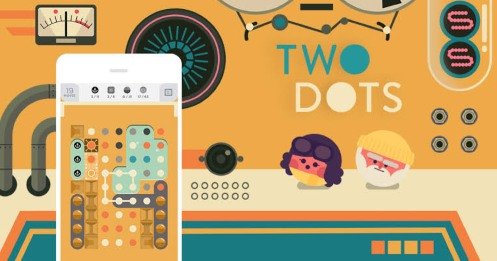

Two Dots
Two Dots is a color-connecting puzzle where you draw horizontal and vertical lines between matching dots. Create squares to clear entire colors, complete changing level objectives, manage obstacles and limited moves, and use boosters carefully when a difficult board blocks your progress.
Two Dots
Two Dots is a color-connecting puzzle game where you draw lines between matching dots and complete a specific objective within a limited number of moves. The first levels feel calm and straightforward, but later boards introduce obstacles, special dots, restricted spaces, and goals that require more than clearing the largest group you can see.
Players who enjoy colorful matching puzzles can also try Farm Fruit Pop Bubble, which uses aiming and bubble-shooting controls instead of drawing lines.
What Is Two Dots?
Two Dots is a single-player mobile puzzle game created by Playdots. It first launched in 2014 and is currently available for Android, iPhone, and iPad. The game celebrated its twelfth anniversary in 2026, confirming its long-running place in the mobile puzzle category.
The main idea is to connect two or more dots of the same color. Connections can move horizontally or vertically, but not diagonally. Once connected, the dots disappear and new pieces fall into the empty spaces.
Each level has its own objective. You may need to collect a certain number of colored dots, remove obstacles, drop objects to a target area, or interact with special board mechanics.
The official Two Dots website presents the current game, rotating events, and links to supported mobile editions.
How Two Dots Gameplay Works
A level begins with a grid containing dots in several colors. Touch one dot and drag across neighbouring dots of the same color to create a connection.
A valid line must include at least two matching dots. When you release your finger, every dot in the connection disappears.
The remaining pieces then move into the open spaces, and new dots may enter the board. This creates a different arrangement for your next move.
The basic process is simple:
- Read the level objective.
- Check the available colors and obstacles.
- Connect matching dots horizontally or vertically.
- Use the resulting movement to prepare another connection.
- Complete every objective before the move counter reaches zero.
Two Dots is not timed, so you can inspect the board for as long as needed before making a move. Some mechanics still spread or change after each move, which means careful planning matters even without a clock.
Why Making a Square Matters
The most important basic technique in Two Dots is creating a square.
Connect four or more dots of the same color in a closed loop. When the square is completed, every normal dot of that color is removed from the board.
This can create several benefits at once:
- It collects many dots without tracing every one individually.
- It changes a large part of the board.
- It creates more opportunities for automatic movement.
- It can help important objects fall.
- It may expose or damage several blockers.
A square does not need to be large. A simple two-by-two arrangement is often enough.
Longer loops can surround additional dots and may interact with advanced mechanics, but beginners should first learn to recognise small squares quickly.
Long Lines or Small Squares
A long connection can remove many dots immediately, but a smaller square may be more valuable.
Suppose you can connect eight blue dots in one line or four blue dots in a square. The line removes eight blue dots. The square removes every normal blue dot currently visible on the board.
The better choice depends on the objective.
A long line may be preferable when:
- You need only a few more dots of that color.
- It damages several nearby blockers.
- The square would not affect the main goal.
- Removing the line prepares a stronger second move.
A square may be preferable when:
- Many dots of that color are visible.
- You need to change the board significantly.
- You want objects above to fall.
- You need more space around obstacles.
Do not make a square automatically. Check whether clearing that color will improve the level rather than simply producing a satisfying animation.
Level Objectives
Two Dots does not use the same goal on every board. The changing objectives are a major part of its difficulty.
Collect Colored Dots
These levels ask you to remove a stated number of dots in one or more colors.
Squares are especially helpful because they clear every normal dot of the selected color. However, you should still check whether another required color needs more attention.
Clear Obstacles
Some boards include objects that must be damaged or removed through nearby connections.
A large match may look strong but have no effect when it is too far from the obstacle. Prioritize connections that touch the required areas.
Move Objects Downward
Certain objectives require objects to reach the bottom or another marked position.
Removing dots underneath the object is normally more useful than clearing pieces above it. Watch which columns provide a clear path.
Interact With Special Dots
Later levels introduce dots with unique behaviour, including Anchor Dots, Fire Dots, and many other mechanics. The official help centre recommends checking the in-game settings guide when a special dot is unfamiliar.
Limited Moves
Each main level provides a fixed number of moves. A long connection and a two-dot connection both normally use one move, so the number removed is not the only factor to consider.
Before drawing a line, ask what it will achieve.
A useful move should do at least one of the following:
- Advance the stated objective
- Create or prepare a square
- Damage an important obstacle
- Open space beneath a target object
- Prevent a spreading mechanic from becoming worse
- Set up a stronger next move
A connection that removes dots without helping any of these areas may waste part of the move limit.
The remaining counter is shown above the puzzle. Check it regularly rather than waiting until the final move.
Reading How Dots Will Fall
Removing dots changes the board, but the direction of movement is not always identical across every level.
Many boards use normal downward gravity. Other stages may contain mechanics that redirect movement, block columns, or separate parts of the grid.
Before completing a connection, look at the dots above it.
Try to predict:
- Which pieces will fall into the cleared spaces
- Whether two matching groups will move closer
- Whether a square setup will remain intact
- Whether a target object will move
- Whether a blocker will prevent normal movement
You cannot predict every new dot entering the board, but you can understand how the pieces already visible are likely to move.
Players who enjoy planning around changing number positions can try Chain Cube 2048 3D Merge.
Obstacles and Special Mechanics
Two Dots gradually introduces new mechanics rather than presenting every rule during the first few stages.
Some obstacles stay in one position and require nearby matches. Others spread, move, cover dots, stop gravity, or react to particular colors.
This changes how you should approach a board.
A normal color-collection level may reward large squares. A board containing a spreading obstacle may require immediate control, even when a better square is almost ready.
The official game guide includes explanations for individual mechanics and currently documents advanced objects such as Paper Boxes, which block gravity and require one or more hits to remove.
When a new object appears, check its behaviour before spending several moves testing random connections.
Boosters and Power-Ups
Two Dots includes optional tools that can help solve difficult levels.
Eraser
The Eraser removes one selected dot. It is useful when a single unwanted piece prevents you from completing a square or opening a route.
Shuffler
The Shuffler rearranges the dots on the board. It can help when the available colors are poorly positioned or no useful square is close.
Color Burst
A Color Burst removes dots of one selected color. It can support a collection objective or change the board when that color is blocking useful movement.
Sure Shot
Sure Shot targets a selected dot and clears dots in its row and column. This can help reach obstacles or open a restricted section.
Booster Boxes
Booster Boxes apply a helpful effect at the beginning of a level. The exact result depends on the booster received.
These tools are described in the official Two Dots game guide. Availability, quantities, and costs may change between versions or events.
Use a booster when it solves a specific problem. Activating one without studying the board may provide little value.
Lives and Failed Levels
Two Dots uses a lives system represented by hearts. Players can normally hold up to five lives, and failing a main level removes one. Lives regenerate over time, and additional lives may be received through friends, rewards, events, or Gold.
This system can interrupt repeated attempts at a difficult board.
Instead of replaying immediately with the same plan, use each failure to identify the real problem:
- Did an obstacle spread too far?
- Were too many moves spent collecting an easy color?
- Was a target object trapped in the wrong column?
- Did you overlook a possible square?
- Was a booster used too early?
Changing one decision during the next attempt is more useful than relying on a better random layout.
Gold and Optional Purchases
Gold is the premium currency used for extra moves, lives, and power-ups. It can be earned through some activities and can also be purchased. The official Two Dots store is operated by Zynga, while the Two Dots brand remains associated with Playdots.
The game is free to download but contains optional in-game purchases, including purchases involving random items.
Extra moves can help when a level is almost complete, but check the board first. Buying more moves will not solve a stage when the remaining layout still lacks a useful path.
Events and Other Modes
Two Dots includes rotating activities alongside its main map.
The official events guide currently lists modes and events such as Treasure Hunts, Scavenger Hunts, Arcade, Flip, Square Race, Dots Race, daily activities, and team-based events. Availability can change over time and may differ between players.
Treasure Hunts
Treasure Hunts are limited-time groups of new levels. They provide a shorter challenge outside the main progression map.
Scavenger Hunts
Scavenger Hunts use hidden-object gameplay rather than normal dot connecting. Players inspect detailed scenes and locate listed items.
Readers who like this type of observation challenge may also enjoy Find Easy Hidden Differences.
Arcade
Arcade uses a survival-style structure with several levels that must be completed without losing.
Races and Competitive Events
Square Race and Dots Race compare progress or activity between players. These are competitive event systems rather than live head-to-head puzzle boards.
The main game remains a single-player puzzle experience.
Controls
Two Dots is designed around touchscreen movement.
| Action | Control |
|---|---|
| Begin a connection | Touch and hold a dot |
| Add another dot | Drag to an adjacent matching dot |
| Complete the connection | Lift your finger |
| Create a square | Drag through matching dots in a closed loop |
| Select a power-up | Tap its icon |
| Use a targeted power-up | Tap the desired dot or position |
| Open settings | Tap the cog icon |
| Check objectives | View the information above the board |
The connection can turn at right angles, but dots must be beside one another horizontally or vertically. Diagonal connections are not part of the normal rule.
Graphics and Sound
Two Dots uses a clean visual style built around flat colors, simple shapes, and illustrated map environments.
The puzzle board avoids unnecessary clutter, making dot colors and obstacles easy to recognise. New areas on the progression map use different themes and background illustrations.
The game has also received visual updates during its long life. Zynga announced a broad art redesign around the game’s twelfth anniversary in 2026.
Sound effects respond to connected dots, squares, cleared objectives, booster use, and level results. Music remains gentle enough to support the puzzle rather than compete with it.
Audio is not required for understanding the board.
Accessibility and Color-Blind Mode
Because the main gameplay depends heavily on color, distinguishing dots clearly is important.
Two Dots includes a color-blind mode that adds visual differences to the dots. It can be enabled through the settings menu using the cog icon.
This is useful for players with color-vision differences and for anyone who finds similar shades difficult to separate.
The lack of a turn timer also gives players time to inspect symbols, colors, obstacles, and possible connections without pressure.
Difficulty and Learning Curve
The opening levels teach the connection rule with open boards and simple objectives.
Difficulty increases through:
- Lower move limits
- More required colors
- Restricted board shapes
- Spreading obstacles
- Special dots
- Objects that affect gravity
- Multiple objectives in one level
- Hard and Ultra-Hard stages
- Combinations of several mechanics
The controls do not become more complicated. Instead, the board asks you to use the same simple line-drawing action more thoughtfully.
A new player may focus on long connections. An experienced player is more likely to look for squares, predict movement, and protect moves for the hardest objective.
Useful Two Dots Strategies
Read Every Objective
Some levels have more than one target. Do not finish the easy color requirement while ignoring the difficult obstacle.
Search for Squares First
Before making a normal connection, check the full grid for a possible square.
Prepare a Square Over Two Moves
When three sides of a square are close, use one move to position the missing dot rather than clearing the setup accidentally.
Work Under Falling Objects
Clear dots beneath anchors or other falling targets so gravity can move them toward the required area.
Control Spreading Obstacles Early
Do not wait until fire, slime, or another spreading mechanic covers useful spaces.
Use Small Connections With Purpose
A two-dot line can be valuable when it places matching colors together or damages an important object.
Protect Flexible Areas
Do not clear the middle of the board randomly. Central dots often provide more possible connections than pieces trapped near an edge.
Check the Move Counter
Change your strategy when the remaining moves become low. Stop preparing long combinations that cannot be completed in time.
Save Boosters for Specific Problems
Use an Eraser for one blocking dot or a Shuffler for an unusable layout. Do not spend tools simply because a level is labelled difficult.
Learn From Failed Attempts
Notice which objective remains unfinished most often. Build the next attempt around that problem.
Common Mistakes
Making the Longest Line Automatically
The longest available connection may not affect the objective or prepare a useful board.
Ignoring Small Squares
A four-dot square can be stronger than a much longer line.
Clearing the Wrong Color
Removing one color can change the board, but it wastes moves when another color is required.
Using Boosters Before Studying the Layout
A power-up should solve a visible problem rather than provide random activity.
Waiting Too Long to Handle Obstacles
Spreading mechanics become harder after each move.
Looking Only at the Current Connection
Check where the remaining dots will fall before releasing your finger.
Spending Gold Without a Clear Path
Extra moves are useful only when the objective can realistically be completed.
Repeating the Same Opening
A difficult level may require a different priority, not simply a better set of incoming dots.
Who Should Play Two Dots?
Two Dots suits players who enjoy color-matching puzzles, move-limited challenges, clean artwork, and levels that gradually introduce new rules.
It works well for brief sessions because one stage can be completed in a few minutes. The main map and rotating activities also provide longer-term progression.
Players may enjoy it when they like:
- Connecting and matching colors
- Planning several moves ahead
- Solving changing board layouts
- Creating chain reactions
- Collecting stars and event rewards
- Hidden-object side activities
- Calm games without a turn timer
People who dislike life systems, optional purchases, rotating event screens, or levels influenced by incoming dot arrangements may find some stages frustrating.
Players looking for another short logic challenge can try Escape Game Basic, where clues and objects replace colored-dot connections.
Honest Strengths and Limitations
| Strengths | Possible Limitations |
|---|---|
| The connection rule is easy to understand | Later levels can become difficult |
| Squares create meaningful strategic choices | New dot positions include uncertainty |
| Levels use many different objectives | Some mechanics need explanation |
| The game is not timed | Move limits can still create pressure |
| Color-blind mode improves readability | Gameplay depends heavily on visual recognition |
| Rotating events add variety | Event availability can change |
| Scavenger Hunts provide a different puzzle style | Not every player receives identical event timing |
| Suitable for short mobile sessions | The lives system can pause repeated attempts |
| Free to download | Optional purchases and random items are included |
| Thousands of levels are available | The central connection action can feel repetitive |
Two Dots Game Information
| Detail | Information |
|---|---|
| Game title | Two Dots |
| Developer and brand | Playdots |
| Current official store operator | Zynga |
| Original release | 2014 |
| Genre | Color-connecting puzzle |
| Main mode | Single-player |
| Platforms | Android, iPhone, and iPad |
| Main control | Touch and drag |
| Main objective | Connect matching dots and complete level goals |
| Time limit | No standard turn timer |
| Move limit | Used in main puzzle levels |
| Color-blind mode | Supported |
| Payment model | Free with optional purchases |
| Current level count | More than 5,000 levels |
The official help centre currently describes Two Dots as containing more than 5,000 levels, while the official site advertises several main modes and rotating special features.
Frequently Asked Questions
What type of game is Two Dots?
Two Dots is a single-player color-connecting puzzle. Players link matching dots and complete objectives within a limited number of moves.
How do I connect dots?
Touch one dot and drag through matching dots positioned horizontally or vertically beside it. Release to remove the completed connection.
Can I connect dots diagonally?
No. Normal connections move horizontally and vertically rather than diagonally.
What happens when I make a square?
Creating a closed square removes every normal dot of that color currently visible on the board.
Is Two Dots timed?
No. You can take as long as needed between moves. Some obstacles still spread or change after each move.
Does Two Dots have multiplayer?
The main levels are single-player. Some events compare scores or progress, and current social features allow players to add friends and share lives.
Is Two Dots free?
Yes. Two Dots is free to download, but it includes advertisements, Gold, boosters, and optional in-game purchases.
What are lives?
Lives represent your available level attempts. Players normally hold up to five and lose one after failing a main level.
Can Two Dots be played offline?
Some regular content can be played offline, but events, social features, store purchases, updates, and progress syncing may require an internet connection.
Does Two Dots have a color-blind mode?
Yes. Open the settings menu and enable Color Blind mode to add visual differences between dot colors.
What are Scavenger Hunts?
Scavenger Hunts are hidden-object minigames where players search illustrated scenes for listed objects. They use different gameplay from the main dot-connecting levels.
What is the best beginner strategy?
Read the objective, search for squares before drawing normal lines, predict how dots will fall, and use boosters only when they solve a clear problem.


Reviews
There are no reviews yet.