

Hidden Treasures
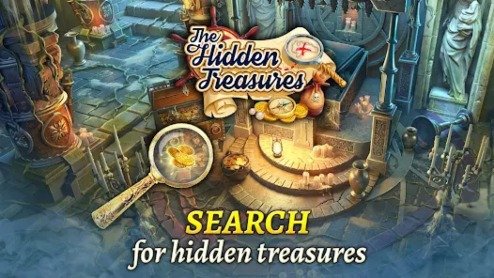
Hidden Treasures is a short mouse-controlled puzzle game with three timed hidden-object levels. Search detailed scenes, click every requested item, save three limited hints for difficult objects, and complete each picture before the timer expires.
Hidden Treasures Timed Hidden Object Puzzle Game
Hidden Treasures is a short hidden-object puzzle game where players search detailed scenes for every item shown in the object list. Each level has a time limit, so careful observation must be balanced with quick decisions.
The game uses only the mouse. Click a concealed item when you recognize it, remove it from the list, and continue until every requested object has been found. Three limited hints are available in each level, making it important to save help for objects that genuinely block progress.
This description covers the 2012 browser game commonly listed as DFG Hidden Treasures, not the newer mobile adventure with a similar name.
What Is Hidden Treasures?
Hidden Treasures is a single-player hidden-object browser game credited to Daily_Free_Games on Kongregate. Its main objective is to find every concealed item before the timer expires.
The game contains three different levels. Each level has its own hidden-object scene, item list, timer, and allowance of three hints. Kongregate lists an April 23, 2012 release date, while Newgrounds lists a May 8, 2012 upload and credits Krisantus as the author. (Kongregate)
The structure is much simpler than a story-heavy puzzle adventure. There are no long conversations, character upgrades, equipment menus, or open-world areas. The focus remains on viewing an illustrated scene, matching the requested objects, and finishing before time runs out.
Players who enjoy picture-based observation challenges can also try Find Easy Hidden Differences, where the objective is to compare two similar images and identify visual changes.
How Hidden Treasures Gameplay Works
Each level opens with a crowded scene containing ordinary objects, decorative details, and the items you need to locate.
The requested items are shown through the game interface. Search the picture, compare the shapes with the list, and click each matching object.
A normal level follows this pattern:
- Review the full hidden-object list.
- Scan the scene before making the first click.
- Select the clearest objects.
- Remove them from the list.
- Search smaller and less obvious areas.
- Watch the remaining time.
- Use a hint when one object remains difficult.
- Find every requested item before time expires.
- Continue to the next level.
The game has three levels, and all requested objects must be found to pass each one. Only three hints are available per level. (Kongregate)
Hidden Treasures Controls
The original game uses mouse controls.
| Action | Control |
|---|---|
| Select a hidden object | Left mouse button |
| Start a level | Click the displayed start button |
| Use a hint | Click the hint option |
| Continue after completion | Click the continue button |
| Select a menu option | Left mouse button |
| Restart a failed level | Click the restart option |
| Mute sound | Click the sound or mute button when shown |
Kongregate’s instructions state that the player uses the mouse to click objects. (Kongregate)
A current browser host may allow touchscreen taps, but the original interface was designed for a desktop pointer.
Understanding the Object List
The object list tells you what must be found before the level can end.
Read the entire list before beginning. Knowing every target allows you to notice one item while searching for another.
For example, while looking for a bottle, you may also notice a key, shell, cup, tool, or piece of clothing from another part of the list.
Do not search for only one item at a time from the beginning. A broader first scan can remove several easy objects quickly and leave more time for the difficult ones.
Starting With the Easiest Objects
Large and clearly colored objects should usually be selected first.
Removing easy items offers several benefits:
- The remaining list becomes shorter.
- You become familiar with the scene.
- Large objects no longer distract your attention.
- More time remains for small details.
- The final search feels less confusing.
Begin with foreground objects, large furniture, open floor areas, and items that contrast strongly with the background.
Save darker, smaller, partly covered, or unusually sized objects for the second search pass.
Searching the Scene in Sections
Random eye movement often causes players to check the same areas repeatedly.
A more reliable method is to divide the scene into sections:
- Upper left
- Upper center
- Upper right
- Middle left
- Center
- Middle right
- Lower left
- Lower center
- Lower right
Search one section fully before moving to the next.
This method is especially helpful when only one or two objects remain. Instead of repeatedly viewing the entire screen, you can eliminate each area in an organized way.
Using a Left-to-Right Pattern
Another effective method is to scan as though reading a page.
Begin in the upper-left corner and move slowly toward the right. Lower your view slightly, then scan back toward the left.
Continue this pattern until reaching the bottom.
This controlled movement helps prevent the eyes from jumping toward colorful distractions that are not part of the object list.
Looking at the Foreground
Foreground items are usually larger and easier to recognize.
Check:
- Tables
- Chairs
- Large containers
- Floor decorations
- Boxes
- Open pathways
- Large plants
- Objects close to the bottom edge
Finding these items quickly can create a strong start and preserve the hints for later.
However, do not assume every large object belongs to the list. Compare the shape carefully before clicking.
Checking the Background
Background items are often smaller or partly blended into the environment.
Look closely at:
- Shelves
- Walls
- Windows
- Doorways
- Distant furniture
- Decorative pictures
- Roof areas
- Small containers
- Patterns in the scenery
An item may appear less detailed in the background, so its overall outline matters more than small visual features.
Searching the Corners and Edges
Hidden-object games frequently place difficult items near the edges of the image.
Check:
- Upper corners
- Lower corners
- The area directly above the object list
- Door frames
- Window borders
- Behind large foreground decorations
- Along shelves
- Beside interface panels
Some objects may be partly obscured by the edge of the scene.
Move slowly along the full border before deciding to use a hint.
Looking for Shape Rather Than Color
An object may not use the color you expect.
Lighting, shadows, background tones, and the game’s artwork can make an item appear darker or lighter than its reference.
Focus on:
- Outline
- Curves
- Straight edges
- Handles
- Circular parts
- Points
- Length
- Repeated patterns
A bottle may blend into a dark shelf, but its narrow neck and rounded body can still reveal it.
Shape recognition becomes especially important in the final part of a level.
Watching for Unusual Sizes
Hidden items are not always shown at realistic sizes.
A normally large object may appear as a small decoration. A small object may be enlarged and placed among furniture or scenery.
Do not reject a possible match only because its size looks unusual.
Compare the silhouette with the target list. Hidden-object games often adjust size to make items fit naturally into the illustrated environment.
Finding Partly Covered Objects
Some items may be visible only in part.
An object can be placed:
- Behind furniture
- Under a table
- Beside a box
- Behind a plant
- Against a wall decoration
- Beneath another item
- Near the edge of the scene
Look for recognizable sections such as a handle, blade shape, curved edge, top opening, or repeated pattern.
When clicking, select the center of the visible section rather than guessing where the hidden part continues.
Using Contrast to Find Items
Contrast helps an object stand out from its surroundings.
Look for:
- Bright objects against dark backgrounds
- Dark shapes against light walls
- Smooth objects among rough textures
- Circular objects among straight boards
- Unusual colors inside natural scenery
- Sharp edges among soft decorative shapes
The object may be difficult to identify by name but easy to notice because it does not visually belong in that area.
Watching the Timer
Every level must be completed before time expires. (Kongregate)
Do not spend most of the available time staring at one difficult item.
When an object remains hidden:
- Move to another part of the list.
- Find the easier items.
- Return with fewer targets remaining.
- Use a hint when the timer becomes more important than saving assistance.
The timer encourages steady progress, but rushed random clicking can waste more time than a short organized scan.
Using Hints Wisely
Each level provides only three hints. (Kongregate)
A hint should be used when:
- You have scanned the complete scene.
- Only one or two items remain.
- The timer is becoming low.
- You cannot understand the target image.
- A small object blends into the background.
- Repeated searching is no longer productive.
Avoid using hints on large or obvious items during the first part of the level.
A practical hint plan is:
- First hint for a confusing object
- Second hint for a difficult final item
- Third hint saved for an emergency near the timer’s end
You may not need all three in every level.
What a Hint Does
The exact animation depends on the hosted version, but a hint normally directs attention toward one remaining object.
After using it:
- Watch the whole screen.
- Look for flashing, movement, a circle, or another highlight.
- Click the indicated object.
- Confirm that it disappeared from the list.
- Continue searching without immediately using another hint.
Do not click the hint button several times quickly. You may miss the first indication and waste the remaining assistance.
Avoiding Random Clicking
Random clicking is rarely an effective strategy.
It can cause several problems:
- Time is lost.
- The correct object may still be missed.
- The player stops studying the scene.
- A hosted version may apply a mistake penalty.
- Repeated clicks make it harder to understand which selection worked.
Before clicking, compare the suspected object with the target image or name.
A careful click takes slightly longer but creates more reliable progress.
Clicking Near the Object’s Center
Small hitboxes can make a correct object difficult to select.
Click near the center whenever possible.
When an item is partly covered, click the middle of its visible area. Avoid clicking only its outline or a tiny decorative section.
When a correct-looking object does not register:
- Try the center again.
- Check whether it belongs to another background item.
- Confirm that it is still listed.
- Reset browser zoom if every click feels misaligned.
- Avoid clicking many unrelated places.
Remembering Checked Areas
The time limit makes repeated searching costly.
Mentally mark which areas have already been checked.
You can use a simple order:
- Left side first
- Center second
- Right side third
- Edges last
When returning to a section, search for the remaining object’s shape rather than examining every decoration again.
Handling the Final Object
The final object often feels harder because the list no longer provides several possibilities.
When one item remains:
- Stop clicking.
- Study its shape carefully.
- Check the corners.
- Check objects at unusual sizes.
- Look behind foreground items.
- Review colors different from the reference.
- Scan the scene in sections.
- Use a hint when the timer becomes low.
Taking a calm second look is often enough to notice something previously treated as part of the background.
Learning Through Repeated Attempts
Failing a timed level does not mean the scene is impossible.
A second attempt is often easier because you remember:
- Several item locations
- Which objects blend into the background
- Where the list appears
- How much time is available
- When hints are most useful
- Which sections were previously ignored
During a replay, collect remembered objects quickly and save more time for the items that caused difficulty.
Three-Level Structure
DFG Hidden Treasures contains three levels. (Kongregate)
This makes it a compact browser game rather than a long campaign.
The short structure works well for:
- A quick puzzle session
- Observation practice
- A short break
- Replaying for a faster result
- Learning hidden-object search methods
- Casual play without a large save system
Players seeking a longer puzzle experience may prefer Escape Game Basic, where clues and interactive objects are used to progress through escape-style challenges.
Does Hidden Treasures Have a Story?
The 2012 DFG browser game does not advertise a developed story or named characters.
Its public description focuses only on finding concealed objects across three timed levels and using a limited hint system. (Kongregate)
The title provides a treasure-search theme, but gameplay remains centered on observation rather than narrative choices or character conversations.
Is Hidden Treasures Multiplayer?
No multiplayer mode is documented for DFG Hidden Treasures.
It is designed as a single-player mouse puzzle. One person searches each scene and completes the item list.
Friends or family members can look at the screen together and suggest object locations, but the game does not provide separate player controls, online matchmaking, or competitive rooms.
For small multiplayer activities, players can visit Fun Mini Online.
Is Hidden Treasures a Puzzle Game?
Yes.
Kongregate categorizes it with Hidden Object and Puzzle tags, while Newgrounds places it under puzzle games. (Kongregate)
The main skills are:
- Visual attention
- Shape recognition
- Memory
- Search organization
- Time management
- Careful mouse control
There are no platforming, combat, racing, or resource-management systems in the documented browser game.
Is Hidden Treasures Suitable for Beginners?
The controls are suitable for beginners because only the mouse is required.
The three hints per level also provide help when a concealed object becomes difficult.
Newgrounds labels the game as suitable for all audiences, and its short three-level structure makes it approachable for players unfamiliar with hidden-object games. (newgrounds.com)
The timer can still create pressure, but repeated attempts help players memorize the scenes.
Original Flash Format
DFG Hidden Treasures was originally distributed as an Adobe Flash SWF browser game. An archived Gamesflow embed identifies its game file as an SWF and uses the old Flash-player format. (gamesflow.com)
Modern browsers no longer run the original Adobe Flash plugin directly.
A current website may make the game available through:
- Flash emulation
- A converted browser version
- A compatibility player
- An archived game system
- Another web wrapper
Loading, sound, saving, and mouse accuracy can differ between hosts.
What to Do When the Game Does Not Load
When Hidden Treasures remains on a blank screen:
- Refresh the game page once.
- Wait for the compatibility player to initialize.
- Use a current desktop browser.
- Allow required page scripts.
- Close unnecessary browser tabs.
- Return zoom to 100 percent.
- Check whether the website supports old Flash games.
- Disable a strict blocker only for a trusted game page.
Do not install unknown Flash programs from pop-up messages. A trustworthy modern host should handle compatibility within the website.
What to Do When Mouse Clicks Are Misaligned
Older Flash games were often designed for one fixed screen size.
Stretching the game can cause visible objects and clickable areas to become slightly misaligned.
Possible fixes include:
- Set browser zoom to 100 percent.
- Leave full-screen mode.
- Refresh after changing the zoom.
- Click the center of each object.
- Use a mouse instead of touch controls.
- Close overlays covering the play area.
- Allow the game to finish loading.
When every click lands in the wrong place by a similar distance, browser scaling is likely the problem.
Can Hidden Treasures Be Played on Mobile?
The original game was designed for mouse-controlled desktop browsers.
A mobile browser may translate taps into clicks, but compatibility depends on the website’s emulator and screen scaling.
A phone can make small hidden objects harder to see. A tablet may work better because it provides more screen space, but the game’s interface was not originally designed around touch gestures.
Desktop play with a mouse remains the most reliable option for the 2012 version.
Is Hidden Treasures Free?
The original game was distributed through free browser-game websites such as Kongregate and Newgrounds. (Kongregate)
A hosting website may display advertisements around the game page or offer optional site accounts, but the basic three-level puzzle does not use the in-app purchase system associated with the newer G5 mobile title.
DFG Hidden Treasures Versus The Hidden Treasures Objects
The similar titles can cause confusion.
| DFG Hidden Treasures | The Hidden Treasures: Objects |
|---|---|
| Short 2012 browser game | Larger G5 mobile adventure |
| Three levels | Hundreds of puzzles |
| Pure hidden-object searching | Hidden-object or match-3 choice |
| Mouse controls | Touchscreen controls |
| Three hints per level | Boosters, quests, and collections |
| Timed scene completion | Story and long-term progression |
| No named main character documented | Follows Captain Aimee and Virgil |
| No ship customization documented | Includes a customizable ship |
| Originally Flash | Native mobile and supported PC app |
| No purchases documented in the basic game | Contains optional in-app purchases |
The newer G5 title follows Captain Aimee through a Caribbean mystery and lets players switch between hidden-object scenes and match-3 puzzles. It is a separate game. (Google Play)
Graphics and Presentation
Hidden Treasures uses illustrated hidden-object scenes filled with items and decorative details.
The artwork is designed to make some targets obvious and others blend into the environment.
Important visual elements include:
- The main scene
- The requested object list
- The timer
- Remaining hints
- Level-completion messages
- Menu and sound buttons
Because the game comes from the Flash era, its images may appear softer on a large modern monitor.
Playing at the intended aspect ratio can keep objects clearer and improve click accuracy.
Sound and Music
Newgrounds user feedback mentions a short music loop and confirms that a mute option is available. This is user commentary rather than an official feature list, but it reflects the uploaded version on that platform. (newgrounds.com)
Sound is not essential for finding objects.
Players can rely on the scene, timer, list, and visual feedback when playing at a lower volume or with sound muted.
Who Should Play Hidden Treasures?
Hidden Treasures suits players who enjoy:
- Hidden-object games
- Short browser puzzles
- Mouse-only controls
- Timed observation challenges
- Limited hint systems
- Visual search tasks
- Quick replayable levels
- Simple games without long tutorials
It may not suit players seeking:
- A long story
- Character progression
- Large numbers of levels
- Online multiplayer
- Detailed adventure puzzles
- Open-world movement
- Modern high-resolution graphics
Players wanting another calm puzzle format can try Chain Cube 2048 3D Merge. More casual, puzzle, strategy, action, and adventure games are available in the Gam-core games collection.
Honest Strengths and Limitations
| Strengths | Possible Limitations |
|---|---|
| Mouse controls are easy to learn | Only three levels are included |
| Hidden-object list provides a clear objective | The experience is very short |
| Timer adds urgency | Time pressure may not suit relaxed players |
| Three hints support difficult moments | Hints are limited |
| Levels can be replayed | Scene variety is limited |
| Suitable for quick sessions | No large progression system |
| Does not require complicated controls | Small objects can be difficult to select |
| Organized searching improves performance | Random clicking is ineffective |
| Free browser versions have been available | Original Flash compatibility varies |
| Suitable for a broad audience | No multiplayer mode is documented |
| Simple interface keeps attention on the scene | Older graphics may look soft on large displays |
| Quick restarts support practice | No detailed storyline is documented |
Tips for Playing Hidden Treasures Better
Read the Full List Before Clicking
Knowing every target allows you to find several objects during one scan.
Remove Large Objects First
Clear obvious items so the remaining list becomes easier to manage.
Search in a Fixed Pattern
Use sections or a left-to-right scan instead of moving randomly.
Check the Edges
Corners, borders, shelves, and the area above the interface often hide small objects.
Focus on Shape
The target may use a different color or brightness inside the scene.
Accept Unusual Sizes
Objects may appear much smaller or larger than expected.
Click the Center
A centered click is more likely to register correctly.
Watch the Timer Regularly
Do not spend most of the level searching for one item.
Save Hints
Keep them for the final objects or low-time situations.
Pause Before Random Clicking
A fresh organized scan is more helpful than many guesses.
Replay Failed Levels
Remembered object locations make the second attempt easier.
Use 100 Percent Browser Zoom
This can improve image clarity and click alignment.
Hidden Treasures Game Information
| Detail | Information |
|---|---|
| Full listed title | DFG Hidden Treasures |
| Common shorter title | Hidden Treasures |
| Kongregate developer credit | Daily_Free_Games |
| Newgrounds author credit | Krisantus |
| Genre | Hidden object, puzzle |
| Main objective | Find every concealed object before time expires |
| Number of levels | Three |
| Hints per level | Three |
| Main controls | Mouse |
| Main mode | Single-player |
| Timer | Included |
| Multiplayer | Not documented |
| Story campaign | Not documented |
| Original format | Adobe Flash SWF |
| Kongregate release listing | April 23, 2012 |
| Newgrounds upload listing | May 8, 2012 |
| Mobile version | No dedicated version documented |
| Modern browser support | Depends on host or Flash emulation |
| Audience label | Suitable for all audiences on Newgrounds |
The level count, timer, hint total, mouse controls, dates, authorship credits, and puzzle classification are documented by Kongregate, Newgrounds, and archived Flash-game listings. (Kongregate)
Frequently Asked Questions
What Type of Game Is Hidden Treasures?
Hidden Treasures is a timed hidden-object puzzle where players click every requested item concealed inside an illustrated scene.
Is the Full Title DFG Hidden Treasures?
Yes. Kongregate and Newgrounds list the 2012 browser game as DFG Hidden Treasures. (Kongregate)
Who Created Hidden Treasures?
Kongregate credits Daily_Free_Games as the developer account, while Newgrounds credits Krisantus as the author of its upload. (Kongregate)
When Was Hidden Treasures Released?
Kongregate lists April 23, 2012. Newgrounds lists its own upload date as May 8, 2012. (Kongregate)
How Many Levels Are in Hidden Treasures?
The game contains three different hidden-object levels. (Kongregate)
How Do You Complete a Level?
Find and click every object shown by the game before the timer expires.
How Many Hints Do You Receive?
Each level allows three hints. (Kongregate)
How Do You Control Hidden Treasures?
Use the mouse to click concealed objects and select the interface buttons.
Does Hidden Treasures Have a Time Limit?
Yes. Every object must be found before the available time expires. (Kongregate)
What Happens When Time Runs Out?
The level is not completed, and the player must normally restart or try again through the displayed menu.
What Is the Best Search Method?
Divide the scene into sections and search them in a fixed order. Remove easy objects first and save hints for the final items.
Why Can I Not Find the Final Object?
It may be partly covered, placed near an edge, shown at an unusual size, or colored differently from the list image.
Why Does a Correct Object Not Register?
Click near its center. Browser zoom or Flash scaling may also cause the clickable area to become misaligned.
Is Hidden Treasures Multiplayer?
No multiplayer mode is documented. It is a single-player mouse puzzle.
Is Hidden Treasures Free?
The game has been hosted as a free browser title on sites such as Kongregate and Newgrounds. (Kongregate)
Does Hidden Treasures Work on Mobile?
The original was made for mouse-controlled Flash browsers. Mobile support depends on the current host and may be less accurate on small screens.
Why Does Hidden Treasures Not Load?
The original uses Adobe Flash SWF technology. A modern browser needs a host with Flash emulation or another compatible version. (gamesflow.com)
Is DFG Hidden Treasures the Same as The Hidden Treasures Objects?
No. The G5 mobile game is a separate Caribbean adventure with hidden-object and match-3 modes, quests, collections, and ship customization. (Google Play)
Is Hidden Treasures Suitable for Younger Players?
Newgrounds labels the game as suitable for all audiences. Its content focuses on visual object searching. (newgrounds.com)
Can Levels Be Replayed?
Yes. Replaying helps players remember item positions, reduce completion time, and finish without using all hints.





Reviews
There are no reviews yet.