
Bossin Adjustable Reclining Gaming Chair: Is It Worth Buying?

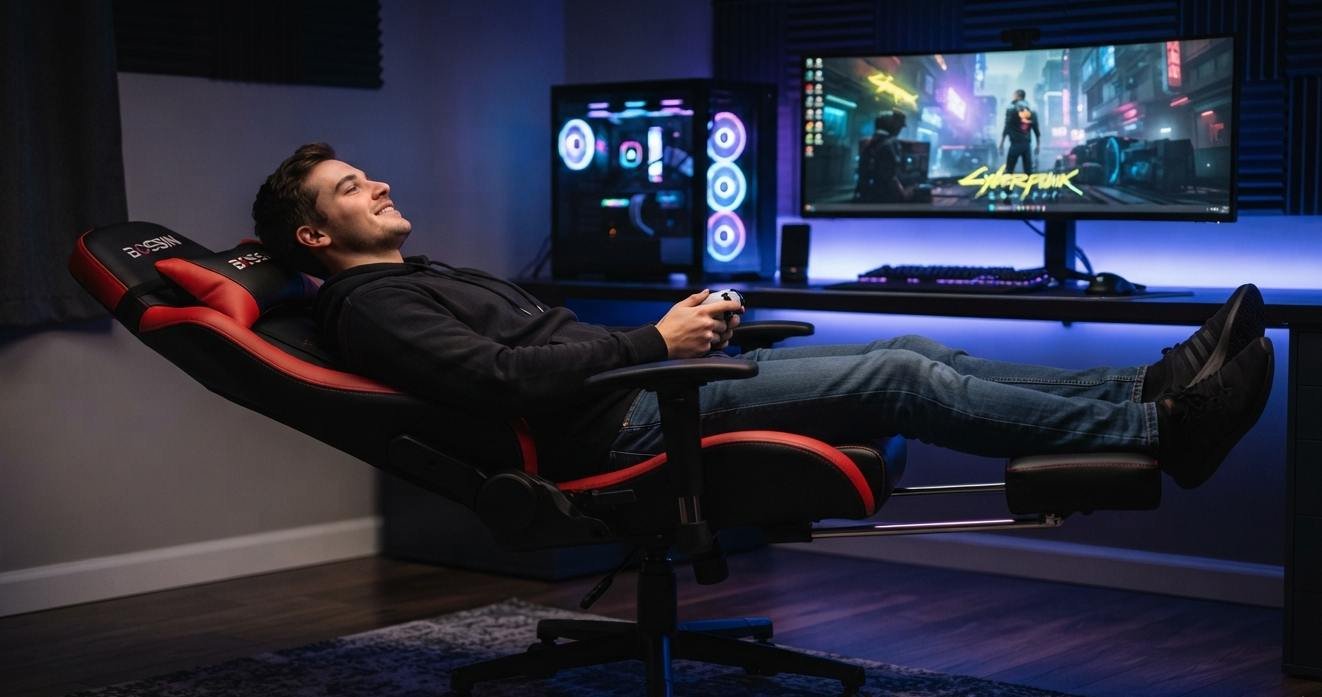
A gaming chair that reclines to 180 degrees sounds impressive until you remember what you actually do at a gaming desk. If you play keyboard-and-mouse games for hours, you need a stable working position. If you spend your evenings with a controller, watching streams, or taking breaks between matches, a recliner can be far more useful.
That is where the Bossin adjustable reclining gaming chair makes its case. It is less about looking like a racing seat and more about giving you a lounge-style gaming position. My take is clear: this chair makes the most sense for relaxed gaming and mixed entertainment, not as a pure competitive desk chair.
The Recline Is The Main Selling Point
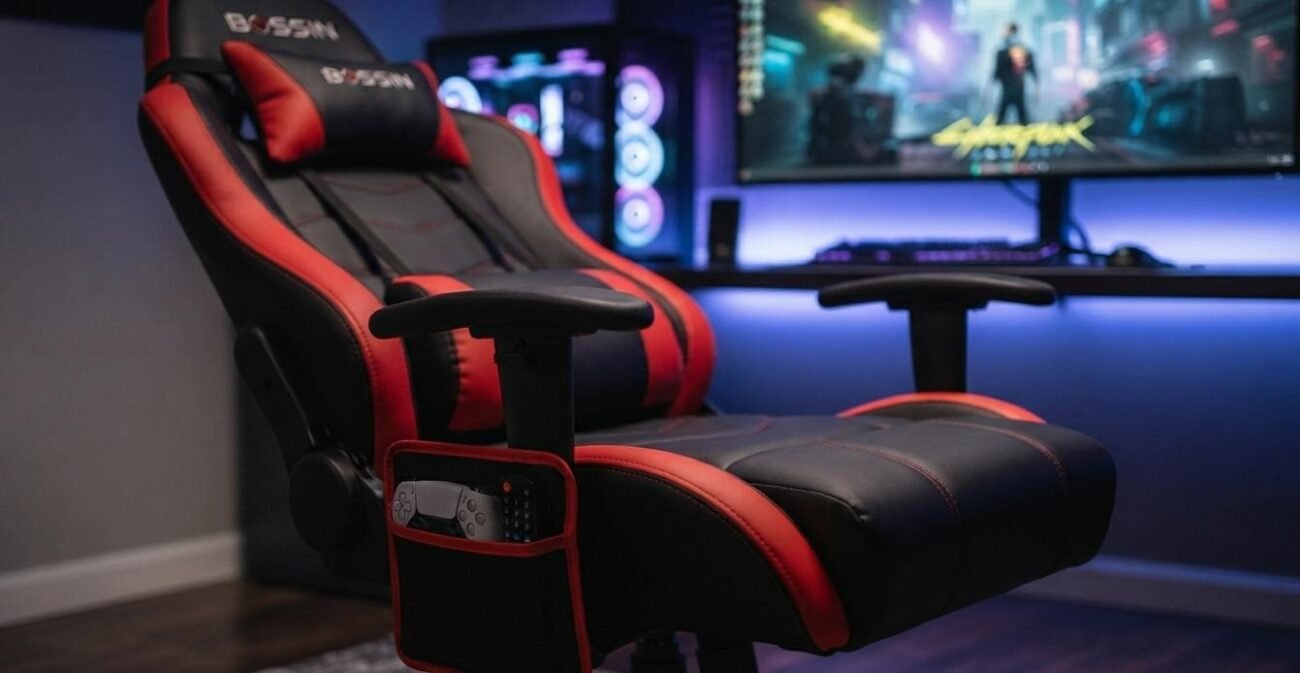
The current BOSSIN rocker game chair listing describes a backrest and footrest that adjust from 90 to 180 degrees. That range is the feature you should care about most because it changes how you use the chair.
At roughly 90 degrees, you can sit upright for a controller session or casual desk work. Push farther back, and the chair becomes a lounge seat for a movie, a long YouTube session, or a break between games. At the full recline position, the footrest becomes part of the experience rather than a decorative extra.
BOSSIN’s own product range also includes conventional gaming chairs that recline to 155 degrees and feature a separate wheeled base. The BOSSIN gaming chair range makes the distinction clear: this rocker-style recliner is a different category of chair.
This Chair Makes More Sense For Controller Gaming
Here is the key distinction I would use before buying the Bossin adjustable reclining gaming chair: what are your hands doing most of the time?
If you hold an Xbox or PlayStation controller, reclining makes sense. Your screen can stay in front of you while your body moves into a more relaxed position. If you use a keyboard and mouse at a fixed desk, a deep recline becomes less useful because your arms still need to reach the desktop.
PC Gamer makes a similar point in its advice on buying gaming chairs. Deep recline is not automatically an ergonomic advantage, and moderate back adjustment can be more useful for desk work. That is a better way to think about the Bossin adjustable reclining gaming chair than merely chasing its maximum recline number.
The Footrest Turns It Into A Lounge Chair
The built-in footrest is the other major reason to choose the Bossin adjustable reclining gaming chair. It lets you shift from active play to passive viewing without having to move to a sofa.
That sounds small until you use it during a long evening. You can play a few rounds, extend the footrest during a cutscene, watch a tournament, then sit upright again. The chair is trying to cover several uses rather than only one.
The current Wayfair listing gives the open dimensions as about 64.4 inches long, 25.2 inches wide, and 28.5 inches high. That 64.4-inch length matters. You need clearance behind and in front of the chair before you recline it fully. Measure the room first, especially if your desk sits close to a wall.
Check The Size Before Trusting The Product Photos
The product photos can make a recliner look smaller than it really is. The listed chair is roughly 25.2 inches wide, with the seat area listed as 23.6 inches by 19.3 inches in the current product description. Wayfair also lists the overall product weight at about 63 pounds.
There is another detail worth checking: capacity figures are not perfectly consistent across the listing text. One part states 300 pounds, while the feature section states a 400-pound maximum. I would not choose the chair based on the higher figure without confirming the exact variant with the seller.
That is a good example of why product specifications matter more than a marketing headline. If you are close to a chair’s stated weight limit, verify the exact model and the current manufacturer’s specifications before ordering.
PU Leather Is Easy To Live With, But It Is Not Mesh
The Bossin adjustable reclining gaming chair uses PU leather upholstery with thick padding. That gives it the lounge-chair feel the design is aiming for, and the surface is easier to wipe clean than many fabric seats.
The tradeoff is airflow. If your room runs warm, a padded PU leather recliner can feel warmer than a breathable mesh office chair. You should also expect a different feel from a high-end ergonomic chair with a tensioned mesh back.
That does not make the Bossin adjustable reclining gaming chair bad. It simply reinforces the main buying decision: this is a comfort-oriented gaming recliner, not an office chair disguised as gaming furniture.
The Lumbar And Head Support Are Useful, Not Magic
The product listing includes soft lumbar support and a headrest. Those are useful additions because the chair is designed for relaxed seating, especially once you recline.
Still, do not treat the word ergonomic as proof that the chair will fit every body. Seat depth, seat height, back shape, and desk height all affect how comfortable a chair feels. OSHA’s computer workstation guidance emphasizes fitting the workstation to the person rather than assuming one configuration works for everyone.
That is why I would test the chair at your actual desk height if possible. A chair can feel excellent in a showroom and awkward once your monitor, keyboard, and arm position come into play.
Assembly Looks Simple, But Check The Hardware
The current Wayfair listing says the chair is designed for easy assembly and that no tools are required, with one version describing an installation time of about eight minutes. That is attractive for a large recliner because nobody wants a two-hour furniture project after the box arrives.
Still, do not rush the assembly. Reclining furniture puts repeated force on its moving joints. Make sure the back connection and reclining mechanism are seated correctly before using the full range.
There is also some user discussion online about assembly and reclining problems with certain Bossin chairs. That does not prove a universal defect, but it is enough reason to inspect the mechanism carefully rather than assuming every unit behaves identically.
Use The Chair Differently For Desk Gaming And Sofa Gaming
The smartest way to get value from the Bossin adjustable reclining gaming chair is to stop asking it to behave like two different chairs at once.
For desk gaming, keep your back more upright, position your screen correctly, and ensure your feet are well supported; for controller gaming or watching video, recline and use the footrest. The chair becomes more comfortable when the use case fits the design.
If you are upgrading the whole room, choosing gaming accessories that actually improve your setup is a better strategy than spending the entire budget on one chair.
Where The Bossin Chair Fits In A Budget Setup
- The Bossin adjustable reclining gaming chair is attractive because it combines several pieces of furniture functionality into one product: a gaming seat, recliner, rocker, footrest, head support, and side storage.
- That can be valuable if you live in a smaller room or want one chair for gaming and entertainment. You do not need a separate recliner for the TV and a separate gaming chair for the console.
- If you are building from scratch, the right mindset is to build a gaming rig without wasting your budget. Spend first on the parts you use every session, then add luxury features such as deep recline.
- The Bossin adjustable reclining gaming chair is best judged as a gaming recliner first.
- If you want a footrest and deep recline, the Bossin adjustable reclining gaming chair is easier to justify.
- The Bossin adjustable reclining gaming chair also makes sense in a shared entertainment room.
- For a controller-first setup, the Bossin adjustable reclining gaming chair has a clear purpose.
- That makes the Bossin adjustable reclining gaming chair more versatile than a basic racing-style seat.
- Still, the Bossin adjustable reclining gaming chair is not automatically the best choice for desk work.
- The Bossin adjustable reclining gaming chair rewards buyers who measure their space first.
- A careful buyer will compare the Bossin adjustable reclining gaming chair with an office-style chair before making a decision.
- The Bossin adjustable reclining gaming chair is most convincing when comfort means being able to change positions.
- That is the strongest reason to consider the Bossin adjustable reclining gaming chair.
Quick Checklist
- Choose it mainly for relaxed or controller gaming.
- Measure the full reclined footprint before ordering.
- Verify the exact weight capacity for your model.
- Check whether PU leather suits your room temperature.
- Match the seat height to your desk if you use it for PC gaming.
- Inspect the recline mechanism after assembly.
- Use the footrest for viewing and relaxed sessions rather than forcing it into desk work.
Closing Thoughts
The Bossin adjustable reclining gaming chair is not the chair I would buy simply because its recline number looks impressive. I would buy it because I wanted a gaming seat that could become a recliner when the match ended.
That distinction makes the product easier to judge. The 90 to 180 degree range, footrest, padded PU upholstery, lumbar support, headrest, and rocker design all point toward relaxed entertainment. The chair is strongest when your gaming life includes controllers, streaming, movies, and long breaks between matches.
If your priority is competitive keyboard and mouse gaming for hours at a fixed desk, a dedicated ergonomic office-style chair deserves a serious comparison. If you want one seat that can take you ranging from gaming to lounging, the Bossin adjustable reclining gaming chair has a much stronger argument.
Buy the chair for the way you actually play, not for the angle printed on the box.
For the rest of the hardware, see optimizing the rest of your gaming system before spending more on peripherals.