
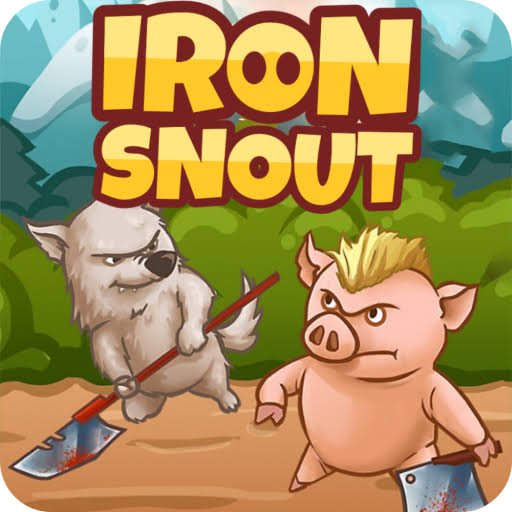


Iron Snout
Iron Snout is a fast 2D arcade fighting game where a martial-arts pig responds to cartoon wolves arriving from both sides. Use simple directional controls, build combinations, survive Classic or Sudden Death rounds, and share local Wolfieball matches with a friend.
Iron Snout Fast Paced Cartoon Fighting Game
Iron Snout is a quick 2D fighting game where a small martial-arts pig stands against endless waves of cartoon wolves. Instead of moving through a long stage, you remain near the center of the arena and use directional inputs to jump, duck, strike, counter incoming attacks, and build longer combinations.
The controls are easy to remember, but each wave becomes faster and more crowded. Success depends on reading which side an opponent is approaching from, choosing the correct response, and avoiding rushed inputs when several threats arrive together.
What Is Iron Snout?
Iron Snout is an arcade fighting game created by independent Lithuanian developer SnoutUp Games. An early browser edition appeared in 2014, while the expanded Steam version launched on January 27, 2016. The game later reached Android, iOS, Nintendo Switch, PlayStation, and Xbox platforms. (Kongregate)
You control a piglet trained in exaggerated cartoon martial arts. Wolves enter from both sides of the screen, sometimes carrying objects or arriving through unusual movement patterns.
The goal is to remain active for as long as possible and defeat enough opponents to create a high score. Iron Snout does not use a traditional campaign where you walk through several connected rooms. It focuses on short survival rounds that become harder over time.
Players who enjoy direct side-view combat can also try City Fighter vs Street Gang, which uses longer levels, selectable fighters, and more traditional beat-em-up movement.
How Iron Snout Gameplay Works
A normal round begins with the pig standing in the middle of the arena.
Wolves approach from the left and right. Pressing a direction makes the pig respond with an attack, jump, duck, dodge, or aerial movement depending on the situation.
There is no separate attack button in the browser version. Every directional input can become part of the combat system.
The main gameplay cycle includes:
- Watch both sides of the arena.
- Identify which opponent will arrive first.
- Press toward an approaching wolf to respond.
- Jump or duck when an incoming object requires it.
- Continue attacking before another opponent reaches you.
- Use dropped in-game items when available.
- Build a longer combination without taking damage.
- Survive as the wave speed increases.
- Try to beat your previous score.
The game restarts quickly after a failed round, making it suitable for short attempts and repeated score chasing.
What Makes Iron Snout Different?
Most fighting games include walking, blocking, several attack buttons, special-move combinations, and separate character selections.
Iron Snout reduces the main browser controls to four directional keys.
This does not make the game automatic. One key can produce different movements depending on whether the pig is standing, jumping, facing an opponent, or reacting to an incoming object.
The pig also remains around the middle of the stage rather than travelling from one side of a level to the other. The challenge comes to the player.
SnoutUp describes the game around endless action, responsive controls, movie-like combinations, colorful cartoon graphics, and the ability to turn objects dropped by opponents into temporary in-game tools. (snoutup.com)
Iron Snout Controls
The browser edition commonly supports either the arrow keys or WASD.
| Action | Arrow Keys | WASD Alternative |
|---|---|---|
| Upper movement or jump | Up arrow | W |
| Lower movement or duck | Down arrow | S |
| Respond to the left | Left arrow | A |
| Respond to the right | Right arrow | D |
| Fast downward landing while airborne | Down arrow | S |
| Menu selection | Mouse or displayed button | Mouse or displayed button |
Kongregate confirms that arrow keys or WASD can be used to jump, duck, and respond toward either side. It also documents pressing down while airborne to return to the ground more quickly. (Kongregate)
The Gam-core version may use only the arrow keys. Follow the instructions shown inside the game when its layout differs.
How Directional Attacks Work
The left and right controls respond toward the matching side of the arena.
Press left when a wolf approaches from the left. Press right when one appears from the right.
The exact animation changes according to distance and timing. The pig may use a short strike against a close opponent or a longer movement when the target remains farther away.
Repeated directional presses can continue a combination, but pressing too early may leave the pig finishing an animation while another opponent approaches from the opposite side.
The safest approach is to watch the result of one input before adding several more.
Jumping and Upper Responses
The up control helps the pig leave the ground.
Jumping can avoid low threats, reach opponents arriving from above, or begin an aerial combination.
While airborne, left and right inputs create attacks toward the matching side. Pressing up again may create another upper movement in supported versions.
Do not remain in the air without a reason. Airborne movement can make it harder to respond when an opponent enters close to the ground.
Use jumps when you have identified the incoming pattern rather than pressing up repeatedly.
Ducking and Low Responses
The down control lowers the pig.
Ducking is useful when an incoming object travels above the character or when a low response is needed against a close opponent.
Pressing down while airborne brings the pig back toward the floor faster. This can help you prepare for the next wave instead of remaining suspended while another opponent approaches. (Kongregate)
Avoid holding down continuously. Some situations require an immediate left, right, or upward response.
Building Combos
A combo is created by completing several successful actions without allowing the sequence to end.
Longer combinations can include:
- Alternating between left and right responses
- Moving from a ground attack into an aerial attack
- Redirecting incoming game objects
- Continuing after an opponent is pushed across the arena
- Responding to several wolves before returning to a neutral position
The Steam and official developer pages highlight combination-based fighting as one of Iron Snout’s main features. (Steam Store)
Combos are useful for score chasing, but survival should remain the first priority. A shorter controlled sequence is better than continuing one extra input and losing the run.
Reading Both Sides of the Arena
The pig remains close to the center, so danger can arrive from either side.
New players often focus only on the wolf they are currently handling. This creates an opportunity for the next opponent to approach unnoticed.
Try to keep your attention near the edges of the screen.
The current target still matters, but the next arriving wolf often determines which direction you should press after the current animation ends.
When both sides become busy, handle the closest threat first.
Enemy Waves
Iron Snout uses an endless wave structure in its main Classic mode.
Early opponents move slowly and give you time to understand the controls. Later waves become faster and introduce more varied movement patterns.
Some wolves run directly toward the pig. Others jump, approach with environmental objects, or create a threat from farther away.
Different enemy types encourage different responses. A single repeated input will not work throughout an entire run.
The official SnoutUp page describes the action as endless, while Nintendo lists endless gameplay, several areas, and multiple difficulty settings in its console edition. (snoutup.com)
Incoming Objects
Some wolves send objects across the screen instead of approaching directly.
Depending on the object and timing, the pig may be able to avoid it, knock it away, or redirect it toward another opponent.
The game handles these interactions automatically through directional inputs. There is no inventory menu or complicated aiming system.
Watch the height of the incoming object:
- Use an upper response when it approaches above the normal standing position.
- Duck when it passes across the upper part of the character.
- Respond toward it when the timing allows a counter.
- Move back toward a neutral position before the next wolf arrives.
Timing matters more than repeated button pressing.
Using Dropped Items
Certain defeated opponents leave temporary game items in the arena.
Moving toward one may allow the pig to catch or use it during the next action. These items provide variety, but they do not create permanent equipment or upgrades.
Do not focus so heavily on collecting one that you ignore an opponent approaching from the other side.
A dropped item is most useful when it naturally appears along the direction you already need to respond.
The official game and platform listings identify using enemy items as part of Iron Snout’s combination-based combat. (snoutup.com)
Health and Survival
Classic mode gives the pig enough health to survive several mistakes.
Taking damage reduces the remaining health, and the round ends when it is fully depleted.
The number of enemies defeated becomes the main measure of the run. Longer survival also gives you more opportunities to build combinations and improve the score.
Avoid becoming careless because health remains available. Damage can accumulate quickly when several enemies arrive close together.
Classic Mode
Classic is Iron Snout’s standard endless survival mode.
Wolves continue entering from both sides, and the objective is to defeat as many as possible before the pig runs out of health.
This is the best mode for new players because it allows mistakes and provides enough time to learn different enemy patterns.
Classic mode is also useful for:
- Practising directional responses
- Learning when to jump or duck
- Understanding dropped items
- Building longer combinations
- Comparing high scores
- Learning each environment
Poki currently lists Classic as one of the browser game’s main solo modes. (Poki)
Sudden Death Mode
Sudden Death creates a stricter survival challenge.
The pig has very little room for error, and one successful enemy interaction can end the attempt.
This makes every directional input more important. Long uncontrolled combinations become risky because the next threat may arrive from the opposite side.
Sudden Death suits players who already understand the basic controls and want shorter, more demanding score attempts.
Poki lists Sudden Death alongside Classic and Wolfieball in the current browser edition. (Poki)
Wolfieball Two Player Mode
Wolfieball is a local two-player mode available in supported versions.
Instead of playing a standard endless survival round alone, two people share one keyboard and compete in a simple ball-based activity using Iron Snout’s directional movement.
One player commonly uses WASD while the second uses the arrow keys. Exact controls can vary by hosted version, so check the instructions shown when the mode begins.
Wolfieball gives Iron Snout a social option without changing its simple control style. Poki confirms that two players can use this mode together. Nintendo’s console edition also supports one or two players on one system. (Poki)
Players interested in more short same-device or multiplayer activities can visit Fun Mini Online.
Pig Versus 100
Some expanded console and computer editions include an additional Pig Versus 100 challenge.
This mode presents a fixed survival goal rather than an endless score attempt. The objective is to complete the full group without losing the run.
Availability depends on the platform. The current Poki browser description focuses on Classic, Sudden Death, and Wolfieball, so players should not expect Pig Versus 100 in every web edition. (Poki)
Forest World
Forest is one of the main browser environments.
It uses a bright outdoor background and its own collection of enemy designs and incoming objects.
The visual theme does more than change the background. Poki notes that Forest and City use different enemy and projectile types, requiring players to adjust their timing. (Poki)
Begin carefully after changing worlds. An approach that worked against one sequence may not match the timing of another environment.
City World
City places the action in an urban street environment.
Its opponents and environmental objects differ from those found in Forest. The faster visual activity can initially make incoming threats harder to read.
Keep attention near both edges rather than watching the background.
The City and Forest worlds give browser players two main settings for score attempts. (Poki)
Additional Console Areas
Expanded console versions advertise endless gameplay across three unique areas.
The exact area and mode selection can differ from the current free browser build. Nintendo, PlayStation, and Xbox editions may therefore contain content that is unavailable on one particular website. (닌텐도 홈페이지)
This is important when comparing screenshots or guides from different platforms.
Difficulty Settings
Console editions include multiple difficulty choices.
A higher difficulty can increase the pace or reduce the time available to respond. Lower settings provide more time to learn enemy movement and directional controls.
Browser builds may present modes rather than a separate difficulty menu.
Use Classic mode or a lower setting when first learning the game. Sudden Death and harder options become more enjoyable after the controls feel natural.
Nintendo and Xbox both list multiple difficulty settings as part of their editions. (닌텐도 홈페이지)
Scoring
Iron Snout rewards survival, defeated opponents, and combination performance.
The main title screen in supported browser versions includes statistics that help players review their results. Poki recommends checking these records and watching the order in which opponents and projectiles appear. (Poki)
A strong score usually comes from consistency.
One long combo can help, but a player who survives several additional waves may finish with a better overall result.
Leaderboards and Achievements
The Steam edition includes leaderboards, gameplay statistics, and 37 achievements. (Steam Store)
Achievements may reward high totals, specific interactions, longer survival, or progress connected with different stages and modes.
Browser achievements can differ from Steam or console achievements.
Do not assume that completing an objective on one platform will unlock it on another. Progress is generally stored separately between websites, Steam, mobile apps, and consoles.
Character Outfits
Some versions include alternative pig outfits.
The Steam edition offers an optional Snoutfit content pack, while browser updates have included seasonal appearances such as a Santa-themed outfit. (Steam Store)
Outfits mainly change appearance. They do not replace the need for accurate directional inputs and careful timing.
Graphics and Presentation
Iron Snout uses colorful 2D cartoon graphics.
The pig and wolves have exaggerated movements that make each response easy to see. Clear silhouettes also help players understand whether an opponent is approaching low, high, or directly from one side.
The bright style contrasts with the increasingly intense pace of later waves.
Some versions include stylized blood effects. Nintendo rates the console version for Blood and Violence, so parents and younger players should check the rating shown on their platform. (닌텐도 홈페이지)
Sound and Feedback
Short sound effects help confirm successful responses, collisions, combinations, and menu actions.
The animation remains the main source of information. You can identify incoming enemies and objects even when playing at a low volume.
During crowded waves, the sound effects can become busy. Focus on the screen edges and character positions rather than depending only on audio cues.
Playing Iron Snout in a Browser
Iron Snout can be played through supported browser platforms without a traditional desktop installation.
The current Poki edition supports desktop, phone, and tablet devices and lists January 2026 as its latest update. (Poki)
Desktop play uses physical keys, which can feel more precise during fast combinations.
Mobile browser versions replace keyboard inputs with touch areas or swipe controls, depending on the host.
Playing on Android
The official Android version uses taps and swipes instead of keyboard directions.
Players swipe or touch toward the required direction to perform attacks, jumps, ducks, and downward movements.
The Google Play edition is published by SnoutUp Games and includes advertising and optional in-app purchases. It currently lists more than one million downloads. (Google Play)
A larger phone or tablet can make touch directions easier to separate.
Playing on iPhone and iPad
An iOS edition titled Iron Snout Pig Fighting Game has also been released.
Touch gestures replace keyboard controls, keeping the same general directional structure used by the browser game. (App Store)
Availability and compatibility can change according to region, device model, and operating-system version.
Playing on Steam
The Steam edition is free to play and supports Windows, macOS, and Linux through the requirements listed on its store page.
It includes single-player support, Steam achievements, statistics, and leaderboards. The listed storage requirement is only 20 MB, although the current Steam client itself requires a supported modern operating system. (Steam Store)
Steam is a suitable choice for players who want platform achievements and saved statistics outside a browser.
Playing on Nintendo Switch
The Nintendo Switch version was released on April 19, 2019.
It supports TV, tabletop, and handheld modes, one or two players on one system, touchscreen functionality, and a listed file size of 49 MB. (닌텐도 홈페이지)
The Switch version also includes content and modes that may differ from the free browser edition.
Other Console Versions
Iron Snout has also appeared on PlayStation 4, PlayStation Vita, and Xbox One.
The PlayStation release includes Cross-Buy support between PS4 and PS Vita, while the Xbox listing advertises endless gameplay, several areas, and multiple difficulty settings. (PlayStation Store)
Console versions are normally paid releases, unlike the free browser and Steam editions.
Is Iron Snout Multiplayer?
Iron Snout is mainly a single-player survival game.
Supported editions also include local two-player Wolfieball. Both participants use the same keyboard, console, or supported device.
There is no standard online matchmaking system where two players join the same match from separate computers.
Steam lists its main edition as single-player, while Nintendo confirms local one-to-two-player support. (Steam Store)
Does Iron Snout Have Upgrades?
Iron Snout does not use a large permanent upgrade tree.
The pig does not gain stronger statistics after every run, and players do not need to purchase attack power before entering harder waves.
Progress comes mainly from:
- Better timing
- Learning enemy patterns
- Longer combinations
- Higher scores
- Achievements
- Different modes
- Cosmetic outfits
- Platform-specific challenges
This keeps new and experienced players on the same basic control system.
Who Should Play Iron Snout?
Iron Snout suits players who enjoy:
- Quick arcade fighting
- Simple keyboard controls
- Score chasing
- Cartoon characters
- Short survival rounds
- Combination-based action
- Local two-player minigames
- Games that restart quickly
- Learning through repeated attempts
It works well for short sessions because a round begins immediately and does not require a long story introduction.
Players looking for a wider cast of action characters can also check Ultimate Heroes.
Iron Snout may not suit players seeking a long campaign, open-world movement, detailed character upgrades, or online competitive matchmaking.
More action, casual, fighting, and browser-friendly titles are available in the Gam-core games collection.
Honest Strengths and Limitations
| Strengths | Possible Limitations |
|---|---|
| Four main directions are easy to learn | Later waves become difficult very quickly |
| Controls respond immediately | Rushed inputs can interrupt good combinations |
| Short rounds are easy to restart | The main survival loop can become repetitive |
| Several enemy patterns create variety | New patterns require trial and error |
| Classic and Sudden Death support different skill levels | Not every mode appears on every platform |
| Wolfieball provides local two-player play | No standard online multiplayer |
| Browser, mobile, Steam, and console editions exist | Content and progress differ between platforms |
| Colorful graphics keep the action readable | Some editions include stylized blood effects |
| Achievements and leaderboards add replay value | There is no large permanent upgrade system |
| Small file requirements on computer and console editions | The game has limited story content |
Tips for Playing Iron Snout Better
Stay Focused on the Center and Edges
Keep the pig in your central vision while also watching both sides of the arena.
Respond to the Closest Opponent First
Do not finish an unnecessary extra attack when another wolf has already reached the pig.
Use Short Inputs
One accurate directional press is easier to control than repeated button mashing.
Return to the Ground Quickly
Press down while airborne when the next threat is approaching at ground level.
Learn One World at a Time
Forest and City use different enemy and projectile patterns.
Do Not Chase Every Dropped Item
Use an item when it is safely available. Ignoring one is better than taking damage while trying to collect it.
Practise in Classic Mode
Classic provides more room for mistakes than Sudden Death.
Watch Spawn Order
Repeated play helps you recognize which threats commonly appear together.
Protect the Run Before Extending a Combo
A smaller completed combination is better than losing health while forcing a longer one.
Take Short Breaks
Fast repeated inputs can become tiring. Rest your hands during longer score-chasing sessions.
Iron Snout Game Information
| Detail | Information |
|---|---|
| Game title | Iron Snout |
| Developer | SnoutUp Games |
| Developer location | Lithuania |
| Early browser release | 2014 |
| Steam release | January 27, 2016 |
| Nintendo Switch release | April 19, 2019 |
| Genre | Arcade fighting, survival, action |
| Perspective | 2D side view |
| Main character | Martial-arts piglet |
| Main objective | Survive wolf waves and earn a high score |
| Browser controls | Arrow keys or WASD |
| Mobile controls | Taps and directional swipes |
| Main browser modes | Classic, Sudden Death, and Wolfieball |
| Main browser worlds | Forest and City |
| Multiplayer | Local two-player in supported modes |
| Online matchmaking | No |
| Steam achievements | 37 |
| Steam price | Free to play |
| Main platforms | Browser, Android, iOS, Steam, Switch, PlayStation, and Xbox |
The developer, releases, controls, modes, worlds, platform support, achievements, and multiplayer information are documented through SnoutUp, Steam, Poki, Kongregate, Nintendo, and Google Play. (snoutup.com)
Frequently Asked Questions
What Type of Game Is Iron Snout?
Iron Snout is a fast 2D arcade fighting game where a martial-arts pig responds to endless waves of cartoon wolves.
Who Created Iron Snout?
Iron Snout was created by SnoutUp Games, an independent developer based in Lithuania. (snoutup.com)
When Was Iron Snout Released?
An early browser version appeared in 2014. The expanded Steam edition launched on January 27, 2016. (Kongregate)
How Do I Control Iron Snout?
Use the arrow keys or WASD. Up jumps or responds upward, down ducks or returns the pig toward the ground, and left or right responds toward the matching side. (Kongregate)
Can the Pig Walk Around the Level?
Not in the same way as a normal beat-em-up character. The pig remains around the center while opponents enter from both sides.
What Modes Are Available?
The main current browser modes are Classic, Sudden Death, and local two-player Wolfieball. Some expanded editions also include additional challenges. (Poki)
What Is Classic Mode?
Classic is the standard survival mode where you try to defeat as many wolves as possible before losing all health.
What Is Sudden Death Mode?
Sudden Death is a harder mode with very little room for mistakes. A single successful enemy interaction may end the run.
What Is Wolfieball?
Wolfieball is a local two-player mode where two people share one keyboard or supported device. (Poki)
Can I Play Iron Snout With a Friend Online?
No. The standard multiplayer option is local rather than online matchmaking.
What Worlds Are in the Browser Version?
The current Poki edition includes Forest and City worlds with different enemy and projectile patterns. (Poki)
Is Iron Snout Free?
The browser, Steam, Android, and iOS editions can be played without an upfront purchase. Mobile versions may contain ads or optional purchases, while console editions are normally sold separately. (Steam Store)
Can I Play Iron Snout on Mobile?
Yes. Browser and app editions are available for supported phones and tablets. Mobile versions use taps and swipes. (Poki)
Is Iron Snout Available on Nintendo Switch?
Yes. The Switch edition supports handheld, tabletop, and TV modes, along with local play for one or two people. (닌텐도 홈페이지)
Does Iron Snout Have Achievements?
Yes. The Steam edition includes 37 achievements, statistics, and leaderboards. (Steam Store)
Does Iron Snout Have Permanent Upgrades?
No large permanent upgrade tree is used. Improvement mainly comes from learning patterns, increasing scores, completing achievements, and mastering different modes.
Is Iron Snout Suitable for Younger Players?
The visuals are cartoon-like, but some versions contain stylized blood and fighting. Nintendo rates its edition for Blood and Violence, so players should follow the age rating shown on their platform. (닌텐도 홈페이지)






Reviews
There are no reviews yet.