


Truck Simulator
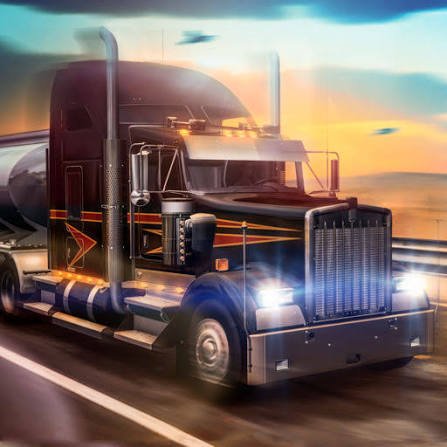
Truck Simulator is a browser driving game where you transport cargo using a heavy truck and trailer. Follow routes, manage traffic, brake early, take wide turns, reverse carefully, and park accurately inside each delivery area.
Truck Simulator
Truck Simulator puts you behind the wheel of a large commercial vehicle where arriving safely matters more than reaching maximum speed. You collect a trailer or cargo assignment, follow the marked route, manage wide turns, and place the truck accurately inside the delivery area.
The first road may feel easy while the truck is moving forward in a straight line. The real challenge begins at a narrow junction, busy city street, or delivery yard. A turn that feels comfortable in a small car may send the trailer across another lane. Braking too late can push the truck beyond the entrance, while reversing without checking the trailer angle can make parking much harder.
Players who enjoy open-road vehicle control can also try City Driver, where free driving, traffic, and several urban challenges create a lighter alternative to cargo transport.
What Truck Simulator Is About
Truck Simulator is a browser driving game based on operating a heavy vehicle across roads, cities, industrial areas, and delivery locations.
Instead of completing short circuit races, you normally work through transport jobs. A task may ask you to collect cargo, follow navigation markers, avoid damaging the truck, and park the trailer at the destination.
The main gameplay loop may include:
- Selecting a truck or delivery job
- Starting the engine
- Connecting or collecting a trailer
- Following a marked road
- Driving through traffic
- Managing fuel or vehicle condition
- Reaching the destination
- Reversing into a loading area
- Earning money or points
- Unlocking trucks or improvements
The exact routes, vehicles, jobs, and upgrade systems depend on the version available on Gam-core. Check the game’s own menu before relying on features described for another Truck Simulator release.
How Truck Simulator Gameplay Feels
Truck Simulator has a slower rhythm than most arcade racing games.
The vehicle takes longer to accelerate, needs more space to stop, and cannot turn through tight corners like a small sports car. This encourages the player to look farther ahead and prepare each movement early.
Long roads can feel calm, but they still require attention. A traffic vehicle may slow down ahead, a junction can appear after a hill, or the navigation route may require a turn across several lanes.
The difficult moments usually happen at low speed. Entering a delivery yard, aligning the trailer, and reversing into a marked position may take more control than the entire highway journey.
For another heavy-vehicle challenge with rough terrain and large tyres, play Monster Truck.
Truck Simulator Controls
The exact controls can differ between browser versions, so check the instructions shown inside the game.
A common desktop layout may include:
- W or Up Arrow: Accelerate
- S or Down Arrow: Brake or reverse
- A and D or Left and Right Arrows: Steer
- Spacebar: Use the handbrake
- C: Change the camera
- I: Start or stop the engine
- L: Turn the lights on or off
- H: Use the horn
- R: Reset the truck when supported
- Esc: Pause or open the menu
Some versions may also include gears, indicators, cruise control, mirrors, wipers, or trailer connection controls.
Mobile editions may replace the keyboard with touchscreen steering, pedals, and dashboard buttons.
Learn acceleration, braking, steering, and the camera first. Extra controls become easier once the truck’s basic movement feels familiar.
Heavy Trucks Need More Turning Space
A truck does not follow the same path as a small car during a corner.
The front of the vehicle may clear the junction while the rear wheels and trailer cut across the inside. Turning too early can send the trailer over the kerb, into a barrier, or against another vehicle.
Use a wider approach:
- Reduce speed before the junction.
- Keep the truck slightly away from the inside edge.
- Begin turning when the front has enough space.
- Watch the trailer as it follows.
- Straighten gradually after entering the new road.
Avoid making one sudden steering movement. Smooth input gives the trailer time to follow without swinging across the road.
Brake Earlier Than You Would in a Car
Heavy vehicles need more time and road space to reduce speed.
Waiting until the truck reaches the corner before braking can push it beyond the turn. A loaded trailer may also make the vehicle feel slower to stop.
Look ahead for:
- Junctions
- Traffic lights
- Slow vehicles
- Delivery entrances
- Steep downhill roads
- Toll areas
- Narrow city streets
- Road barriers
Release the accelerator early and apply the brake smoothly.
Hard braking may stop the truck, but it can leave the vehicle poorly aligned or make the trailer unstable in games with more detailed physics.
Follow the Navigation Route
Most transport jobs use a map, route line, arrow, or checkpoint system.
Check the next instruction before reaching a junction. Waiting until the turn is directly beside the truck may not leave enough space to change lanes safely.
Use long straight roads to look at the route. Do not spend too much time studying the map while the truck is moving through traffic.
When you miss a turn, continue until there is a safe place to change direction. Reversing across a busy road usually creates a larger problem than taking a longer route.
Navigation becomes easier after you learn major roads and common delivery areas.
Keep the Trailer in Mind
The trailer changes how the truck moves.
It adds length, increases the space needed for turns, and responds differently while reversing. The trailer may also swing outward when the cab changes direction sharply.
Check the mirrors or wider camera view when available.
During ordinary driving:
- Leave more space before changing lanes
- Avoid sharp steering
- Keep the trailer away from kerbs
- Watch the rear during narrow turns
- Straighten before accelerating strongly
- Avoid entering small spaces without an exit plan
A route that is easy for the truck cab may still be too narrow for the complete vehicle.
How to Reverse a Truck and Trailer
Reversing is one of the hardest parts of Truck Simulator because the trailer initially moves opposite the steering direction.
Start with the truck and trailer as straight as possible.
Use this basic approach:
- Reverse slowly.
- Make a small steering input.
- Watch the trailer begin to turn.
- Steer back toward the opposite direction to control the angle.
- Continue with small corrections.
- Stop before the angle becomes too sharp.
Large steering movements can make the trailer fold toward the cab. Once that angle becomes extreme, moving forward and straightening the vehicle is often easier than trying to repair it entirely in reverse.
Patience is more useful than speed during parking.
Parking at the Delivery Point
Delivery areas may require the trailer to sit inside a marked rectangle or loading zone.
Before reversing, look at:
- The entrance
- The final parking direction
- Nearby walls or vehicles
- Available turning space
- The side from which the trailer should approach
- Whether the cab can leave after the trailer is aligned
Drive slightly beyond the parking space when necessary, then reverse toward it from a manageable angle.
Use a wider camera or mirrors to check both sides. Do not focus only on one rear corner of the trailer.
When the trailer is nearly aligned, straighten the cab and reverse slowly into the final position.
Choose a Helpful Camera View
Truck Simulator may provide several cameras.
Third-Person Camera
This view shows the full truck and trailer.
It is useful for beginners, tight turns, reversing, and checking clearance around the vehicle.
Cabin Camera
The cabin view makes driving feel more realistic and helps with lane position.
Its limited view can make trailer parking harder unless working mirrors are included.
Top or Wide Camera
A higher angle can help during loading yards and narrow parking tasks.
It may make speed and distance feel less natural on open roads.
Change the camera according to the situation. A cabin view may work well on the highway, while a wider view can make reversing easier.
Managing Traffic
Traffic vehicles can slow down, change lanes, stop at junctions, or block part of the route.
Leave enough distance between the truck and the vehicle ahead. The truck may not stop quickly when traffic suddenly slows.
Before overtaking:
- Check the road ahead
- Confirm that the next lane is open
- Allow room for the trailer
- Avoid passing near a junction
- Return only after the trailer clears the other vehicle
Do not force an overtake simply because another vehicle is slower. A short delay is better than damaging the cargo or ending the job.
Players who prefer faster traffic avoidance can try Highway Racer.
Protect the Cargo
Some Truck Simulator versions measure cargo damage.
Hard collisions, rough steering, sharp braking, or leaving the road may reduce the final payment.
Drive more carefully when transporting fragile or valuable loads.
A safe cargo run usually involves:
- Smooth acceleration
- Early braking
- Wide turns
- Controlled lane changes
- Low speed in delivery yards
- Careful trailer alignment
- Avoiding roadside objects
Finishing quickly may provide a bonus, but unnecessary damage can remove more money than a faster arrival earns.
Fuel and Vehicle Condition
Supported versions may include fuel, engine condition, tyre damage, or repair costs.
Watch the dashboard and route map for fuel stations or service areas.
Do not wait until the fuel level is almost empty before searching for a station. A delivery route may move away from the nearest service point.
Vehicle damage may affect:
- Steering
- Acceleration
- Braking
- Maximum speed
- Delivery payment
- Job completion
Repairing the truck can be more useful than buying a cosmetic change when damage is affecting every journey.
The exact maintenance system depends on the game version.
Choosing Transport Jobs
Job menus may show the cargo type, distance, payment, destination, and time limit.
A higher-paying job may also involve:
- A longer route
- A heavier trailer
- Fragile cargo
- Narrow delivery access
- A strict deadline
- More difficult roads
New players should begin with shorter jobs and ordinary trailers.
Completing several easier deliveries helps you understand the truck before taking a long route with a more difficult parking area.
Choose jobs that match your current vehicle and control level rather than selecting only the largest payment.
Earning Money and Upgrading the Truck
Successful deliveries may provide money that can be used for vehicles or upgrades.
Possible improvements include:
- Engine power
- Braking
- Fuel capacity
- Steering
- Transmission
- Tyres
- Trailer stability
- Cabin appearance
- Truck colour
Maximum power is not always the best first upgrade.
Better braking and stability can make every delivery easier, especially when the truck already has enough power for ordinary roads.
Read the upgrade description before spending money. Cosmetic parts may change appearance without improving performance.
Choosing a Truck
Supported versions may provide several truck models.
A truck can differ in:
- Engine strength
- Acceleration
- Braking
- Fuel use
- Turning response
- Cabin size
- Purchase cost
- Load capacity
A powerful truck helps with heavy trailers and hills, but it may cost more to unlock or operate.
Beginners may prefer a predictable vehicle with stable steering. A faster truck does not automatically produce safer deliveries.
Test a newly selected vehicle on a short job before accepting a difficult long-distance route.
Driving Uphill and Downhill
Heavy cargo changes how the truck behaves on slopes.
Uphill Roads
Build enough speed before the climb without approaching the hill recklessly.
Maintain steady acceleration and avoid unnecessary lane changes. A loaded truck may lose speed even when the accelerator remains pressed.
Downhill Roads
Release the accelerator early and control the speed before it becomes excessive.
Repeated heavy braking may feel less stable in detailed versions. Use a lower gear or engine braking when the game supports it.
Do not wait until the bottom of the hill to prepare for a corner or junction.
Driving at Night or in Bad Weather
Some Truck Simulator versions include night driving, rain, fog, or changing conditions.
These can reduce visibility and make the road harder to read.
When visibility is poor:
- Turn on the lights
- Reduce speed
- Leave more following distance
- Avoid unnecessary overtaking
- Watch road markings
- Brake earlier
- Use wipers when supported
- Check navigation before junctions
Rain may also reduce grip in versions with weather-based handling.
A delivery bonus is not worth rushing through a road you cannot see clearly.
Common Truck Simulator Mistakes
The most common mistake is turning like the truck is a small car.
Another mistake is braking too late. Heavy vehicles need more space, especially when pulling cargo.
Players also forget about the trailer during lane changes and tight corners.
Reversing with large steering inputs creates another problem. The trailer angle changes quickly and becomes difficult to correct.
Some players accept long, difficult jobs before understanding basic parking.
Ignoring fuel, damage, or navigation can also turn a manageable route into a failed delivery.
The final common mistake is rushing inside the delivery yard. The job is not complete until the trailer is parked correctly.
How to Improve Your Driving
Begin with control rather than job income.
A useful learning order is:
- Practise ordinary steering.
- Learn early braking.
- Complete wide turns.
- Change camera views.
- Drive with a trailer.
- Practise reversing in open space.
- Complete simple parking tasks.
- Take short cargo jobs.
- Drive through traffic.
- Accept longer or heavier deliveries.
Focus on one repeated problem during each job.
Reducing small mistakes produces more improvement than simply driving faster.
Browser Performance and Device Support
Truck Simulator browser games normally work best on a desktop or laptop with keyboard controls.
Performance depends on the browser, device, graphics quality, and other programs running at the same time.
When the game feels uneven:
- Close unnecessary tabs
- Lower graphics settings
- Reduce shadows or reflections
- Stop demanding background programs
- Use a stable browser window size
- Restart after changing settings
Smooth performance is especially important while parking because delayed steering makes small trailer corrections difficult.
Mobile support depends on whether the Gam-core version provides touchscreen controls.
Truck Simulator and Official Simulation Games
The phrase Truck Simulator is also associated with commercial simulation games from SCS Software, including Euro Truck Simulator 2 and American Truck Simulator. SCS Software is an established developer known for licensed trucks and detailed transport simulation.
Those commercial games should not be confused with an unverified browser title using the general name Truck Simulator.
Before publishing specific claims about official brands, European or American maps, multiplayer convoys, or licensed vehicles, confirm that those features actually appear in the Gam-core version.
The browser game may offer a much simpler transport experience focused on routes, parking, and short cargo jobs.
Truck Driving and Real Road Safety
Truck Simulator is a game and should not be treated as real heavy-vehicle training.
Real commercial truck driving requires legal licensing, professional instruction, medical and safety requirements, vehicle inspections, and compliance with road laws.
The Federal Motor Carrier Safety Administration provides official information about commercial-vehicle safety in the United States.
The National Highway Traffic Safety Administration provides broader guidance on safe road use, seat belts, speed, distraction, and crash prevention.
The World Health Organization road-safety resources explain why speed, visibility, vehicle condition, and responsible road behaviour matter outside games.
Virtual cargo jobs and parking exercises should remain on the screen.
What Makes Truck Simulator Worth Playing
Truck Simulator provides a different driving challenge from ordinary racing games.
The goal is not always to arrive first. You need to complete the route, protect the cargo, manage the trailer, and park accurately at the destination.
This slower structure gives small decisions more importance. A smooth turn, early brake, or careful reverse can save more time than aggressive driving.
The game may feel quiet for players who want constant racing or crashes. Much of the experience involves following roads and completing practical transport tasks.
That calm pace is also its strongest feature. Players can concentrate on vehicle control, route planning, and improving each delivery.
Browse the racing games collection for more online vehicle challenges.
Who Will Enjoy Truck Simulator?
Truck Simulator suits players who enjoy heavy vehicles, cargo transport, route following, careful parking, traffic systems, and slower driving challenges.
Beginners can start with short jobs and wide roads.
More experienced players can manage long trailers, difficult delivery yards, night routes, heavier cargo, and tighter deadlines.
The game works well for players who prefer planning and control over constant speed.
Anyone seeking a professional trucking simulation should confirm which features the browser version includes. Players looking for accessible transport missions are more likely to enjoy its direct structure.
Play Truck Simulator Free Online
Play Truck Simulator free online on Gam-core.com and take control of a heavy vehicle across roads, cities, delivery yards, and cargo routes.
Brake before the corner, leave room for the trailer, and approach the delivery area with a clear parking plan. The route may look simple on the map, but completing it without cargo damage or a difficult recovery is what makes each successful delivery satisfying.







Reviews
There are no reviews yet.