
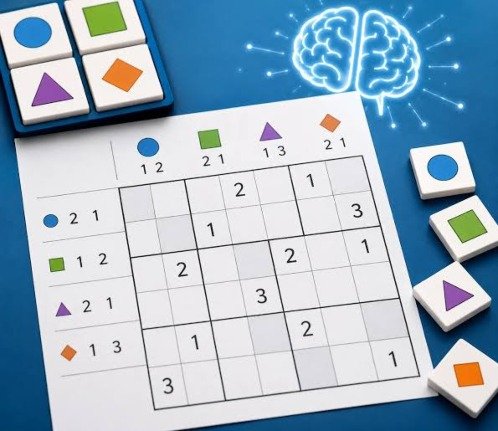


Logic Games
Logic Games is a large puzzle collection featuring number grids, hidden paths, ships, trees, tents, loops, inequalities, and many other challenges. Learn each rule through solved examples, use notes and hints when needed, and progress from small beginner boards to harder logic puzzles.
Logic Games Brain Puzzle Collection
Logic Games is a large puzzle collection built for players who enjoy solving rules rather than relying on quick reflexes. One puzzle may ask you to place trees without letting them touch, while another may involve connecting numbers, completing a hidden path, arranging magnets, or finding the correct position of ships.
The collection includes many puzzle styles, difficulty sizes, hints, notes, and saved progress. You can spend a few minutes on one small grid or work through a larger challenge that requires careful deduction.
What Is Logic Games?
Logic Games, also listed as 100 Logic Games Time Killers, is a single-player puzzle collection containing more than 100 types of logic challenges. Its Android listing states that the app includes 10,000 puzzle levels, built-in rules, solved examples, hints, note-taking tools, saved progress, achievements, and leaderboards.
This is not one puzzle repeated with different numbers. The collection includes many rule systems, so moving to another game can feel like learning a completely new challenge.
Some puzzles use numbers, while others depend on shapes, paths, shaded cells, hidden objects, inequalities, or positioning rules. The variety makes Logic Games useful for players who like Sudoku but occasionally want a different type of problem.
Players who prefer a more visual number challenge can also try Chain Cube 2048 3D Merge, where matching cubes and planning future placements replace traditional grid deduction.
How Logic Games Works
You begin by choosing a puzzle type from the main collection. Each type has its own rules, board design, symbols, and goal.
The first level is usually small enough to teach the main idea. Later boards become larger and include fewer obvious starting moves.
A normal session follows a simple pattern:
- Choose a puzzle category.
- Read the rules and solved example.
- Select a board size or difficulty.
- Mark information that must be true.
- Remove choices that break the rules.
- Use notes when more than one answer appears possible.
- Complete the board without creating a contradiction.
- Continue to a harder puzzle or try another type.
Most puzzles do not require fast movement. You can pause, study the board, undo an incorrect action, and return to a saved level later.
More Than One Hundred Puzzle Types
The main strength of Logic Games is the number of different challenges available. The official listing names puzzle types such as Parks, Snail, Skyscrapers, Tents, Battleships, Nurikabe, Hitori, Magnets, Hidden Stars, Futoshiki, Fillomino, Number Link, Masyu, Slitherlink, Hidato, Kakuro, Calcudoku, Domino, Galaxies, and many more.
These puzzles do not all test the same skill.
A path puzzle may require you to connect cells in a certain order. A shading puzzle asks you to decide which squares must remain empty or filled. A number puzzle may depend on sums, inequalities, or neighboring values.
This means getting stuck in one category does not make the entire collection frustrating. You can switch to another puzzle with a completely different style and return later.
Learning Rules Through Solved Examples
Every puzzle type has its own conditions. Guessing without reading them can make a simple board feel impossible.
Logic Games includes written instructions and solved examples that show how the rules apply to a finished puzzle.
The solved example is often more useful than reading the rule description alone. It shows why certain cells are marked, how clues affect nearby spaces, and what a valid completed board should look like.
Before starting a new category, spend a minute comparing the example with its clues. Notice which choices were forced and which would have created a broken rule.
This small step can prevent repeated mistakes during the first few levels.
Parks Puzzles
Parks asks you to place trees inside separated areas of a grid.
The trees cannot be positioned too close to one another, and each region must follow the stated placement rules. The challenge comes from finding spaces that satisfy several conditions at the same time.
A square may look valid when viewed inside one region but become impossible because it touches a tree in another area.
Start by checking the smallest regions. They often provide fewer possible positions and can reveal the first forced move.
Once one tree is placed, mark the nearby spaces that can no longer contain another tree.
Skyscrapers Puzzles
Skyscrapers uses a grid where each number represents the height of a building.
Clues around the outside show how many buildings can be seen from that direction. Taller buildings hide smaller ones standing behind them.
A clue showing one means the tallest building must appear first from that side. A larger clue requires a more gradual arrangement.
The puzzle combines number placement with visual reasoning. You need to follow the row and column rules while also matching every outside clue.
Beginners should start with the strongest clues because they usually reduce the number of possible arrangements quickly.
Tents Puzzles
Tents places campers or trees on a grid and asks you to position tents beside them.
Each tent must belong to a nearby tree, but tents cannot touch one another in forbidden ways. Row and column clues show how many tents belong in each line.
The difficulty comes from matching every tent to one tree without using the same tree twice.
When a row has already reached its required number, mark the remaining spaces as empty. This can create new forced positions in crossing columns.
It is better to confirm a move through several rules than to place a tent only because one square appears convenient.
Battleships Puzzles
Battleships turns the familiar guessing game into a solo deduction puzzle.
A hidden fleet is placed inside a grid. Numbers along the edges show how many ship sections appear in each row and column.
Ships have different lengths and cannot touch in restricted ways. Some cells may already reveal water or part of a ship.
Begin with completed rows and columns. When a line already contains the correct number of ship cells, mark every remaining space as water.
Then inspect revealed ship pieces. Their shape and position may show which direction the rest of the ship must continue.
Nurikabe and Hitori
Nurikabe involves separating numbered islands with connected shaded walls. Each number tells you the required size of its island.
Islands cannot join incorrectly, while the shaded wall must remain connected. Small blocked areas can create contradictions, so every shaded choice affects the wider board.
Hitori uses repeated numbers in rows and columns. You shade selected cells so the remaining visible numbers do not repeat, while still keeping the unshaded area connected.
Both puzzles use shading, but their rules are different. Do not carry assumptions from one type into the other.
Read the category name and rule screen carefully when switching between them.
Number Link and Hidden Path
Number Link asks you to connect matching numbers without allowing paths to cross or leave unused spaces under certain rule sets.
A pair near the edge may have only one realistic connection. Completing that path can divide the board and make other routes easier to identify.
Hidden Path uses clues and directional information to reveal the correct route through a grid.
In both puzzles, avoid drawing the longest path first unless its route is forced. A long early connection may block several smaller paths later.
Use the undo button when a route creates an enclosed space that no remaining pair can reach.
Kakuro and Calcudoku
Kakuro combines number placement with addition. Empty cells are grouped into runs, and each clue gives the required total.
Numbers normally cannot repeat within the same run. This means a small total across several cells has only a few possible combinations.
Calcudoku also uses arithmetic, but its board is divided into cages. Each cage provides a target number and an operation such as addition, subtraction, multiplication, or division.
The rows and columns must follow their own number rules while every cage reaches its target.
These puzzles feel difficult when players try random calculations. Writing possible combinations first makes the board much easier to manage.
Futoshiki and Mathrax
Futoshiki is based on number placement and inequality signs.
Each row and column must contain the allowed numbers without repetition. Greater-than and less-than symbols show how neighboring cells relate to one another.
A chain of inequality signs can be very useful. When several cells must increase in one direction, only a limited number of sequences may fit.
Mathrax adds arithmetic clues between cells, often involving sums, differences, products, or other number relationships.
Both puzzle types reward players who combine clues. One inequality may not solve a cell, but it can become decisive when paired with row limits and another nearby clue.
Using Notes Without Turning Them Into Guesses
Logic Games includes note-taking support for more complicated puzzles.
Notes allow you to record possible values or positions without confirming them as final. This is useful when a cell has two realistic answers but the board does not yet provide enough information.
Do not fill every empty cell with every possible number. Too many notes create visual clutter and make useful information harder to see.
Add notes only after removing impossible choices. Update them whenever a related row, column, region, or clue changes.
The goal is to use notes as temporary evidence, not as permission to guess.
Hints, Undo, and Restart
A timed hint system is available when a puzzle stops making sense. The collection also supports undo, restart, automatic saving, and quick resuming.
Undo is useful when you notice a contradiction shortly after making a move. It lets you correct the mistake without rebuilding the whole board.
Restart is better when several guesses have made the puzzle difficult to trust. Beginning again with a clearer method can be faster than checking every old choice.
Use hints after making a real attempt. A hint is more helpful when you understand which part of the board caused the problem.
Main Logic Games Features
- More than 100 puzzle styles: Each category uses its own rules, clues, and board structure.
- Thousands of levels: The listed version contains 10,000 individual puzzles across the full collection.
- Increasing difficulty: Smaller boards introduce the rules before larger challenges require longer deductions.
- Built-in instructions: Every puzzle type includes rules and a solved example.
- Automatic saving: An unfinished puzzle can be continued later without starting again.
- Undo and restart tools: Incorrect moves can be reversed or the full board can be reset.
- Timed hints: Help becomes available when a puzzle has stopped your progress.
- Note-taking mode: Possible values can be recorded without marking them as confirmed answers.
- Progress tracking: The game shows progress within individual puzzle lists.
- Zoom controls: Larger grids can be enlarged for easier reading.
- Achievements and leaderboards: Supported versions track completed goals and comparison scores.
Logic Games Controls
The mobile version mainly uses touchscreen controls.
| Action | Common Control |
|---|---|
| Select a cell | Tap it |
| Add a number or symbol | Tap an available option |
| Shade a square | Select the shading tool, then tap |
| Draw a path | Swipe or select connected cells |
| Add notes | Turn on note mode and select possibilities |
| Undo a move | Tap the undo button |
| Restart a puzzle | Open the menu and choose restart |
| Use a hint | Tap the hint button |
| Zoom the board | Pinch with two fingers |
| Move around a large board | Drag the screen |
Controls vary between puzzle types. A path puzzle may use dragging, while a number grid may display a keypad or row of symbols.
How to Approach a New Puzzle
Start With the Strongest Clues
A clue that leaves only one possible answer should be handled first. Forced moves provide reliable information for the rest of the board.
Mark Impossible Spaces
Knowing where something cannot go is often as valuable as placing the final answer.
Check Intersections
Rows, columns, regions, and paths affect one another. A clue that seems weak alone may become useful at an intersection.
Avoid Early Guessing
A guessed move can create several incorrect deductions. Continue searching for a forced choice before testing possibilities.
Review the Rules
When no move seems possible, you may have forgotten a condition. Reopen the instructions and compare the current board with the solved example.
Change Puzzle Types
A short break with another category can clear your thinking. Return to the difficult board when it no longer feels visually familiar.
Common Logic Games Mistakes
Treating Every Puzzle Like Sudoku
Many categories use numbers, but their rules can be completely different. Read the instructions before assuming rows and columns work in a familiar way.
Confirming Notes Too Early
A possible value is not the same as a proven value. Keep uncertain choices in note mode.
Looking at One Clue Alone
Most difficult moves come from combining several conditions. Check nearby rows, columns, and regions before deciding.
Ignoring Empty Spaces
An empty square may be important because no valid item can be placed there. Marking impossible cells reduces the remaining choices.
Restarting Too Quickly
One contradiction does not always require a full reset. Use undo and check the recent moves first.
Using Hints Before Learning the Rule
A revealed answer may solve one cell without helping you understand the puzzle. Study the example before requesting help.
Playing Large Boards Too Soon
Bigger puzzles are not always better. Complete smaller versions until the deduction pattern feels natural.
Improving Without Rushing
Logic Games does not need to be played against a clock unless a particular challenge or score system encourages faster completion.
Accuracy is more useful than speed when learning a new puzzle. A careful solution builds patterns you can recognize later.
After completing a board, think about the first clue that opened the puzzle. That clue type may provide a useful starting point in similar levels.
When a mistake occurs, identify why it looked correct at the time. Understanding the false assumption is more valuable than simply clearing the board.
Players interested in clue-based problem solving can also play Escape Game Basic, where logic is applied to objects, codes, and locked rooms instead of numbered grids.
Graphics and Interface
Logic Games uses a clean grid-based presentation designed to keep clues and markings readable.
Each puzzle type uses symbols suited to its rules, such as trees, tents, numbers, paths, walls, ships, arrows, or shaded cells.
The visual style is functional rather than decorative. This helps players concentrate on relationships between clues without busy backgrounds.
Pinch zoom is useful on larger boards, especially when several small symbols appear close together. The app also records individual game progress so completed and unfinished puzzles are easier to track.
Players who prefer picture-based observation can try Find Easy Hidden Differences, where the challenge comes from noticing small visual changes between scenes.
Difficulty and Learning Curve
Logic Games is welcoming at the beginning because most categories include small introductory levels.
The difficulty rises in two ways. Boards become larger, and the available clues require more steps before producing a confirmed answer.
A small puzzle may be completed by following obvious rules. A larger board may require notes, elimination, connected deductions, and careful checking.
Difficulty also varies between categories. A player may find path puzzles easy but struggle with arithmetic grids.
This does not mean one type is objectively harder. Different puzzles depend on different ways of thinking.
Who Should Play Logic Games?
Logic Games is a good match for players who enjoy Sudoku, number grids, path puzzles, deduction, quiet gameplay, and short mental challenges.
It is useful for people who become bored when a puzzle app contains only one rule system. Switching between many categories keeps the experience from feeling too repetitive.
The collection also works well for short sessions. You can complete a small puzzle during a break and save a larger board for later.
Players looking for action, character movement, stories, or online team play may find the experience too quiet. Logic Games focuses almost completely on grids, rules, and problem solving.
For a traditional strategy challenge against an opponent, visit Master Chess. More casual, board, puzzle, and strategy titles are available in the Gam-core games collection.
Honest Strengths and Limitations
| Strengths | Possible Limitations |
|---|---|
| Contains many different puzzle types | The large menu may feel overwhelming at first |
| Small levels help explain unfamiliar rules | Some written rules require careful reading |
| Thousands of boards provide long-term play | Grid presentation may feel plain to some players |
| Undo and notes support careful solving | A few puzzles can require lengthy deductions |
| Hints prevent one level from blocking progress | Frequent hint use can reduce the challenge |
| Automatic saving suits short sessions | Most activities are single-player |
| Zoom helps with large boards | Small symbols may still be harder to read on compact screens |
| Difficulty increases gradually | Players wanting stories or action may lose interest |
Logic Games Information
| Detail | Information |
|---|---|
| Full listed title | 100 Logic Games Time Killers |
| Common name | Logic Games |
| Genre | Logic, puzzle, number, and deduction |
| Game mode | Single-player |
| Puzzle types | More than 100 |
| Listed levels | 10,000 |
| Main tools | Notes, undo, restart, hints, and zoom |
| Progress | Automatic saving and individual puzzle tracking |
| Platform | Android in the verified listing |
| Controls | Touchscreen |
| Price model | Free version with advertising or purchases depending on availability |
Frequently Asked Questions
What type of game is Logic Games?
Logic Games is a collection of grid puzzles based on deduction, numbers, paths, shading, positioning, and pattern rules.
Is Logic Games only Sudoku?
No. It includes more than 100 puzzle styles, including Battleships, Kakuro, Parks, Tents, Nurikabe, Hitori, Slitherlink, Hidato, Number Link, and many others.
How many levels are available?
The verified Android listing states that the collection includes 10,000 puzzle levels.
Does Logic Games explain each puzzle?
Yes. Puzzle categories include written rules and a solved example showing how a completed board works.
Can I save an unfinished puzzle?
Yes. The app supports automatic saving and quick resuming.
Does Logic Games provide hints?
Yes. Timed hints are available when you become stuck.
Can I undo a wrong move?
Yes. You can reverse moves, and a restart option is available when you want to clear the full board.
Does Logic Games include notes?
Yes. Note-taking can be used to record possible answers in more difficult puzzles.
Can I zoom into large puzzles?
Yes. Pinch zoom is included for boards that are difficult to read at their normal size.
Is Logic Games multiplayer?
The main puzzle collection is designed for single-player solving. Achievements and leaderboards may be available, but the boards themselves are completed individually.
Is Logic Games suitable for beginners?
Yes. Small introductory boards and solved examples help explain unfamiliar puzzle rules before the levels become larger.



Reviews
There are no reviews yet.