
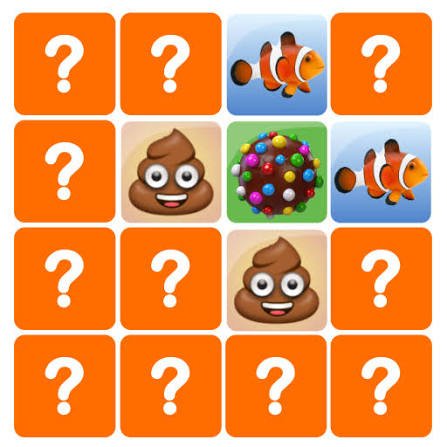


Memory Game
Memory Game is a classic card-matching puzzle where you reveal two cards at a time and search for identical pairs. Remember each picture’s position, complete known matches, clear larger boards, and improve your move count or finishing time.
Memory Game
Memory Game begins with a board of face-down cards. Every card hides a picture, symbol, number, colour, or object, and every hidden design has one matching partner somewhere else on the board.
You turn over two cards at a time. When the pictures match, the pair stays open or disappears from the board. When they are different, both cards turn face down again. The challenge is to remember where each design appeared and use that information during later turns.
The controls are simple, but a crowded board can become difficult quickly. Random clicking may reveal useful cards, yet it also creates too much information to remember. A calm method helps you clear the board with fewer moves and less wasted time.
Players who enjoy close visual observation can also try Find Easy Hidden Differences, where careful scanning is needed to identify small changes between two pictures.
What Memory Game Is About
Memory Game is a browser puzzle based on matching pairs, visual recall, concentration, and efficient card selection.
A round normally includes:
- A grid of face-down cards
- Two matching copies of every picture
- Mouse or touchscreen controls
- A move counter or timer in supported versions
- Several board sizes or difficulty levels
- A final score based on speed or accuracy
- Immediate restarts
- New shuffled layouts
- Optional themes or card designs
The objective is to reveal every matching pair.
Some editions count how many turns you use. Others record the completion time, award stars, or ask you to finish before a timer expires.
Several unrelated browser games use the title Memory Game. The exact number of cards, level structure, visual themes, and scoring rules therefore depend on the version available on Gam-core.
How Memory Game Works
At the beginning of a round, every card is hidden.
Select one card to reveal its picture. You then choose a second card.
There are two possible results:
The Cards Match
When both cards show the same picture, the pair is completed.
Depending on the game, the cards may:
- Remain face up
- Disappear
- Become locked
- Change colour
- Add points to the score
- Provide extra time
The Cards Do Not Match
When the pictures are different, the game gives you a brief moment to see them before both cards turn face down.
That failed match is still useful. You now know the pictures hidden in two positions.
The next time either picture appears, you may already know where its partner is located.
Memory Game Controls
The most common controls are simple.
Desktop Controls
- Move the mouse: Point at a card
- Left click: Turn over the selected card
- Menu buttons: Choose difficulty, restart, or continue
- Esc: Pause or return to the menu in supported versions
- Q: Quit the current round in some editions
Mobile Controls
- Tap a card: Reveal it
- Tap a second card: Check for a match
- Tap menu icons: Restart, pause, or choose another level
Most versions do not require keyboard movement or quick button combinations.
Wait until an unmatched pair turns face down before choosing again. Clicking during the turning animation may be ignored or may cause an unintended selection in some builds.
Begin With a Simple Scanning Method
Do not choose the opening cards from completely random positions.
Use a pattern that makes their locations easier to remember.
You might scan:
- From left to right
- From top to bottom
- Row by row
- Column by column
- From the corners toward the centre
A structured route connects every picture with a clear location.
For example, “apple in the second card of the top row” is easier to remember than “apple somewhere near the top.”
The method does not guarantee an immediate match, but it reduces confusion as more cards are revealed.
Remember Positions, Not Only Pictures
Recognising a picture is only half of the task.
You also need to remember where it appeared.
Use simple position labels such as:
- Top-left corner
- Second card in the first row
- Far right of the middle row
- Bottom-centre
- One place above the lower-left corner
A card’s location should be linked to its picture.
Instead of thinking only “I saw a yellow star,” think “yellow star, second row, right side.”
This small difference makes the information more useful when its matching card appears later.
Use Rows and Columns
Large boards become easier when divided into rows and columns.
Imagine every card has an address.
A six-column board might contain positions such as:
- Row one, column two
- Row three, column five
- Final row, first column
You do not need to say every address aloud. The purpose is to organise the board mentally.
When two similar pictures appear in nearby positions, row and column thinking also helps prevent them from becoming mixed together.
Finish Known Pairs First
When the first card of a turn reveals a picture you have already seen, select its known partner immediately.
Do not ignore a guaranteed pair to test an unknown card.
Completing known matches:
- Reduces the number of hidden cards
- Simplifies the board
- Protects move efficiency
- Confirms your remembered position
- Creates more space for later decisions
A smaller board is easier to manage.
Leaving several known pairs face down creates unnecessary mental work.
Use Unknown Cards Carefully
When the first card is unfamiliar, the second selection usually needs to reveal another unknown position.
This provides new information even when the cards do not match.
Avoid turning over a card whose picture you already know unless it matches the current first card. Doing so creates a predictable failed attempt without teaching you anything useful.
A strong turn should produce one of two benefits:
- Complete a known pair.
- Reveal useful new information.
Random choices may do neither.
Reduce the Number of New Pictures at Once
A large grid can reveal many images quickly, but trying to remember all of them at the same time becomes difficult.
Work through one part of the board before moving to another.
You might begin with:
- The top two rows
- The left half
- Four corner cards
- One small square section
When a card’s partner is likely to be outside that section, remember its location and continue.
This approach reduces how many new positions compete for attention at one time.
Create Quick Mental Labels
Card pictures may be detailed, but your memory label can be short.
Examples include:
- Red car
- Blue fish
- Green leaf
- Round clock
- Brown dog
- Yellow star
- Purple hat
Do not spend time describing every detail.
The label only needs to distinguish one design from the others.
When two cards look similar, add one useful detail, such as “small blue fish” and “large blue fish.”
Use Visual Associations
A picture can be linked to the area around it.
For example:
- A sun in the top row
- A fish near the bottom
- A car beside the left edge
- A tree in the corner
These simple associations make positions easier to recall.
You can also connect neighbouring cards in a short mental scene, such as “the cat sits beside the ball.”
The association does not need to be realistic. It only needs to help you remember which pictures appeared near each other.
Pause Before the Cards Turn Back
When two cards fail to match, do not immediately look toward the next selection.
Use the short display period to record both positions.
Mentally repeat:
- The first picture and location
- The second picture and location
For example:
“Moon at top-left. Boat at bottom-centre.”
When the cards turn back over, check that you can still point to both positions.
This small pause can prevent the same failed pair from being opened again later.
Avoid Repeating Failed Selections
One common mistake is reopening the same two unmatched cards several times.
This happens when the pictures were noticed but their positions were not recorded clearly.
After a failed turn, try to remember what made each location different.
You might use:
- Distance from a corner
- Position beside a completed pair
- Row number
- Nearby picture
- Left or right half of the board
Repeated failed selections increase the move count without adding new information.
Clear the Board in Sections
When several pairs remain, divide the board into smaller areas.
Finish a section when enough information is available, then move your attention elsewhere.
A possible order is:
- Top-left area
- Top-right area
- Lower-left area
- Lower-right area
- Remaining centre cards
You do not need to follow this order strictly. A known pair should still be completed wherever it appears.
The section method simply gives hidden cards a clearer mental home.
Use Completed Pairs as Landmarks
Cards that remain visible can become useful location markers.
You may remember that a hidden symbol is:
- Below the matched apples
- Beside the completed stars
- Two places left of the matched animals
- Between two open pairs
If completed cards disappear, use the empty spaces in the same way.
The board changes as pairs are cleared, so new landmarks can make the remaining positions easier to describe.
Start With Corners and Edges
Corner cards have distinctive positions and are usually easy to remember.
The same is true for cards along the outer edges.
Centre cards can be harder because many similar positions surround them.
Opening corners and edges early gives you clear reference points. Later, those cards can help locate pictures closer to the middle.
This is a useful starting strategy, but it is not a fixed rule. Any organised scanning pattern can work.
Do Not Rush Untimed Rounds
When no timer is active, take enough time to think before each turn.
A quick incorrect selection may add another move and make the board more confusing.
Before clicking, ask:
- Have I seen this picture before?
- Do I know its partner?
- Am I selecting a new position?
- Did I already test these two cards?
- Which part of the board am I working through?
An extra second of thought can prevent several repeated mistakes.
Untimed modes are useful for learning a consistent method.
Playing Against a Timer
Timed Memory Game rounds require quicker decisions, but random clicking is still inefficient.
Use a compact routine:
- Reveal a card.
- Recognise its picture.
- Match it immediately when the partner is known.
- Otherwise, reveal a new card.
- Record both positions quickly.
- Continue without unnecessary pauses.
Do not spend too long searching your memory for one uncertain location.
When the partner cannot be recalled, opening a new card may provide more value than wasting several seconds.
Accuracy and pace need to work together.
Move-Limited Levels
Some versions allow only a fixed number of turns.
In these levels, repeated mistakes are especially costly.
Prioritise:
- Guaranteed pairs
- Unopened cards
- Clear position labels
- Small corrections
- Careful decisions
- Avoiding repeated failed combinations
Do not select two known nonmatching cards.
Every move should either clear a pair or reveal information that can help later.
Increasing Difficulty
Memory Game can become harder through several changes.
Later rounds may include:
- More cards
- More rows and columns
- Similar-looking pictures
- Shorter display times
- A countdown timer
- Fewer allowed moves
- Moving card positions
- Distraction animations
- Multiple card themes
A larger board does not require a completely different strategy.
Continue using rows, sections, mental labels, and known-pair completion. The main difference is that you must manage more information.
Similar-Looking Cards
Some card sets use pictures that are easy to confuse.
Two cards might contain:
- Different shades of the same colour
- Similar animals
- Objects facing opposite directions
- Matching shapes with different patterns
- The same object in different sizes
Use a more precise label when this happens.
Instead of “bird,” remember “red bird facing left.”
Do not assume two cards match after noticing only the general category. Wait until the designs are clearly identical according to the game.
Matching Sounds or Words
Not every Memory Game uses identical pictures.
Some educational variations may ask you to match:
- A word with its picture
- A sound with an object
- Uppercase and lowercase letters
- A number with a quantity
- Related objects
- Opposite ideas
- Flags and country names
Read the level instructions before assuming every pair looks identical.
The same location strategy still works, but the relationship between cards may require an extra thinking step.
Difficulty Levels
A game may offer settings such as easy, medium, and hard.
Easy
An easy board usually contains fewer cards and clearer images. It is useful for learning the controls and scanning method.
Medium
A medium board introduces more positions and requires stronger location memory.
Hard
A hard board may contain many cards, similar designs, a shorter timer, or stricter move limits.
Begin with a board you can complete calmly.
Moving to a larger grid before establishing a method can turn the game into repeated guessing.
Measuring Improvement
Completion time is not the only useful result.
You can also track:
- Number of moves
- Incorrect pair attempts
- Repeated mistakes
- Highest difficulty completed
- Remaining time
- Stars earned
- Consecutive known matches
Fewer moves usually show more efficient recall.
A faster time can be useful, but it should not come from uncontrolled clicking.
Compare results on the same board size or difficulty level. A larger grid naturally requires more selections.
Common Memory Game Mistakes
The most common mistake is selecting cards randomly without a scanning pattern.
Another mistake is remembering the picture but not its location.
Players may also leave known pairs hidden while opening more cards.
Clicking too quickly after a mismatch can prevent both positions from being remembered.
Some players repeatedly choose the same failed combination.
Looking only at the centre of the board can make edge positions harder to recall.
Rushing an untimed round creates unnecessary errors.
The final common mistake is becoming frustrated after forgetting one card. A single forgotten location does not erase all the useful information already collected.
How to Improve at Memory Game
A useful learning order is:
- Learn the card controls.
- Scan the board in a fixed direction.
- Give each picture a short label.
- Connect the picture with its position.
- Pause after failed pairs.
- Complete known matches immediately.
- Work through the board in sections.
- Use completed pairs as landmarks.
- Try a larger grid.
- Replay for fewer moves.
Focus on accuracy before speed.
When you repeatedly forget centre cards, divide that area into smaller sections instead of clicking faster.
Recovering After Forgetting a Position
You may recognise a picture but fail to remember where its matching card appeared.
Do not click several old positions randomly.
Use the board to narrow the search:
- Which row was it in?
- Was it near a corner?
- Did it appear beside a completed pair?
- Was it on the left or right half?
- Which cards have not been tested?
When the location still cannot be recalled, choose a genuinely new card.
That selection may reveal the missing partner or provide useful information for another pair.
One-Player Mode
Most browser Memory Games are designed for one player.
The objective may be to:
- Clear the board
- Use the fewest moves
- Finish quickly
- Beat a saved best score
- Complete several difficulty levels
- Unlock new card designs
A solo round lets you think without waiting for another player.
It also makes score comparison straightforward because every move belongs to the same person.
Two-Player Memory
Some editions support local two-player play.
Players take turns revealing two cards.
A typical rule set works like this:
- A matching pair is collected
- The successful player may receive another turn
- A failed pair passes control to the other player
- The player with the most pairs wins
Two-player Memory has an extra challenge. Every revealed card can also help the opponent.
Watch closely during the other player’s turn. Ignoring their cards gives away useful information.
The exact turn rules depend on the version, so read the instructions before beginning.
Playing Fairly With Another Person
In local multiplayer:
- Take turns clearly
- Do not cover the screen
- Avoid clicking during the other player’s turn
- Do not distract them physically
- Agree on the difficulty first
- Restart only when both players understand why
- Keep the competition friendly
The game is based on shared information. Both players should be allowed to see every revealed card.
Themes and Card Designs
Memory Game editions may use themes such as:
- Animals
- Food
- Vehicles
- Numbers
- Letters
- Flags
- Shapes
- Toys
- Sports
- Seasonal pictures
Themes mainly change the artwork, but some can affect difficulty.
Distinctive animals may be easy to separate, while similar symbols or flags can require more careful attention.
New card sets can make a familiar board feel different because your old picture labels no longer apply.
Unlockable Cards and Progress
Some versions reward completed rounds with new card designs, themes, backgrounds, or statistics.
Progress may be based on:
- Number of completed boards
- Total pairs found
- Difficulty reached
- Completion streaks
- Play time
- Low move counts
These rewards add a longer goal, but the main rules remain the same.
Do not assume the Gam-core version contains unlockables until they appear in its menu.
Browser and Mobile Play
Memory Game is well suited to desktop and mobile browsers because it normally uses only clicking or tapping.
For smoother play:
- Use an updated browser
- Allow the board to load fully
- Close unnecessary tabs
- Use fullscreen mode for larger grids
- Avoid resizing the window during a round
- Keep the screen visible
- Wait for card animations to finish
- Check touch response before a timed level
Larger screens make card positions easier to separate.
On a small mobile display, landscape mode may provide a clearer grid when supported.
Accessibility and Comfortable Play
Useful accessibility features may include:
- Large card designs
- Clear symbols
- Colour and shape differences
- Sound controls
- One-button interaction
- Touch support
- Untimed difficulty
- Adjustable board size
- Pause and restart buttons
A card game should not depend only on small colour differences when alternative symbols can provide clearer identification.
Choose a board size that remains comfortable to see.
Take a short break when concentration drops and the same cards begin being reopened repeatedly.
Memory Game and Puzzle Skills
Memory Game is best treated as a pattern and recall challenge rather than a medical or educational treatment.
The game asks you to:
- Notice visual details
- Connect pictures with positions
- Organise a board
- Update information after every turn
- Avoid repeated errors
- Plan the next selection
Results inside the game do not measure a person’s intelligence or health.
Performance can change because of tiredness, distraction, screen size, unfamiliar pictures, or the chosen difficulty.
Play for enjoyment and gradual score improvement rather than treating one result as a serious assessment.
Other Puzzle Games on Gam-core
Players who enjoy remembering positions may also like Find Easy Hidden Differences, which focuses on visual comparison and attention.
Chain Cube 2048 3D Merge offers a number-based puzzle where placement and future combinations matter.
For a longer point-and-click challenge, Escape Game Basic asks players to notice clues, remember useful objects, and solve room-based puzzles.
These games use different rules, but each rewards careful observation instead of rushed input.
What Makes Memory Game Worth Playing
Memory Game creates a complete puzzle from one simple action: turn over a card.
The first selections reveal an unfamiliar board. Each later turn adds information, confirms a remembered position, or corrects an earlier mistake.
Rounds are short enough for casual browser play, while larger grids provide a stronger challenge.
The shuffled layout also gives the game replay value. Knowing the pictures does not tell you where they will appear during the next round.
There is no need to learn a long control list or follow a complicated story. Players can begin immediately and improve through a clearer scanning method.
The game may feel quiet for players who prefer constant action, racing, or multiplayer battles. Its appeal comes from concentration, organisation, and the satisfaction of clearing the final pair without another failed turn.
Who Will Enjoy Memory Game?
Memory Game suits players who enjoy:
- Matching-pair puzzles
- Card games
- Visual patterns
- Short browser rounds
- Mouse or touchscreen controls
- Personal best scores
- Calm gameplay
- Increasing grid sizes
- Simple family-friendly rules
Beginners can start with fewer cards and focus on remembering one section at a time.
More experienced players can use larger grids, stricter timers, and lower move targets.
The game works well for quick sessions because a new board starts immediately and every round has a clear ending.
Play Memory Game Free Online
Play Memory Game free online on Gam-core.com and turn over face-down cards to find every hidden matching pair.
Scan the grid in a clear order, connect each picture with its position, and complete known pairs before opening more cards. Random clicking may occasionally produce a lucky match, but an organised approach helps you clear the board with fewer moves and a better finishing time.




Reviews
There are no reviews yet.