
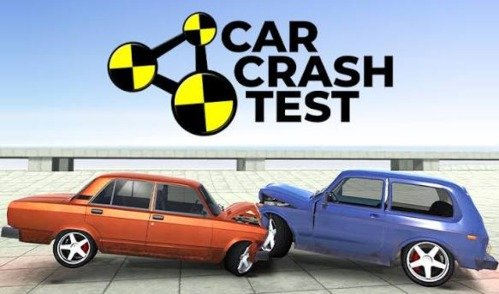


Crash Test
Crash Test is a physics-based driving game where you control cars across virtual test areas filled with ramps, barriers, drops, and destructible obstacles. Create vehicle damage, earn coins, change camera views, unlock new cars, and repeat each test with a different route.
Crash Test Car Destruction Driving Game
Crash Test is a physics-based driving game where wrecking the vehicle is part of the objective rather than a sign that you have failed. You drive across testing areas filled with ramps, barriers, drops, parked vehicles, and solid obstacles, then use each collision to earn points or coins.
The challenge is not simply pressing the accelerator and hitting the nearest wall. A good run requires control, a useful route, and an understanding of how speed, position, and vehicle choice affect the result. Everything happens inside a virtual test area and should never be copied with a real vehicle.
What Is Crash Test?
Crash Test is a browser driving and destruction game based on vehicle damage physics. Players control cars through prepared testing areas and create virtual collisions to see how the body, wheels, doors, windows, and other visible parts react.
Some versions use a free-driving structure, while others provide levels, score goals, unlockable vehicles, or specific objects that must be damaged. The main idea remains the same: drive the vehicle, test its limits, and improve the result of each simulated crash.
The commonly available browser version uses Unity WebGL and can run on supported desktop and mobile browsers. It includes coins, vehicle unlocks, changing test locations, and several driving controls.
Players who prefer reaching a finish line instead of destroying the car can try Asphalt 8 Car Racing, which focuses on races, jumps, drifting, and high-speed competition.
How Crash Test Gameplay Works
A normal session begins with a vehicle and an open testing area. The map may contain walls, ramps, traffic barriers, raised platforms, heavy objects, other cars, or long downhill sections.
You drive around the area and choose where the test will happen. A direct collision can produce immediate damage, while a ramp may send the vehicle into a roll that affects several parts at once.
After the car stops moving, the game may calculate damage, award coins, record a score, or allow you to restart. Those rewards can often be used to unlock another vehicle or access a more demanding test area.
The basic gameplay loop is straightforward:
- Select an available vehicle.
- Look over the virtual test area.
- Drive toward a ramp or obstacle.
- Control the vehicle until the collision.
- Review the damage or score.
- Collect earned rewards.
- Unlock another car or location.
- Restart and try a different route.
Short attempts make the game easy to replay. One test may last only a few seconds, but a different approach can produce a very different result.
Why Crashing Is the Goal
Most driving games reward clean turns and an undamaged car. Crash Test reverses that expectation.
The vehicle is treated like a virtual test object. Walls, drops, ramps, and moving hazards are placed around the map so players can see how different impacts affect it.
A small collision may bend one part of the car without ending the run. A heavier impact may damage the steering, remove visible pieces, or leave the vehicle unable to continue.
The fun comes from watching the physics respond rather than following a realistic safety test procedure. This is an arcade simulation, not a scientific tool or driving lesson.
Vehicle Damage and Physics
Crash Test uses a physics system to calculate how the car moves and reacts after contact. Speed, direction, wheel position, and the shape of the obstacle can influence the result.
A front impact may affect the vehicle differently from a side hit. Landing on the roof can create another type of damage, while repeated smaller collisions may slowly reduce the car’s condition.
The damage system gives each attempt a little uncertainty. Even when you use the same route, a small steering change can alter how the vehicle lands.
The browser game is designed around visible deformation and destructible vehicle parts, with points or coins connected to damage in several available versions.
Open Test Areas and Obstacles
Crash Test maps are usually more open than traditional racing tracks. You are not always required to follow one road or pass through checkpoints in a fixed order.
Instead, the area acts like a virtual vehicle playground. You can look for high ramps, narrow gaps, solid walls, stacked objects, parked cars, or steep drops.
Open maps allow players to create their own small challenges. You might try to reach the highest platform, make a clean jump, roll the vehicle, or hit a difficult target.
Players who enjoy open roads and more traditional street driving can also visit CarX Street. That game gives more attention to races, city driving, customization, and controlled drifting.
Main Crash Test Features
- Physics-based vehicle damage: Cars react to impacts based on movement, speed, and contact position.
- Open driving areas: Players can choose their own routes through maps containing ramps and obstacles.
- Different vehicles: Coins or progress may unlock cars with different sizes, shapes, and handling.
- Short repeatable tests: A damaged vehicle can be reset quickly for another attempt.
- Camera options: Different views help players drive or watch the collision from a better angle.
- Virtual stunt areas: Ramps, slopes, platforms, and barriers create varied testing situations.
- Coin rewards: Damage and completed challenges can provide currency for additional content.
- Several game modes: Some versions include free driving, crash tests, derby areas, races, springboards, or similar activities.
- Browser play: The WebGL version runs through a compatible browser without a traditional PC installation.
- Single-player format: The main challenge is improving your own damage result, driving control, or score.
Crash Test Controls
Controls can vary between versions, but common desktop controls include:
| Action | Common Control |
|---|---|
| Accelerate | W or Up arrow |
| Brake or reverse | S or Down arrow |
| Steer left | A or Left arrow |
| Steer right | D or Right arrow |
| Handbrake | Spacebar |
| Change camera | C |
| Restart vehicle | R |
| Nitro or boost | Left Shift |
| Slow motion | T in supported versions |
| Move the camera | Mouse |
The browser version listed by GamePix uses WASD or the arrow keys for driving, Space for the handbrake, C for camera changes, Left Shift for nitro, R for restarting, and T for slow motion.
Mobile versions may replace keyboard commands with steering buttons, pedals, and camera icons on the screen.
Learning the Vehicle Handling
The cars can feel heavier or looser than vehicles in a simple racing game. This is partly because the physics system must continue calculating movement after a collision begins.
Start by driving around the test area without immediately using a ramp. Learn how quickly the vehicle turns, how long it needs to stop, and whether the rear slides during sharp steering.
Small steering changes are useful near narrow ramps. Holding a direction for too long may turn the vehicle sideways before it reaches the target.
Different vehicles may not respond in the same way. A long vehicle can be harder to rotate, while a smaller car may change direction quickly but feel less stable.
Choosing a Useful Camera View
The default camera is often placed behind the vehicle, which is practical for normal driving. It gives a clear view of the road and helps with steering.
Other camera angles can make ramps, landings, or narrow targets easier to judge. A wider view may also show nearby obstacles that are hidden behind the car.
After a collision, changing the camera can help you inspect the damaged vehicle from another side. Some versions allow the camera to rotate freely with the mouse.
Do not keep switching views during a difficult approach. Choose one angle before accelerating so the sudden camera movement does not affect your timing.
Using Ramps in the Virtual Test Area
Ramps create some of the most unpredictable moments in Crash Test. The car may land on its wheels, strike the ground at an angle, roll several times, or miss the intended obstacle.
A straight approach usually makes the jump easier to control. Entering at a sharp angle can rotate the vehicle before it leaves the ramp.
Not every jump needs maximum speed. Too much speed may carry the vehicle beyond the part of the map you wanted to reach.
Use each attempt to understand the distance. Restart, adjust the virtual car’s approach, and compare the new result without copying the activity outside the game.
Earning Coins and Unlocking Vehicles
Many Crash Test versions reward players with coins based on damage, distance, completed tests, or objects destroyed.
These coins can unlock additional vehicles and sometimes new testing locations. The exact prices and reward system depend on the version being played.
Avoid spending immediately when the next available car does not offer anything useful. Saving for a noticeably different vehicle can make the progression feel more rewarding.
A larger car may respond differently during impacts, while a smaller one can be easier to guide through narrow parts of the map.
Unlocking a new vehicle does not automatically create a better score. You still need to learn its steering, weight, and stability.
Different Ways to Use the Test Area
Direct Collision
Drive toward a solid obstacle and see how the front or side of the virtual vehicle responds. This is the easiest type of attempt to set up.
Ramp Jump
Use a ramp to send the car into the air. Steering, speed, and the landing surface affect whether it lands cleanly or begins rolling.
Downhill Run
A steep road allows the vehicle to gain speed before reaching obstacles at the bottom.
Vehicle Contact
Some maps include parked or moving cars. Contact between vehicles creates a less predictable result because both objects can move.
Repeated Damage
When the car remains driveable, continue through the map and test how long it can move after several virtual collisions.
Target Challenge
Choose a difficult barrier, platform, or object and try to reach it accurately rather than relying on random movement.
Game Modes
The exact mode list differs between browser versions. Common options may include:
Crash Test
This mode places the main attention on damaging the selected vehicle and increasing the score.
Free Drive
Free Drive allows you to move around the map without a strict objective. It is useful for learning controls and finding interesting parts of the area.
Derby
A derby area may include other vehicles and place more attention on repeated contact.
Race
Some versions include racing activities where reaching the goal becomes more important than creating damage.
Springboard or Ramp Mode
These areas use large ramps, jumps, and elevated platforms to test the vehicle in the air.
Destruction Area
The map may contain objects that can be hit, moved, or broken to increase the result.
One widely hosted version lists Crash Test, Free Park, Derby, Dump, Race, and Springboard among its available modes.
Graphics and Sound
Crash Test uses 3D environments with vehicles, ramps, buildings, roads, and visible collision effects.
The most important visual detail is the condition of the car. Damaged panels, broken parts, missing wheels, and changes in shape show what happened during the test.
The map design is usually practical rather than crowded. Large obstacles stand out so players can choose a route without needing to study a complex interface.
Engine sounds help communicate acceleration, while collision sounds make impacts easy to notice. The game can still be followed with audio turned off because the important results are visible.
What Makes Crash Test Satisfying?
The game creates a clear cause-and-effect relationship. You control the virtual car, choose a route, and immediately see how that decision changes the collision.
Failed attempts can still be interesting. Missing a ramp may send the vehicle toward another part of the map and create a result you did not plan.
Fast restarts also remove much of the frustration. You can correct the steering or speed without replaying a long level.
The game is less about winning a traditional race and more about testing ideas inside a safe digital environment.
Common Mistakes in Crash Test
Using Maximum Speed Every Time
More speed does not always create a better result. It can cause the car to miss a target or leave the useful part of the map.
Ignoring the Approach
A poor angle may turn the vehicle before it reaches the obstacle. Straighten the car early rather than correcting at the last second.
Holding the Steering Key
Long steering inputs can cause overcorrection. Use shorter taps when lining up with a ramp.
Forgetting the Camera
A poor view can hide the landing area or nearby obstacles. Change the camera before beginning the run.
Restarting Too Soon
The car may continue moving after the first impact and create additional damage. Wait until the virtual vehicle has fully stopped before resetting.
Expecting Every Car to Feel the Same
Different sizes and shapes affect steering and stability. Test each newly unlocked vehicle before trying a difficult route.
Spending Every Coin Immediately
Save rewards when a later vehicle or location offers a more meaningful change.
Tips for Better Crash Test Runs
Learn the Map First
Drive around at a controlled pace and note where the largest ramps, drops, barriers, and open areas are located.
Build Speed in a Straight Line
When using a ramp, line up the vehicle before accelerating. Last-second steering can spoil the approach.
Use the Handbrake Carefully
The handbrake can help rotate the vehicle, but using it too early may remove too much speed.
Change One Part of Each Attempt
Adjust only the speed, angle, or starting point. Changing everything at once makes it difficult to know what improved the result.
Watch the Entire Collision
Secondary movement can produce more points after the first contact. Let the physics sequence finish before restarting.
Test Every New Vehicle
Spend one or two runs learning its handling. Do not judge it only by appearance.
Save Boost for Open Approaches
Nitro is easier to control on a straight section with enough space. Using it near a corner may send the car away from the intended target.
Keep All Crash Experiments Virtual
Crash Test is entertainment built around simulated physics. Real roads, vehicles, ramps, and safety barriers must never be used to copy anything shown in the game.
Who Should Play Crash Test?
Crash Test is a good match for players who enjoy driving games, vehicle physics, short attempts, unlockable cars, and open maps.
It works well when you want freedom rather than a strict racing line. Players can choose their own targets and repeat tests without following a long campaign.
Fans of vehicle customization and city racing may prefer CarX Street, while younger racing fans may enjoy the more colorful competition in Cars Fast as Lightning.
Players looking for realistic motorsport rules, official racing championships, or detailed mechanical repairs may find Crash Test too simple. The game focuses on virtual damage and quick experimentation rather than a full driving career.
Honest Strengths and Limitations
| Strengths | Possible Limitations |
|---|---|
| Vehicle damage makes every attempt visually different | Repeated crashes may feel similar during long sessions |
| Open maps allow different routes | Some areas have limited objectives |
| Quick restart supports experimentation | Vehicle control can feel loose at first |
| Unlockable cars provide progression | Rewards may take time to collect |
| Several camera views improve visibility | Camera movement can occasionally feel awkward |
| Simple driving controls are easy to learn | Advanced physics settings are limited |
| Works through a browser | Performance depends on the device and browser |
| Short sessions are easy to fit into free time | It does not offer a deep racing campaign |
Crash Test Game Information
| Detail | Information |
|---|---|
| Game title | Crash Test |
| Genre | Driving, simulation, destruction |
| Game mode | Single-player |
| Perspective | 3D |
| Main objective | Test vehicles and create virtual damage |
| Main systems | Driving, crash physics, coins, and unlockable cars |
| Common controls | WASD, arrow keys, Space, C, R, Shift, and T |
| Platform | Web browser |
| Technology | Unity WebGL in common browser versions |
| Device support | Desktop, with mobile support depending on version |
More driving, racing, casual, and action titles are available in the Gam-core games collection.
Frequently Asked Questions
What type of game is Crash Test?
Crash Test is a physics-based driving and vehicle-destruction game. You control cars through virtual testing areas containing ramps, walls, drops, and other obstacles.
What is the main objective?
The objective is to use the virtual test environment, create vehicle damage, earn rewards, and unlock additional cars or areas.
How do I control the car?
Common desktop controls use WASD or the arrow keys. Space may activate the handbrake, C changes the camera, and R restarts the vehicle.
Can I change the camera?
Yes. Common browser versions include several camera views, and some allow camera rotation with the mouse.
Does Crash Test have different cars?
Yes. Many versions include several vehicles that can be unlocked with coins or progress.
How do I earn coins?
Coins may be awarded for vehicle damage, distance, completed tests, destroyed objects, or other results depending on the game version.
Is Crash Test a racing game?
It uses driving controls, but its main focus is vehicle physics and virtual damage. Some versions also include a separate race mode.
Can I play Crash Test on mobile?
Some WebGL versions support mobile browsers and provide on-screen controls. Compatibility depends on the device and game build.
Does Crash Test have multiplayer?
The common browser version is mainly a single-player game.
Does Crash Test require a download?
No. The browser version runs online through a compatible browser.
Why does my car become difficult to steer?
Heavy damage may affect the visible wheels or vehicle movement. Restart the test when the car can no longer be controlled properly.
Are the virtual crashes safe to copy in real life?
No. The game uses simulated environments and physics for entertainment. Never copy its collisions, jumps, or stunts with a real vehicle.




Reviews
There are no reviews yet.